
Profile Properties Syntax
list(
  ;; Property Group DPL
  list(nil 'name     "GroupName"
           'category [ "Cell" | "Devices" | "Nets" | "Pins" | "MaxVoltageDrop" |
                       "HighCurrent" ]
           'aprGroup [ 't | 'nil ]
           ['toolTip "toolTip"]
           ['properties
                list(
                  list(nil 'name "PropertyName"
                           'type ['bool|'string|'int|'float|'enum|'current|
                                  'voltage|'aprPattern]
                           ['widget    'multiLineTextEdit]
                           ['defValue value]
                           ['range    '(low high)] ;; int/float range
['items '("item1" ... "itemN") ] ;; enum choices
['callbackS_callback]
)
)
]
)
)
Description
Sample syntax required to create and define custom profiles to capture frequently used property configurations for design intents. Each profile comprises a group of frequently used disembodied property list (DPL) properties, for example, add shield, add guard ring, and so on. The profiles can be created by your system administrator.
Arguments
Example of a Property Profile
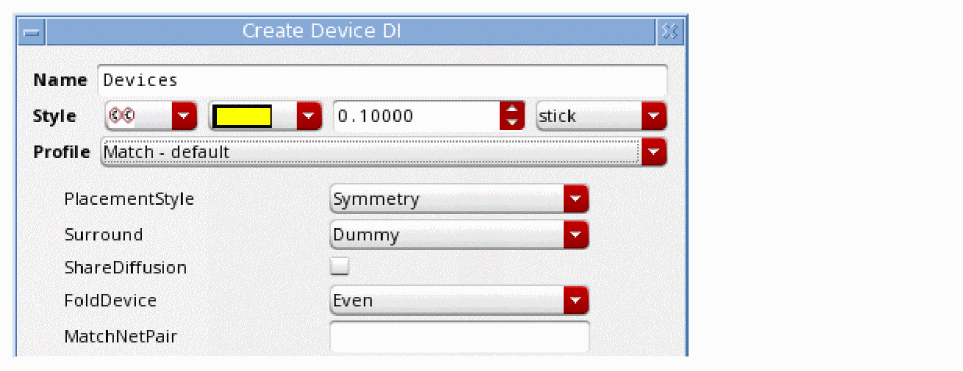
The Match – default profile comprises the properties PlacementStyle, Surround, ShareDiffusion, FoldDevice, and MatchNetPair.
In the property group definitions file, this profile is listed as follows:
list(
;;; ==================== Devices
list(nil 'name "None" 'category "Devices" 'toolTip "Simple Note") ;;; No properties just a simple note
    list(nil 'name "Match - default" 'category "Devices" 'toolTip "How devices are to match"
            'properties list(
                       list(nil 'name "PlacementStyle" 'type        'enum    'defValue "Symmetry" 'items '("Symmetry" "CommonCentroid" "Interdigitate"))
                       list(nil 'name "Surround"        'type     'enum    'defValue "Dummy"    'items '("Dummy" "FGR" "Both" "asNeeded") 'toolTip "GuardRing style")
                       list(nil 'name "ShareDiffusion" 'type        'bool    'defValue nil )
                       list(nil 'name "FoldDevice"         'type    'enum    'defValue "Even"     'items '("Even" "Odd" "Avoid"))
                       list(nil 'name "MatchNetPair"        'type   'string 'defValue "")
Each property in the profile is defined. The property PlacementStyle is a list (enum) and a default value (Symmetry) has been specified:
list(nil 'name "PlacementStyle" 'type 'enum 'defValue "Symmetry" 'items '("Symmetry" "CommonCentroid" "Interdigitate"))
On the Create Design Intent form this profile is displayed as follows:
The following example illustrates how to add callback function on a profile property:
(defvar myProfilesWithCB
'((nil name "Profile With CB"
category "Devices"
tooltip "DI with callback available in the dialog"
properties ((nil name "Prop bool"
type bool defValue t
callbackS_callback)
(nil name "Prop int"
type int
defValue 0
callbackS_callback)
(nil name "Prop float"
type float
defValue 0.0
callbackS_callback)
(nil name "Prop enum"
type enum
defValue "value1"
items ("value1" "value2" "value3")
callbackS_callback)
(nil name "Prop string"
type string
defValue ""
callbackS_callback)
(nil name "Prop ML string"
type string
defValue ""
widget multiLineTextEdit
callbackS_callback))))))
You can evaluate a custom procedure when a profile property is used.
Example of an APR Group Profile
The APR Group profile comprises the properties Pattern.
In the property group definitions file, this profile is listed as follows:
list(
;;; ==================== Devices
    list(nil 'name "APR Group" 'category "Devices" 'toolTip "How devices are to be grouped" 'aprGroup t 'properties list(
                       list(nil 'name "Apr" 'type 'aprPattern
         )
)
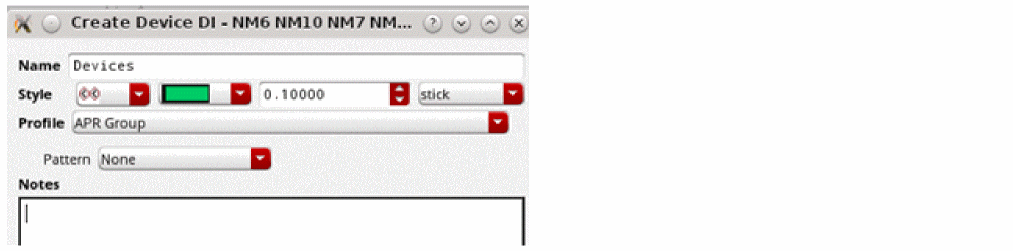
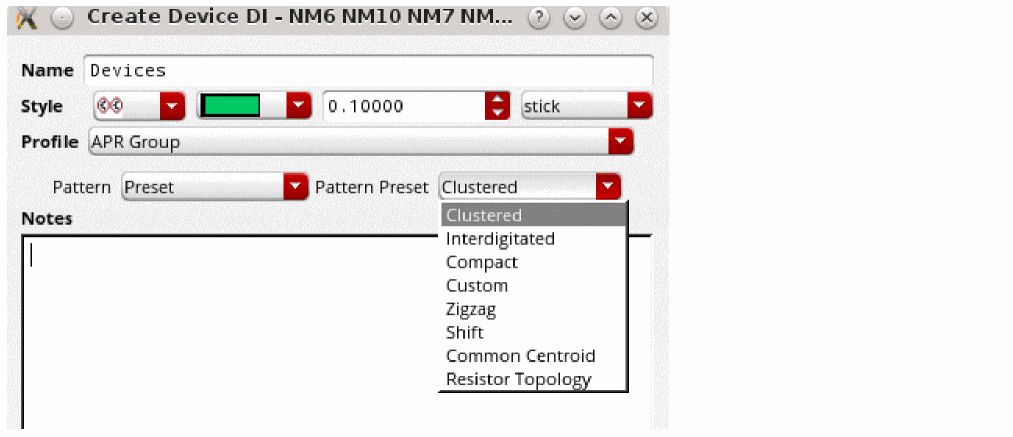
You can specify an pattern set as shown in the following figure.
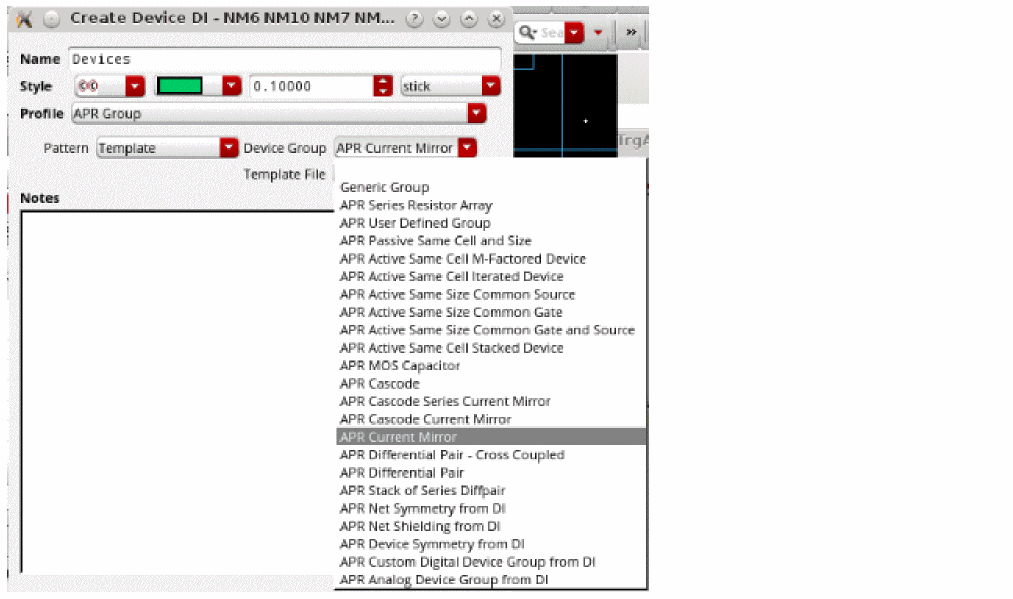
You can also specify the APR finder for device group. This can be applied when used in layout with APR flow. In addition, there is a provision to include an existing template file to reuse the configuration.
Setting Default Value for APR Group Design Intent
You can customize to specify the state and values of a field when opened as a default setting in the Profile - APR Group.
list(nil 'name "APR Group" 'category "Devices" 'toolTip "How devices are to be grouped" 'aprGroup t
'properties list(
list(nil 'name "Apr" 'type 'aprPattern 'defValue '(nil Pattern "Preset" PatternPreset "Custom"))
)
)
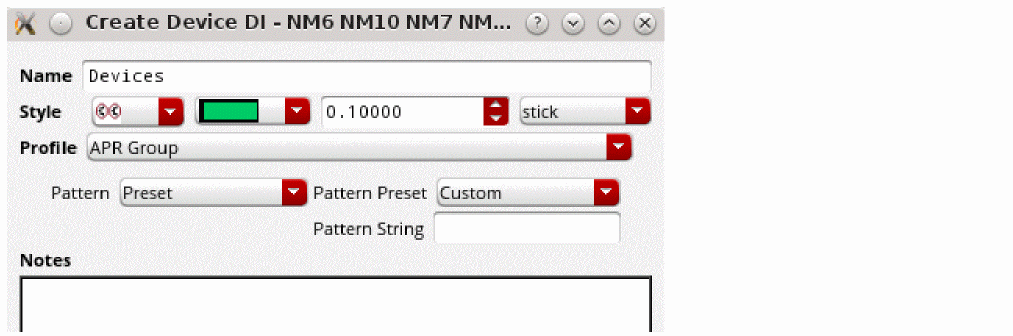
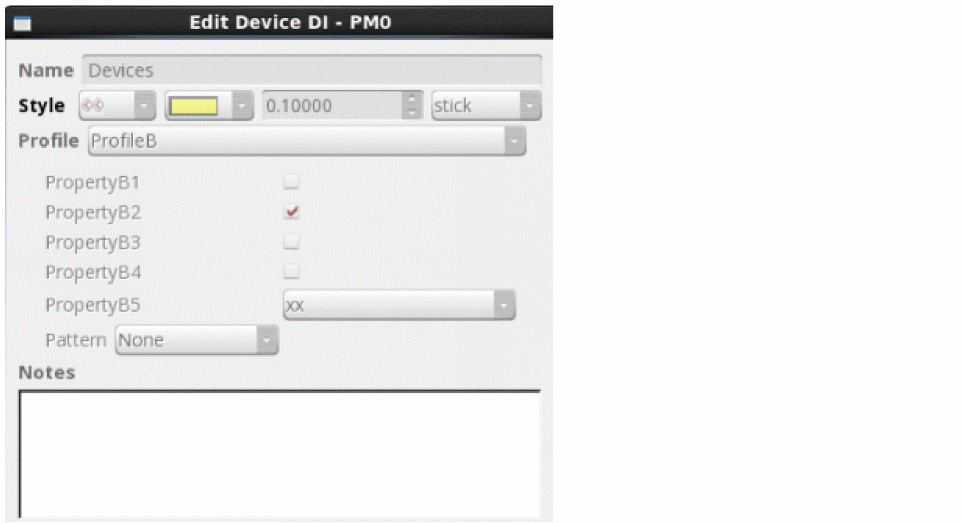
To extend the APR group with additional custom properties, you can either update the diPropGroupDefs.il or update on the fly in the current Virtuoso session using the following.
ciDiReplaceOrAddPropertyGroupDef(
list(nil 'name "ProfileB" 'category "Devices" 'toolTip "***" 'aprGroup t
'properties list(
list(nil 'name "PropertyB1" 'type 'bool 'defValue nil)
list(nil 'name "PropertyB2" 'type 'bool 'defValue t)
list(nil 'name "PropertyB3" 'type 'bool 'defValue nil)
list(nil 'name "PropertyB4" 'type 'bool 'defValue nil)
list(nil 'name "PropertyB5" 'type 'enum 'defValue "xx" 'items '("xx" "yy" "zz"))
list(nil 'name "Apr" 'type 'aprPattern 'defValue '(nil Pattern "Preset" PatternPreset "Custom"))
)))
On the Create Design Intent form this profile is displayed as follows:
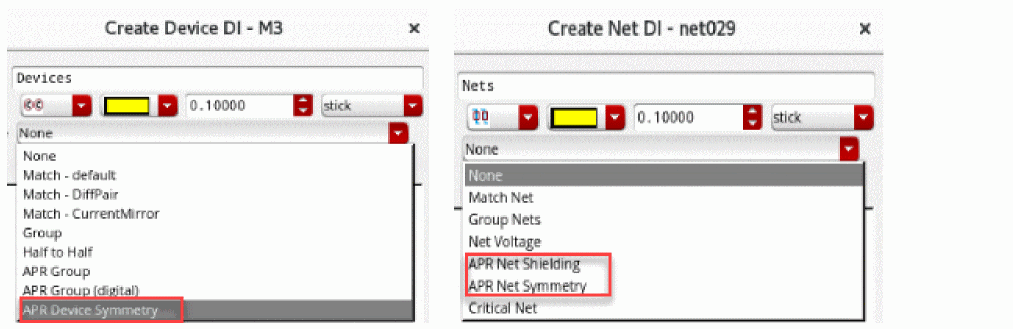
Additionaly, there are more DI profiles available by default. For example:
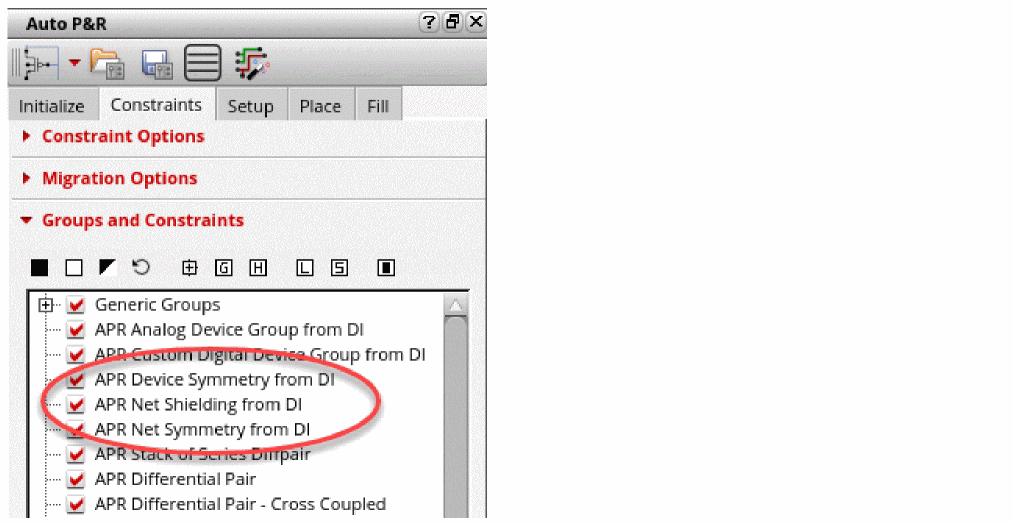
The automatic placement and routing flow in layout can search for the design intents with APR profile defined on them to create right set of constraints.
Related topics
Modifying Sample Profiles and Property Definitions
Return to top