





|
|
||||||||||
|
|
|
|
|
|
|
|
|
|
|
|
The Virtuoso® UltraSim™ waveform interface (UWI) lets you write Virtuoso UltraSim probe data and read probe data into the Virtuoso UltraSim simulator. The current application programming interface (API) supports writing Virtuoso UltraSim simulation data to user-defined formats. This document describes creating Virtuoso UltraSim waveform outputs in user-defined formats.
The Virtuoso UltraSim waveform interface is comprised of a set of functions that enables simulation data to be written in a variety of formats (see Figure 1-1).
Figure 1-1 UWI Overview
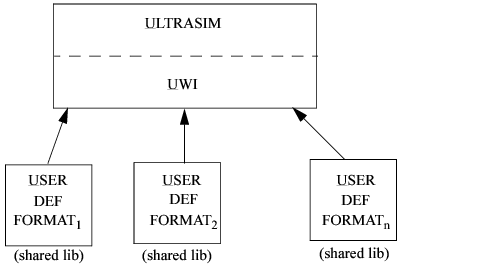
You create source files (C-source files) containing the API function definitions for each output format specified in the netlist. You can specify more than one format in the netlist and, for each format, you should define the APIs in a separate .C source file. Dynamic libraries are created from these source files and are linked to the Virtuoso UltraSim simulator during run time.
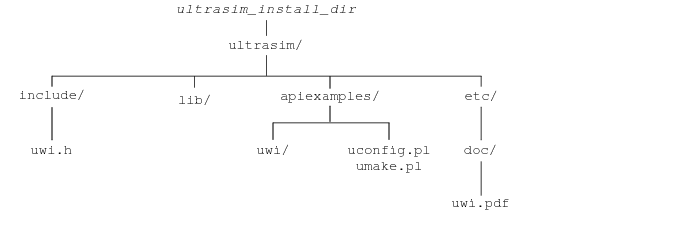
To minimize the effort required for creating these libraries, auto-build scripts and makefiles are included in the ultrasim/ directory. Figure 1-2 shows the complete waveform interface directory structure.
Figure 1-2 UWI Directory Structure
|
Automated scripts for building library. uconfig and umake for automating the process of building the shared Virtuoso UltraSim waveform interface library. |
|
|
Example source files, config file, and makefile.file. |
|
|
Header file for Virtuoso UltraSim waveform interface structures and function prototypes. |
|
|
Specifies the output waveform format. Different output waveform formats can be generated using wf_format statements. Set wf_format in the uconfig.pl file. Valid Values: fsdb, sst2, psf, psfascii, wdf, psfxl, and user-defined formats. |
|
|
Specifies the shared libraries for the requested formats. All formats require a uwi_lib statement, except for sst2 (default), psf, fsdb, psfascii, wdf, and psfxl. |
If waveforms need to be generated in sst2 format, specify this information in the netlist along with the other formats.
.usim_opt wf_format = xydb
.usim_opt uwi_lib = ./libXYDB.so
Generates all signals specified in the probe statements in xydb format. The shared library contains definitions of API functions to create the user-defined output format.
Note: The Virtuoso UltraSim simulator generates signals in user-defined formats and, if required for postprocessing, in sst2 formats. Postprocessing occurs when the netlist contains .measure statements.
Registers the public functions of a waveform library with the Virtuoso UltraSim simulator. The function is called on each shared library after loading. The function returns a pointer to a uwi_WfIntDef structure containing pointers to the API functions. The user defines the functions and assigns them to the members of this structure.
The uwi_register function is required for every library. The Virtuoso UltraSim simulator, in addition, has the following requirements on the function handlers returned. The functions open and defineWf are mandatory.
The format character string within the uwi_WfIntDef structure identifies the provided waveform format. This string needs to match the wf_format string in the netlist to activate the provided waveform output.
uwi_StreamHandle open( const uwi_Setup* initData )
This function is called whenever a new file stream in the user-defined output format needs to be opened. uwi_StreamHandle associates the waveforms with the format written.
typedef void* uwi_StreamHandle;
This function is called by the Virtuoso UltraSim simulator with a uwi_Setup argument. The argument contains the description of the global simulation information valid for the current output being written.
The information provided in the uwi_Setup structure is intended to provide a precise description of the overall simulation run associated with this stream. filename is the name of the SPICE netlist and the analysis field is defined as
enum uwi_AnalysisType {TRAN, DC, NOISE, AC}
alterIter, ageIter, temp, and tRes provide additional information in case of more complex simulation runs. In general, output systems can take advantage of this information beginning with better error checking and output filename creation up to more efficient data structures. tRes gives the time resolution of the x axis specified in the usim options. The default is 1ps.
You can replace filename in uwi_Setup with your own output file and then open that to dump the waveform or other information. If you open a file for writing and you want it to be used as the stream, that file handle must be returned by
uwi_WfHandle defineWf( uwi_StreamHandle stream, const uwi_WfDefinition* wfDef )
This function creates a handle for the given waveform definition in the given stream. The signal name, scope of the signal, units represented, and type of the signal are passed through by the uwi_WfDefinition structure. The function returns a pointer to uwi_WfHandle if successful. The waveform handle is subsequently used while calling the function to write Virtuoso UltraSim simulation data.
uwi_WfDefinition is defined as a structure containing all signal-specific information. The instance of this structure is controlled by the Virtuoso UltraSim simulator and is not guaranteed to exist during the call to the defineWf function.
The individual field descriptions are as follows:

|
wfName represents the actual signal name |
|
|
scopeName is a null-terminated char* array |
Each entry in this array represents the part of the hierarchical path to this signal, starting with the top level.
|
|
units identifies the physical unit of this signal (either a V for voltage or A for current) |
|
|
uwi_WfType is an enum defined as |
enum uwi_WfType {ANALOG,DIGITAL}
The type of a distinguishes between continuous time signals and discrete signal values.
int endDefineWfs( uwi_StreamHandle stream )
This function indicates the completion of definition of all waveforms to be added to the database. This optional function can be ignored by setting the function pointer in the uwi_WfIntDef structure to null.
int addDWfPoint( uwi_StreamHandle stream, uwi_WfHandle wfHandle, uwi_Logic val, double t )
This function sets the digital value of the waveform in a stream, pointed to by wfHandle. The x axis value is passed through the argument t (for DC, t is ignored). The digital value passed through the argument value is one of the enumerated types defined in uwi_Logic. If successful, the function returns 0.
This function sets the analog value of a waveform in a stream pointed to by wfHandle for the time t. If successful, the function returns 0.
int flush(uwi_StreamHandle stream)
This function is called when the Virtuoso UltraSim simulator requires the flushing of the waveform data corresponding to the uwi_StreamHandle. If successful, the function returns 0.
int close(uwi_StreamHandle stream)
This function closes the stream handle instance referred to by stream. This function is called once for each stream opened. The function returns 0 if successful. It is a good practice to close the open streams. That would avoid any conflict during output process.
int resetXCoord(uwi_StreamHandle stream)
Note: Other functions and variables defined in the uwi.h header file are used internally by the Virtuoso UltraSim simulator and can be ignored.
This section describes how to use the scripts provided to build the shared library.
|
|
Create a directory and create the .c files containing the function definition of the APIs. |
|
|
Run uconfig.pl in the directory containing the source files (.c files) by typing |
uconfig.pl uwi [ -P:64 ]
(Use -P:64 for 64-bit applications.)
A makefile to create the library is generated.
umake.pl
Windows NT users should consider the following:
|
|
The system variable CELESTRT_HOME should be set correctly to the ultrasim/ home directory. |
|
|
The compiler used in the scripts to build the library is the Visual C++ compiler. Set the Windows system variables INCLUDE, PATH, and LIB to specify the include files, the Visual C++ path, and the library before using the scripts to build the library. |
For example, if your Visual C++ is installed at C:\Program Files\Microscoft Visual Studio, the Windows system variable INCLUDE should include the directory c:\Program Files\Microsoft Visual Studio\vc98\include, PATH should include the directory c:\Program Files\Microsoft Visual Studio\vc98\bin, and LIB should include c:\Program Files\Microsoft Visual Studio\vc98\lib.
This example illustrates the use of these APIs to dump a waveform in a simple ASCII format.