
N-Well and P-Well Pins Creation
Abstract Generator supports the creation of N-Well and P-Well pins. During abstract generation, the tool recognizes the text labels for N-Well and P-Well shapes on the layout and creates corresponding physical pins.
N-Well Pins
To create N-Well pins, during the Pins step, you need to:
-
Define the geometric specification of N-Well shapes.
Example: (Nwell (Nwell drawing)) - Create text labels for the N-Well pins.
During abstract generation, the tool identifies all text labels on the layout design. Then, it recognizes the shapes overlapping each text label and creates pins of the same size as the overlapping shape.
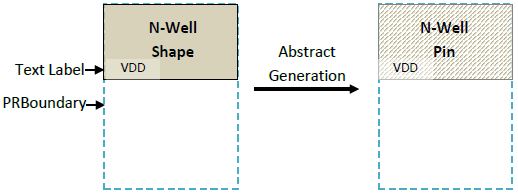
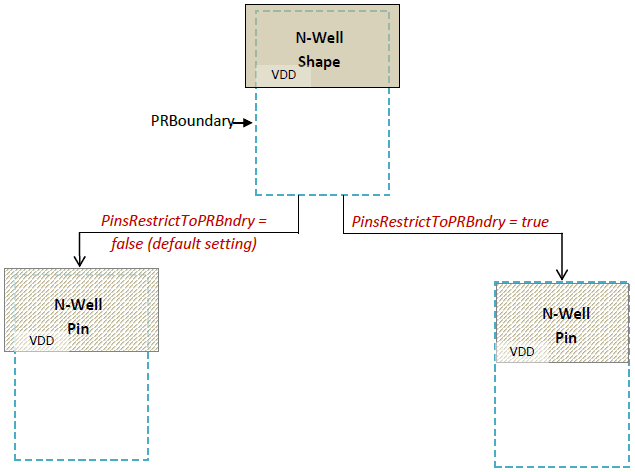
For some designs, the N-Well shape boundary may exceed the PRBoundary. By default, Abstract Generator will create N-Well pins of the same size as the N-Well shape.
The PinsRestrictToPRBndry option enables you to limit the N-Well pin size to the PR boundary. The default value is false.
P-Well Pins
To create P-Well pins, during the Pins step, you need to:
-
Define the geometric specification of the P-Well shapes.
Example: (Pwell (Pwell drawing)) - Create text labels for the P-Well pins.
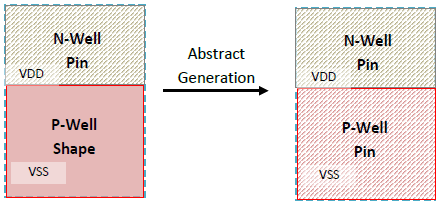
During abstract generation, the tool identifies all text labels on the layout design. Then, it recognizes the shapes overlapping each text label and creates P-Well pins of the size of the overlapping P-Well shapes.
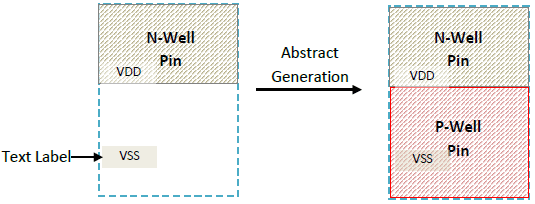
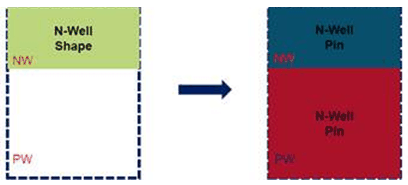
If there are no Pwell shapes overlapping a text label, then the size of the P-Well pin is calculated as follows:
Area (P-Well Pin) = Area (PRBoundary) – Area (N-Well Pin)
The Pwell pin is placed adjoining the Nwell pin.
Multiple N-Well and P-Well Pins
To create multiple N-Well or P-Well pins, define the geometric specification of the shapes and then create text labels for the pins.
Defining the geometric specification of the N-Well shapes: (Nwell (Nwell drawing))
Defining the geometric specification of the P-Well shapes: (Pwell (Pwell drawing))
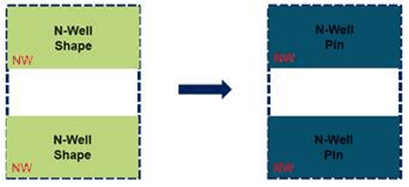
If there are no P-Well shapes under the P-Well label, then the P-Well pin are is calculated using the following formula:
Pwellpin = TotalPrBoundary - NwellPin
If an N-Well shape cuts the PrBoundary into multiple regions, then multiple P-Well pins are created.
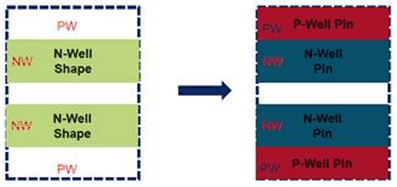
P-well pins are created only in the regions that have the P-well labels. Notice that a P-Well pin is not created in the middle region of the above example.
If there are multiple P-Well labels at the same region, then a P-Well pin is created only for the first label, and a warning is displayed for the remaining labels.
Related Topics
Specifying Layers and Geometries for Extraction
Customizing Abstracts of Routed Blocks in Standalone Abstract Generator
Return to top