
Customization of the Abstract Generation Flow
Tasks that you otherwise cannot perform directly by using the available Abstract Generator options can be done using an advanced methodology. This methodology is based on the concept of calling custom code, also called a hook, during the abstract generation flow. This section briefly describes the predefined hooks and how to customize them.
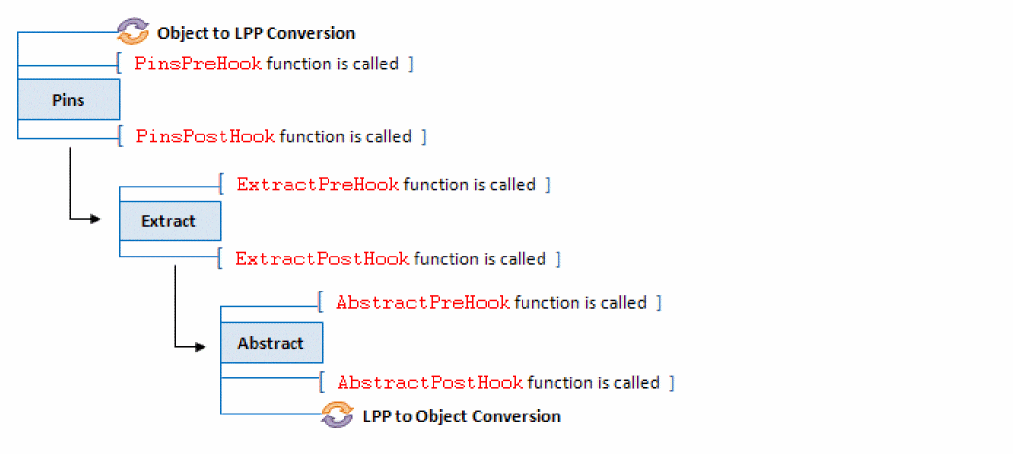
Abstract generator provides predefined hooks, which are automatically called before and after running of a flow step (Pin, Extract, or Abstract). There are therefore, two predefined hooks for every flow step. Following are the predefined hooks in Abstract Generator:
-
PinsPreHook: This function is called prior to running the Pins step. -
PinsPostHook: This function is called after running the Pins step. -
ExtractPreHook: This function is called prior to running the Extract step. -
ExtractPostHook: This function is called after running the Extract step. -
AbstractPreHook: This function is called prior to running the Abstract step. -
AbstractPostHook: This function is called after running the Abstract step. -
ExitHook: This function is run even ifAbstractPostHookis not specified, when the tool is closed.
Before the PinsPreHook function is called, the pin and blockage objects in the abstract are converted into corresponding pin and blockage shapes.
After running the AbstractPostHook function, these shapes are converted into the corresponding objects.
The following diagram depicts the sequence of running the predefined hooks:
These hooks are empty by default, and you can redefine them to run a specific task every time a flow step runs.
These predefined hooks exist both in SKILL and TCL. Both SKILL and TCL hooks, empty or redefined, are called for each flow step irrespective of the interpreter selected in the GUI. This ensures consistent results regardless of the interpreter chosen for abstract generation.
The SKILL hooks are called prior to the TCL hooks.
You can modify the definition of the predefined hooks. Ensure to retain the name of the predefined hook while redefining it.
The return value of a hook is not used.
The hooks for the Abstract Generator flow steps require the following arguments:
t_binName t_libName t_cellName t_viewName
Abstract Generator passes appropriate values for these arguments at run time. The ExitHook function is not associated with any specific Abstract Generator step, and therefore does not require any argument.
Example of a Customized AbstractPostHook Function
Consider a scenario in which you need to copy the original pin shape from a layout to the pin purpose in the abstract view. This task cannot be directly performed using any of the available Abstract Generator options. You can, however, use the AbstractPostHook function to define this functionality so that it runs automatically after each run of the Abstract step.
Type the following SKILL AbstractPostHook code at the abstract prompt.
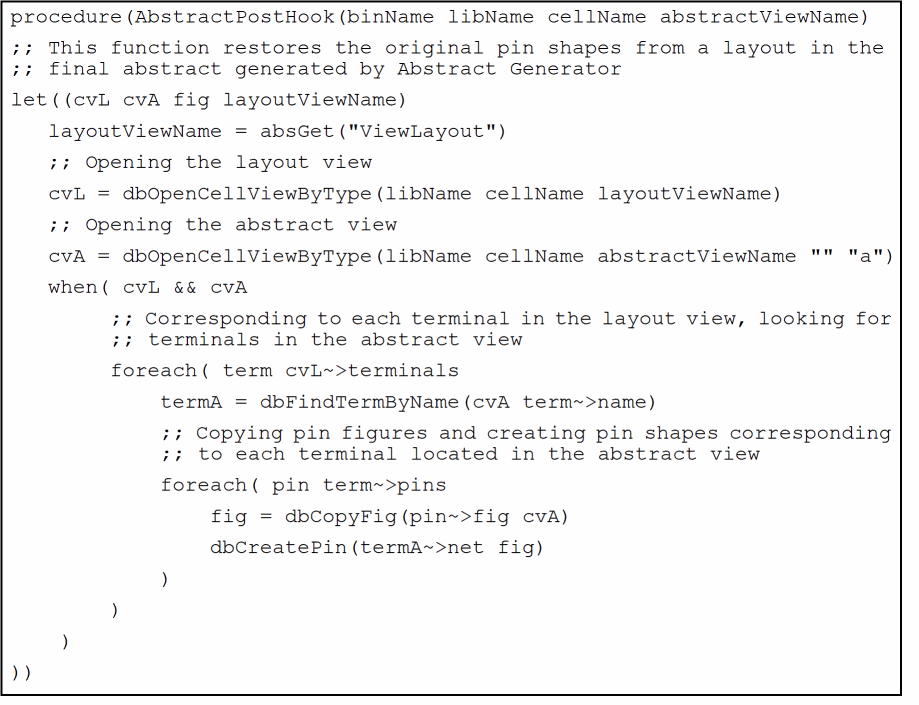
By default, AbstractPostHook option runs before the pin shapes and blockage shapes present in an abstract are translated to the corresponding pin and blockage objects. Consider that there are some shapes on the Metal1 layer in the layout view. When creating a detailed blockage to cover these Metal1 layer shapes, before the post hook runs, these blockage shapes will be created on (Metal1 boundary). To refer to these shapes, you have to refer to the shapes on (Metal1 boundary) LPP. After running post-hook, Abstract Generator converts the Metal1 blockage shapes to Metal1 blockage objects. Thereafter, the blockages can be accessed using the corresponding object ID.
Use the runAbstractHookPostOat option to specify whether AbstractPostHook needs to be called before or after conversion of pin and blockage shapes into corresponding pin and blockage objects. By default, the runAbstractHookPostOat option is set to false. So, AbstractPostHook is called before the conversion.
When set to true, AbstractPostHook is called after the conversion.
absSetOption("runAbstractHookPostOat" "false")
Customization of the ExitHook Function
Consider a scenario in which you need to run a customized code while exiting Abstract Generator. This task cannot be directly performed using any of the available Abstract Generator options. You can, however, use the ExitHook function to define this functionality so that it runs automatically when you close the Abstract Generator window.
Type the following SKILL code at the abstract prompt.
absSkillMode()
procedure(
ExitHook()
printPort = outfile( "./output.txt" )
println("Exiting Abstract Generator." printPort))
; ; ExitHook() is a procedure that is called when the program exits.
When the above procedure is defined, the tool creates a new file named output.txt and writes a message to the file indicating that the program is aborted.
Related Topics
Return to top