
Import Data in Abstract Generator
The selected design library may already contain either layout or logical views of cells or views created by Abstract Generator in a previous session. If it does not, you need to import physical layout or logical data. Therefore, after specifying the cell library and attaching the necessary technology data, import information about the cells for which you want to create abstracts. You can import various types of data, such as LEF, DEF, GDSII, and OASIS.
The figure below shows the types of layout and logical data that can be imported into Abstract Generator and the format of data that is exported.
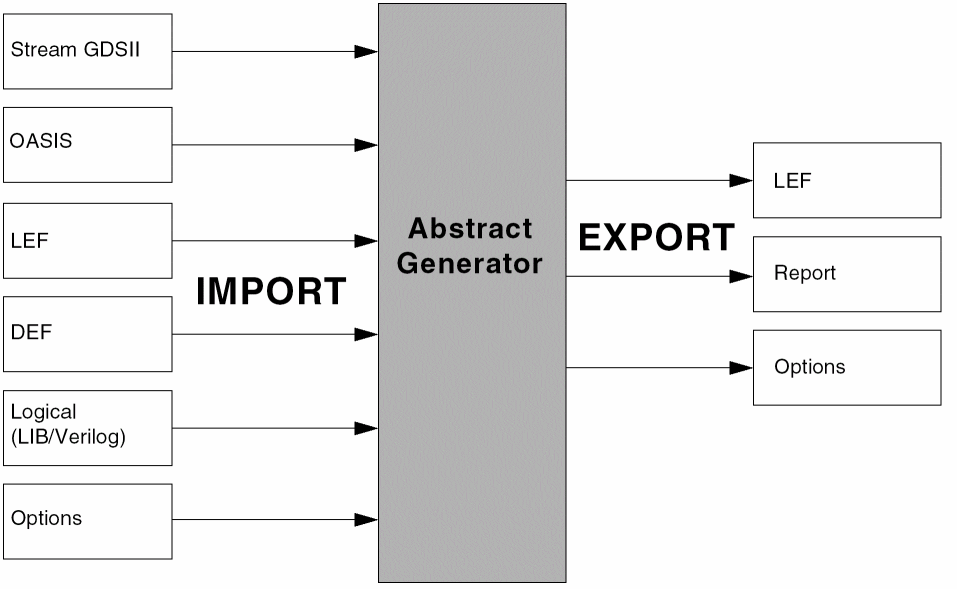
You can import physical layout information, typically represented in the GDSII, OASIS, LEF, or DEF formats. Physical layout information comprises hierarchical shape databases that describe the polygons, paths, and text that make up each individual cell. This data is translated and a layout view for each cell is created in the OpenAccess database.
You can also import logical information, which is represented in Verilog or Liberty format (LIB) formats. This type of information includes data on which pins should be created and the terminal directions assigned.
Abstract Generator creates logical views in the current library directory. If there is already a layout view present for any given cell, Abstract Generator does not create a new cell but adds the new logical view to any other views already present for the cell. If logical information is imported after running the Pins Step, Abstract Generator confirms that the layout and logical views match before extracting terminal properties from the logical view. See the import options in the File Menu.
Return to top