
The SimVision environment appears when you use the -gui option with the or command or when you run the command (either from the command line or from a Tcl file that you specify using the -input option to the xrun .
SimVision MS can be invoked from the command-line interface and GUI.
From Command Line
Run the following command to invoke SimVision MS from the command-line interface:
% xrun -f xrunArgs … -ams_edb -gui
- SimVision MS only works in the flex mode.
-ams_edbcan be used without-guiso that no GUI will be invoked at the beginning. Later a standalone SimVision session can connect to a live Xcelium session with enabled mixed-signal debug features.
From GUI
Virtuoso Schematic Editor (VSE) and SimVision MS can interact with each other to display cross selection of the instances on the schematic. This feature is helpful when you have an analog schematic open in VSE and want to understand where exactly are its components placed on the mixed-signal net.
Perform the following steps to invoke SimVision MS from ADE Explorer and enable VSE and Simvision MS cross selection:
- In ADE Explorer, select Simulation - Netlist and Run Options.
The Netlist and Run Options form appears. - In the SIMULATION MODE group box
- Select the Interactive (debugger) option.
-
Select the Enable mixed signal debugger option.
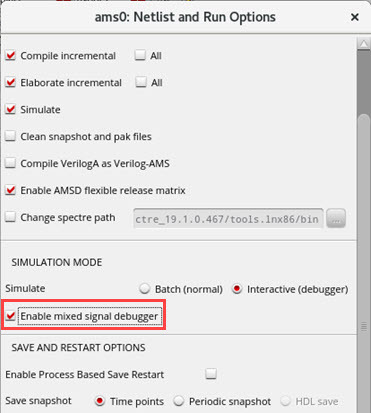
The Enable mixed signal debugger option is available in IC6.1.8/ICADVM20.1 ISR15 and later releases.
- Click OK to close the form.
SimVision MS will be launched in the background.