
SimVision, the unified graphical debugging environment for Cadence simulators, is now fully extended to the analog and mixed-signal simulations in the form of SimVision Mixed-Signal Debug Option (SimVision MS). With a comprehensive set of new features, SimVision MS lets you view and descend into the Spectre/SPICE netlists in the schematic view, explore the mixed-signal boundary, and disclose the port/terminal current flow at any time during a mixed-signal simulation.
Consider the following illustration where the mixed-signal boundary is connected with a connect module L2E. Using SimVision MS, you can go in to the source code of the connect module and then descend into the analog schematic to debug the analog circuit.
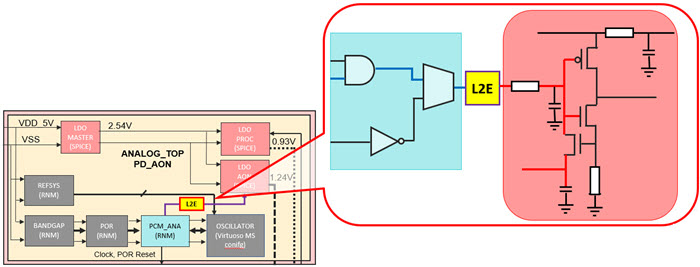
When you use the SimVision environment with the Spectre®AMS Designer simulator, you have access to additional controls to support Verilog®-AMS and other AMS-related design units.
See also in the SimVision: Using the Waveform Viewer book.
For information on analyzing and debugging purely digital designs, see the book.