
B
Technology File Terms
Connectivity Type
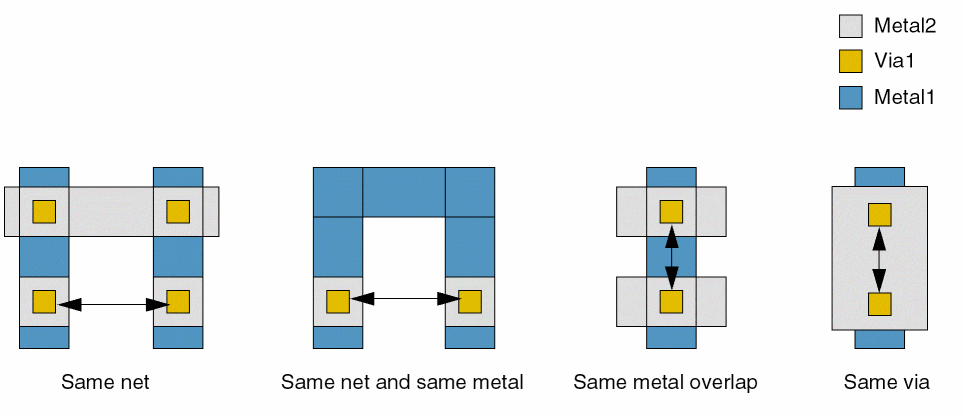
Specifies how shapes are connected. The various connectivity types are illustrated below using a pair of via cuts:
- Same net: The via cuts are on the same net.
- Same net and same metal: The via cuts are on a contiguous same-metal shape.
- Same metal overlap: The via cuts are overlapped by a single metal shape.
-
Same via: The via cuts are overlapped by a single metal shape from above and by another single metal shape from below.
Parallel Run Length
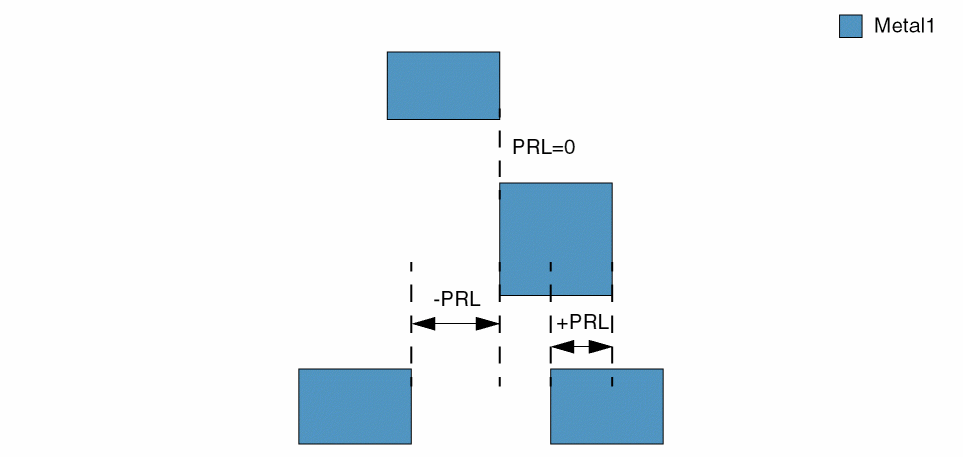
Specifies the overlap between the parallel edges of two neighboring shapes. Parallel run length (PRL) can be positive, negative, or zero.
Range
Specifies a set of values that are allowed or exempted. A range can be defined using the following syntax:
-
"[x_lower]": The given value must be greater than or equal to x_lower and less than or equal to x_upper. -
"(x_lower)": The given value must be greater than x_lower and less than x_upper. -
"[x_lower)": The given value must be greater than or equal to x_lower and less than x_upper. -
"(x_lower]": The given value must be greater than x_lower and less than or equal to x_upper. -
"<x_value": The given value must be less than x_value. -
"<=x_value": The given value must be less than or equal to x_value. -
">x_value": The given value must be greater than x_value. -
">=x_value": The given value must be greater than or equal to x_value. - x_value: The given value must be equal to x_value.
-
Region-based Rule (One layer)
Determines the shapes to which the constraint applies, based on the presence or absence of one or more layers. For example, in the figure below, Metal1 shapes labeled 2, 7, and 8, which straddle the region boundaries, must pass both 'insideLayers and 'outsideLayers rules. Metal1 shapes labeled 1, 3, 9, and 10 must pass only the 'insideLayers rules for their regions, and Metal1 shapes labeled 4, 5, 6, and 11 must pass only the 'outsideLayers rules.
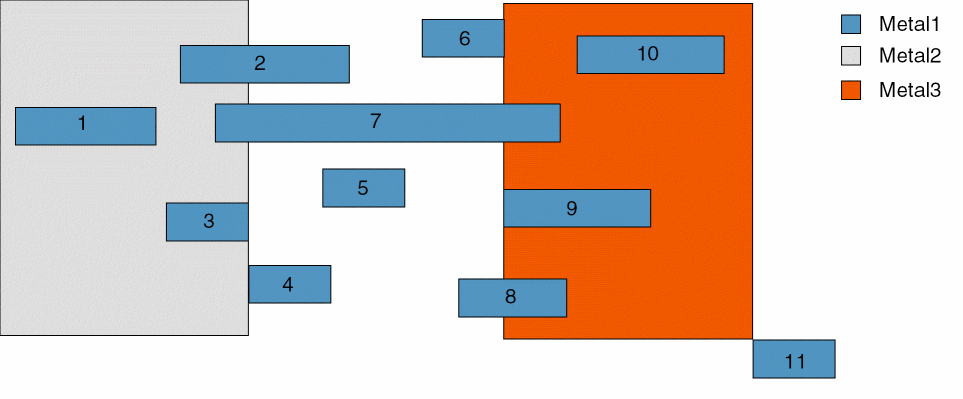
For all constraints, except area-specific enclosure constraints, multiple constraints are defined in an AND group. For example, if minArea is defined as shown below, the Metal2 'insideLayers constraint applies to shapes 1, 2, 3, and 7, and the Metal3 'insideLayers constraint applies to shapes 7, 8, 9, and 10, in the figure above. Both these constraints apply to shape 7. The Metal 2 and Metal3 'outsideLayers constraint applies to shapes 2, 4, 5, 6, 7, 8, and 11.
constraintGroups
    ( minAreaGroup nil nil 'and
     spacings(
   ( minArea "Metal1"
    'insideLayers ("Metal2")
    0.03
   )
   ( minArea "Metal1"
    'outsideLayers ("Metal3")
    0.02
   )
   ( minArea "Metal1"
    'outsideLayers ("Metal2" "Metal3")
    0.01
   )
  ) ;spacings
 ) ;minAreaGroup
) ;constraintGroups
Multiple area-specific enclosure constraints must be defined in an OR group.
Region-based Rule (Two layers)
Determines the shapes to which the constraint applies, based on the presence or absence of one or more layers. For example, in the figure below, the pink arrows show spacing that is entirely inside Metal1 region, the green arrows show spacing that is entirely inside Metal2 region, and the blue arrows show spacing that is entirely outside both Metal1 and Metal2 regions. The red arrows show spacing that is both inside and outside Metal1 and Metal2; both 'insideLayers and 'outsideLayers rules must be applied to these spacings.
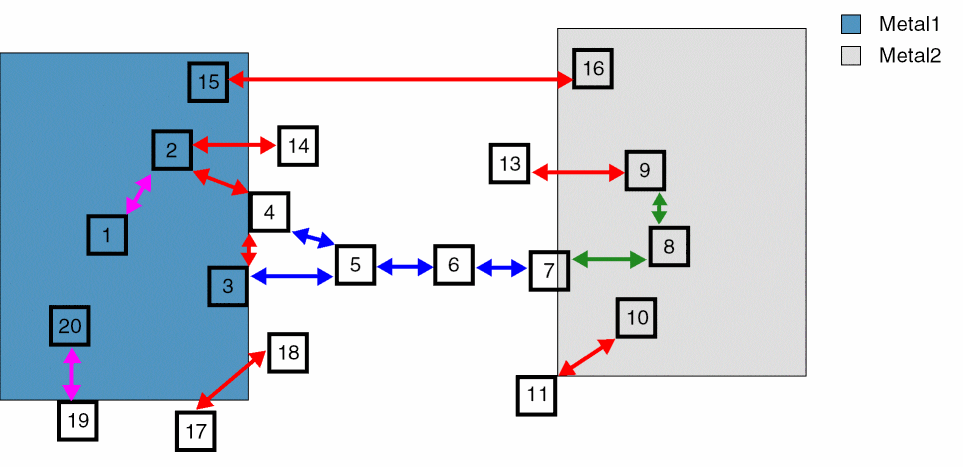
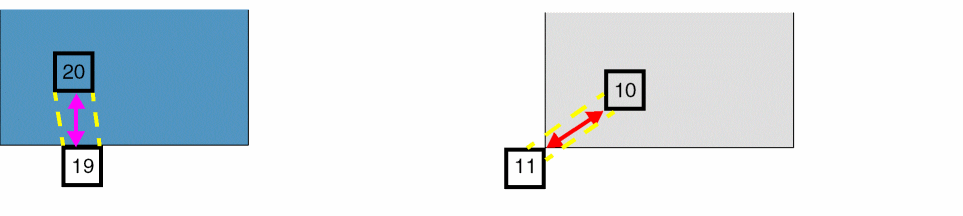
When one of the shapes is inside the region and the other abuts the edge of the region, the marker that is generated can be entirely inside the edge of the region (spacing between shapes 19 and 20) or can straddle the edge of the region (spacing between shapes 10 and 11), as shown below. Therefore, pairs such as 10 and 11 must meet both 'insideLayers and 'outsideLayers rules.
Routing Direction
Denotes the direction in which a design is routed—horizontal or vertical. The preferred routing direction is also know as the right-way direction, and the non-preferred routing direction is also known as the wrong-way direction.
Spacing Direction
Denotes the direction in which spacing is measured. The spacing direction is perpendicular to the routing direction.
Span Length
Denotes the distance between two parallel edges, measured perpendicular to the parallel run length.
Via
Comprises a stacked shape on three layers—metal layer / cut layer / metal layer.
Via Cut
Denotes a cut shape associated with a via.
Return to top