
minDensityCheck
spacings( ( minDensityChecktx_layer['stepf_step| 'stepxf_stepx'stepyf_stepy] ['winf_win| 'winxf_winx'winyf_winy] ['mask1 | 'mask2 | 'mask3] ['targetf_target]f_minDensity)
) ;spacings
(Virtuoso Advanced Node for Layout Only) Specifies the absolute minimum density of shapes on a layer against a specified checking window that is moved by defined steps until the entire design is checked.
The absolute density of a layer is calculated as follows:
Total area of shapes in checking window / Area of checking window
Density constraints are usually represented in two ways. They can apply either across the area of the whole design or specifically to the region covered by the checking window, which is moved incrementally across the design to check for localized problems.
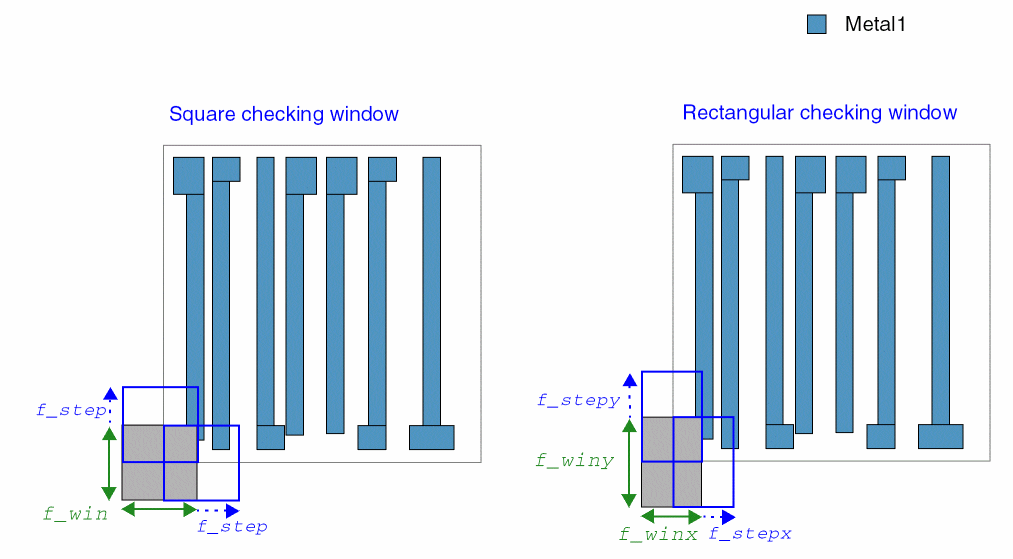
Checking density by using a stepped value requires that you start at a corner of the design, as shown above. The checking window may be rectangular or square. You then continue to step across the design incrementally, moving the window by the step size, each time validating that the density percentage in the window is within the maximum required value.
Values
Parameters
Example
The minimum density of mask2 shapes on Metal1 as a percentage of the total area of a 4.62 by 7.2 checking window must be greater than or equal to 25.2%. The checking window is stepped across the entire layout in increments of half the checking window size until the entire layout has been analyzed. Because a target density is indicated, the checker reports any window that has density less than the target 32%.
spacings(
    ( minDensityCheck "Metal1"
     'winx 4.62 'winy 7.2
  'stepx 2.31 'stepy 3.6
  'mask2
  'target 32
  25.2
 )
) ;spacings
Return to top