maxEdgeLength
spacings(
( maxEdgeLength tx_layer
 ['any | 'horizontalEdge | 'verticalEdge]
 ['allCorner | 'concaveCorner | 'convexCorner | 'mixedCorner]
 ['extendToAlign (g_width g_spacing)
  ['extendOnly | 'alignOnly]]
 ['width g_width]
 g_length
)
) ;spacings
(Virtuoso Advanced Node for Layout Only) Specifies the maximum edge length for a shape on a specified layer.
Values
|
tx_layer
|
The layer on which the constraint is applied.
Type: String (layer and purpose names) or Integer (layer number)
|
|
g_length
|
The length of each edge must be less than or equal to this value.
|
Parameters
|
'any | 'horizontalEdge | 'verticalEdge
|
|
|
The constraint applies only to the edges in the specified direction. The default is 'any.
Type: Boolean
|
|
'allCorner | 'concaveCorner | 'convexCorner | 'mixedCorner
|
|
|
The constraint applies to an edge between two concave corners, two convex corners, or a mixed (concave and convex) corner. The default is 'allCorner.
Type: Boolean
|
|
'extendToAlign (g_width g_spacing) ['extendOnly | 'alignOnly]
|
|
|
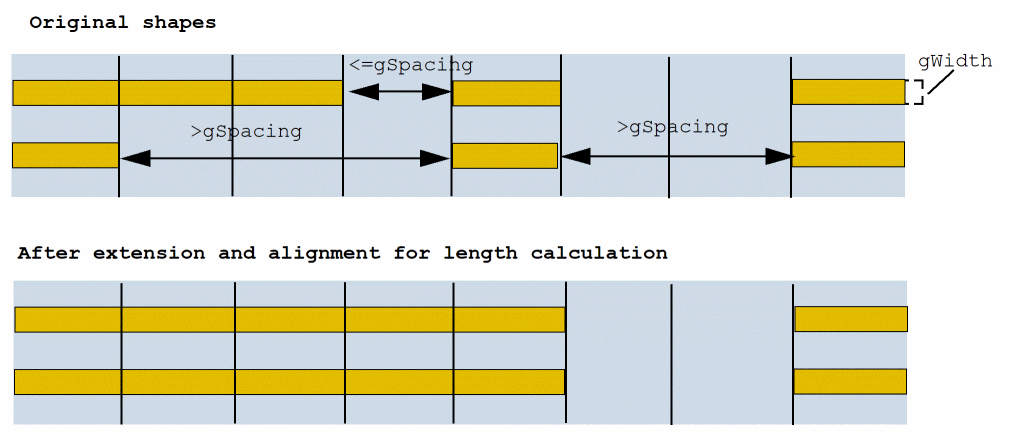
Specifies that if shapes on the upper and lower edges within a cell row have width equal to g_width, the shapes are extended and aligned. In addition, any gap on the same edge that is less than or equal to g_spacing is filled and merged while calculating the length.
Optionally, you can specify either of the following additional parameters:
-
extendOnly: Only the extension operation is performed. -
alignOnly: Only the alignment operation is performed.
|
|
'width g_width
|
|
|
The constraint applies only on shapes with width equal to the given value.
|
Example
On layer Implant1, horizontal edges between two convex corners are at the most 0.08. Shapes with width 0.05 with a gap less than or equal to 0.07 are merged.
spacings(
    (maxEdgeLength "Implant1"
     'convexCorner
  'horizontalEdge
  'extendToAlign (0.05 0.07)
  0.08)
) ;spacings
The following diagram illustrates extendToAlign.
Return to top