minNeighborVoltageSpacing (Two layers)
spacings(
( minNeighborVoltageSpacing tx_layer1 tx_layer2
 ['horizontal | 'vertical]
 'otherLayer tx_otherLayer
 'otherDistance f_otherDistance
 'deltaVoltage f_voltage
 f_spacing
)
) ;spacings
(Virtuoso Layout Suite EXL and higher tiers) Specifies the spacing between two shapes, that meets the delta voltage condition, based on a neighboring shape.
Values
|
tx_layer1
|
The first layer on which the constraint is applied.
Type: String (layer and purpose names) or Integer (layer number)
|
|
tx_layer2
|
The second layer on which the constraint is applied.
Type: String (layer and purpose names) or Integer (layer number)
|
|
f_spacing
|
The spacing between the shapes must be greater than or equal to this value.
|
Parameters
|
'horizontal | 'vertical
|
|
|
The direction in which the spacing is measured. If the direction is not specified, spacing is measured in any direction.
|
|
'otherLayer tx_otherLayer
|
|
|
The layer that is used for f_otherDistance.
|
|
'otherDistance f_otherDistance
|
|
|
The constraint only applies when there are shapes on tx_otherLayer within this distance from the shape on layer1 on the same side where the spacing is measured.
|
|
'deltaVoltage f_voltage
|
|
|
The constraint applies if the delta voltage between the layer1 and layer2 shapes is greater than this value.
The delta voltage is calculated as following:
-
For asynchronous nets:
max(V1max, V2max) - min(V1min, V2min) -
For synchronous nets:
max(|V1max - V2max|, |V1min - V2min|)
|
Example
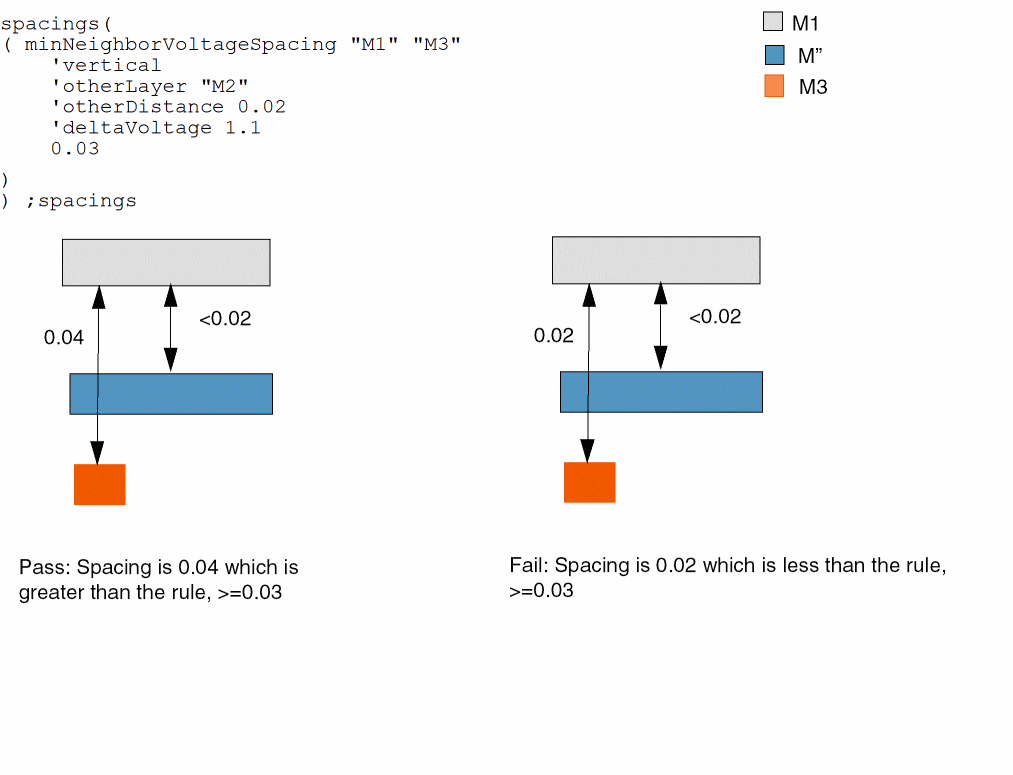
In this example, the maximum delta voltage is assumed to be > 1.1. A minimum vertical spacing of 0.03 is required between shapes on layers M1 and M3 if there is an M2 shape within 0.02 of the M1 shape on the same side as the M3 shape.
Return to top