
Spacing Table Constraints
Spacing tables allow conditional evaluation and application of a constraint value by means of lookup tables. The spacing tables can apply to one or two layers or can be one- or two-dimensional, with the constraint value determined based on one or two other design values. The table specification in a constraint definition takes the following syntax:
|
|
|
where, an index is a design parameter value used to determine the constraint value.
Table entries must be specified in the ascending order of index value. If they are not specified in ascending order, the compiler sorts them in ascending order, as is reflected in a dump of the technology database.
For a constraint value to apply, the design value must be "greater than or equal to" the index value. In the following example, if the width is greater than or equal to 0, the constraint value is 10, and if the width is greater than or equal to 3, the constraint value is 15.
spacingTables(
    ( minSpacing "Metal1"
     (( "width" nil nil ))
  (
    (0   10)
    (3   15)
  )
 )
) ;spacingTables
The first value in the table that matches a query during lookup is returned.
For two-dimensional tables, all table entries must be explicitly specified; otherwise, the technology file compiler uses the default value for the unspecified entries. If no default value is specified, the compiler adds the 0 for the missing table entries.
Ensure that all tables (both one- and two-dimensional) only have entries of interest (that is, the index that affects the rule). Adding extra index values, particularly if they are large, can adversely affect the performance while checking.
Constraint tables do not support expressions for indexes; you cannot parameterize an index by specifying it as a techParams value (techParam(paramName)).
Euclidean and Manhattan Spacing Constraints
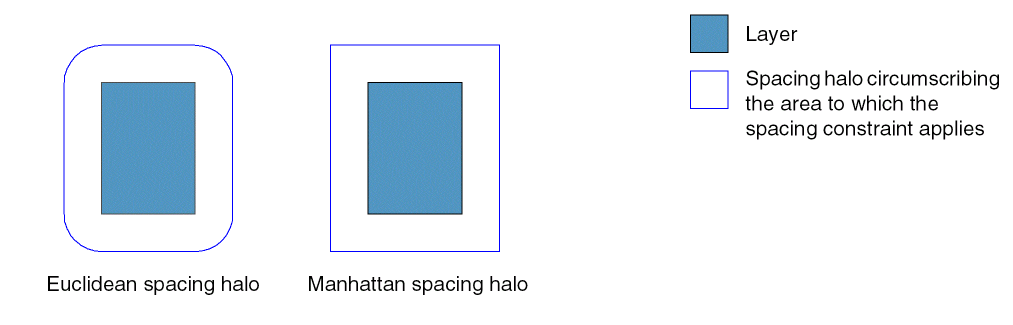
By default, spacing constraints apply within the Euclidean distance around a shape, which means that the area in which the constraint applies, or the spacing halo, has rounded corners.
For some spacing constraints, you can also specify that the distance applied be Manhattan instead. The Manhattan spacing halo, which has squared corners, allows a larger spacing area at the corners, as is required for some process rules or constraints. Throughout this reference manual, constraints for which you can specify Manhattan spacing have 'manhattan specified in their syntax.
Return to top