
Base Layer Fill in the Automated Device Placement and Routing Flow
After device placement, there might be some gaps or unfilled areas in layout designs. Unfilled areas might also result if the Utilization setting was selected on the Initialize tab when generating devices.
Running a DRC check on such designs at this point could report several spacing violations. To avoid these violations, you must generate base layer fill in the unfilled area, between devices. Base layer fill, which includes device, poly, and cut poly fill, are critical for density (manufacturing and matching) reasons at advanced nodes. The automated device placement and routing flow provides a unified interface for adding all types of base layer fill.
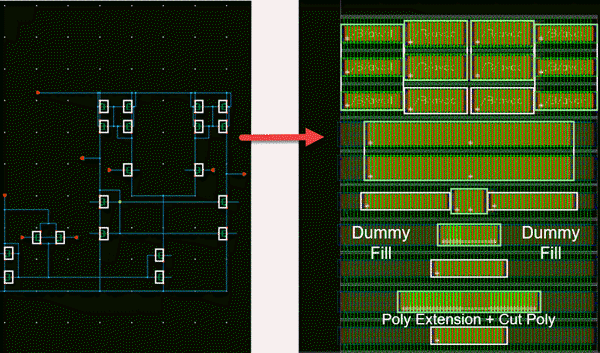
The following image depicts a placed design for which automatic DRC-compliant base layer fill (Dummy and Poly) have been added.
- The dummy fill cells match the neighboring active devices.
-
The poly fill cells extend the gate poly and add cut poly as per the DRC.
Related Topics
Generating and Deleting Base Layer Fill
Troubleshoot Poly Fill Generation
Return to top