
Changing Instance Bindings Inside a Block
A block is a group of instances used in simulators like VHDL. Blocks can contain other blocks and other instances. You can bind instances inside a block the same way you can
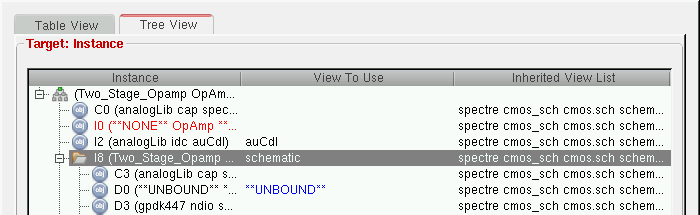
Blocks are better displayed in the tree structure of the Hierarchy Editor.
To change the instance bindings inside a block,
- Select the Tree View tab to display the tree view.
- Select the block containing the instance you want to change.
-
Expand the block to display the instances within it.
-
Right-click the instance whose bindings you want to change.
The pop-up menu appears. -
From the pop-up menu, select Set Instance View – newView.
The new view name appears in the View to Use column in the color used to display user bindings. -
To see the results of your changes, click the Update icon in the toolbar.
If you selected the Auto Update option in the Options form, this step is not required because your configuration is automatically updated. -
To save the changes, from the menu bar, click File – Save or press
Control-s.
Related Topics
Rules Definition at the Instance Level
Changing View Bindings on a Per-Instance Basis
Return to top