
A
Netlisting Overview
Global Nets
The Virtuoso Schematic Editor to Spectre netlister is a hierarchical netlister. It supports hierarchical designs and does not flatten out the netlists. The netlister creates parameterized netlists. In other words, you can use parameters throughout the design hierarchy and the netlister does not evaluate the values of these parameters when generating the netlists. This enables you to dynamically alter the values of these parameters during analyses.
Name mapping is performed during the netlisting. Since this is a hierarchical netlister and Spectre allows mixed cases and escaped special characters, the name mapping is minimal. The most noticeable name mapping is that the net names are mapped into lowercase, due to the lowercase requirement of global nets/signals in Spectre syntax.
The language syntax used in the netlisting is Spectre syntax. However, model files can be either in SPICE syntax or Spectre syntax. By default, the model files are in SPICE syntax. If a model file is in Spectre syntax, make sure the first line in the model file is
simulator lang=spectre
The netlister generates readable, modularized netlists. Each subcircuit is documented in a single block. To create a final simulation input file, two steps are involved: choosing Spectre – Netlist/Simulate – (netlist option) and choosing Spectre – Netlist/Simulate – (create run file) option. When you choose netlist, a structural netlist netlist is created in the run directory. When you choose create run file, a final simulation input file si.inp is created in the run directory. You can also use this file for standalone simulation.
Basically, netlist extracts connectivity, parameter values, parameter inheritance, and all the data stored in the schematics, and it reads the global parameters defined by the Design Variables form. The create run file option combines the raw netlist file, included model files statements (defined by the Model Include Files form), Spectre source statements (Edit Stimulus File), output options, and analyses statements (Edit Analyses/Options File) to create a final run file that is ready to be simulated.
In this process, if you modify your schematics, change your parameter values or other data stored in the schematics, or modify your global parameters, you need to choose netlist again. If you only modify your included model files information, or Spectre source statements or output options and analyses statements, you do not need to re-netlist. Choose create run file again only to obtain a new si.inp file.
During the netlisting, bus signals in schematics are split into single signals in netlists. Iterated instances in schematics are flattened into individual instances. Patch cords in schematics are ignored and their destination signals are used in netlists. Bundles in schematics are split into single signals. Global signals in schematics are retained in netlists.
The netlister does not automatically create model cards for components. Use the Model Include Files form to define the model files to be used. You can also include default model cards for instances for which you did not specify a model name. If you do specify a model name, the model name in the model card is the same as the library cell name.
Additional components can be inserted in the design by directly editing the netlist. You can also use this method to include Verilog-A modules. Use include file statements, and in the case of the analog HDLs, use the ahdl_include statements. Refer to Cadence Verilog-A Language Reference for more information.
Parameters
Component/Subcircuit Parameters
Parameters used for components and subcircuits are stored as DFII database properties. For each component, a set of default properties with their default values is created on the component symbol as cellview properties. When a component is instantiated, you can display these properties in the schematic editor’s tool’s Edit Object Properties form with their default values shown as master values. You can enter the instance values for certain properties as needed. The instance values overwrite the master values (default values) when the netlist is created. You can also add new properties at the instance level. The netlister writes only the parameters/values that are different from their defaults.
Global Parameters (Design Variables)
Global parameters are global to the entire netlist and can be used anywhere inside the design hierarchy as any device parameter value. For example, on a resistor you can specify the resistance as r=res where res is a global parameter. The Design Variables form allows you to define the global parameters with their default values. To reduce the netlisting time, the netlister does not embed global parameter searching. It is your responsibility to make sure that all the global parameters used in the entire hierarchy are defined in the Design Variables form.
When entering global parameters in the Design Variables form, you must make sure that parameters that are functions of other parameters are entered after the dependent parameters are entered. For example, a=5*b and b=10 require you to enter parameter b before parameter a because a uses b. When you use a global parameter in the design hierarchy, it is entered as a string type property (either within an expression or by itself) on the components’ instances or the subcircuits’ instances.
The netlister creates parameters statements based on the variables and their default values defined in the Design Variables form. Variables can be entered as either a constant or as an expression. The netlister does not evaluate the values of the global parameters in the design hierarchy. Later, you can use the alter and sweep statements to change their values during analyses. For information on the parameter capability in the circuit simulator, see the Spectre Circuit Simulator and Accelerated Parallel Simulator User Guide and Spectre Circuit Simulator Reference.
Parameter Inheritance
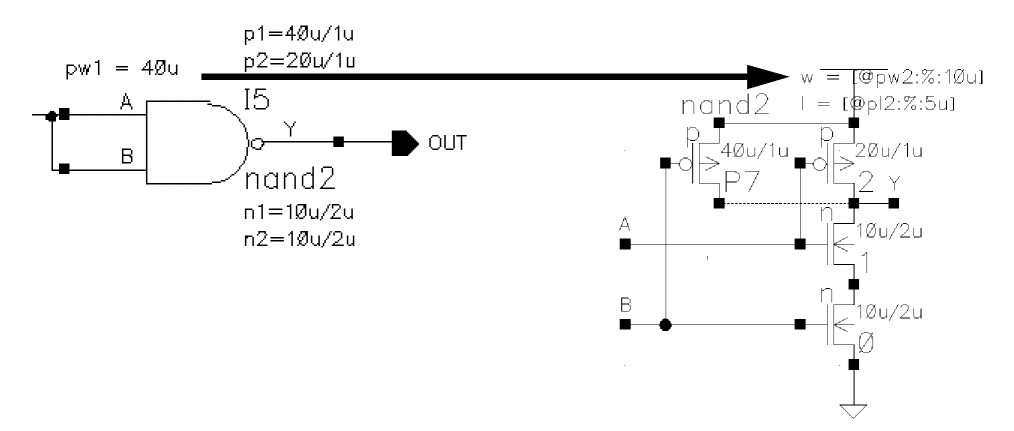
If you are using the sample library, parameter inheritance is handled via netlist processor (NLP) expressions in DFII properties. The syntax of the NLP expression used for parameter inheritance is
[@parameter_name:%:default_value]
where parameter_name is the name of the parameter at the upper-level design from which values are inherited and default_value is the default value of this upper-level parameter.
For example, at the current level of a design, there is a two-input NAND gate instance. A NAND subcircuit consists of two NMOS transistors and two PMOS transistors. A parameter of the NAND instance at the current level, pw, is inherited down to the lower-level parameter w of the pmos instance in the inverter schematic. To make this possible, type the expression [@pw:%:10u] as the value of the parameter w of the pmos instance in the inverter schematic (where 10u is the default value of pw). The parameter w is created as an nlpExpr type of a DFII property.
The netlister reads the NLP expressions during netlisting and creates parameter statements and instance statements for the subcircuits accordingly. The netlister does not evaluate the values of the inherited parameters. For information on entering and changing parameters in a design, refer to the Edit Object Properties form in the Virtuoso Schematic Editor User Guide.
Expressions
You can use the string-type of properties to define the expressions that Spectre supports. The expressions need to be in Spectre syntax. The netlister reads and passes the expressions without evaluating their values.
For example, the value of a parameter w on a MOS device is an expression aw+3*bw, where aw and bw are global parameters that need to be defined in the Design Variables form.
For information on the expression capability in the circuit simulator, see the Spectre Circuit Simulator and Accelerated Parallel Simulator User Guide and Spectre Circuit Simulator Reference.
Return to top