|
Field
|
Description
|
|
Placement Style
|
Lists the supported IO PAD placement styles.
|
|
Connectivity Based
|
Places IO PADs in the IO rows such that the net length between the PADs and the placed blocks is minimized.
|
|
Non Connectivity Based
|
Distributes the IO PADs around the periphery of the design boundary without considering the connectivity between PADs and blocks placed in the design.
|
|
Spacing
|
Defines the inter spacing between the PADs in a given row. This is a post processing step for the PAD placement engine.
|
|
LEFT, RIGHT, TOP, and BOTTOM
|
Refers to the row sides.
|
|
None
|
Specifies that all the placement constraints are to be turned off by default and pads placed with spacing value 0.
|
|
Even
|
Distributes PADs evenly, with the same spacing between PADs, in the designated row.
|
|
Abut
|
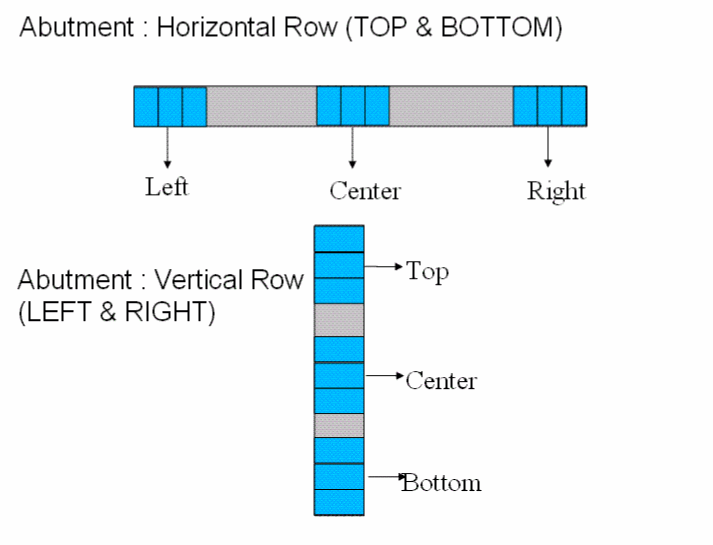
Guides the placement engine to abut the PADs in the designated row. The selection of abutment will depend upon the row side.
-
If the row is horizontal (TOP or BOTTOM), then the choices are ‘LEFT’, ‘RIGHT’, and ‘CENTER’.
-
If the row is vertical (LEFT or RIGHT), then the choices are ‘TOP’, ‘BOTTOM’, and ‘CENTER’.
For example, you may specify area as Left, Right, and Center for the top and bottom rows and Top, Bottom, and Center for the left and right rows.
The following figure describes the various areas for each row.
|
|
|
Following are the abutment options:
-
Top row: Center, Left, Right
-
Bottom row: Center, Left, Right
-
Left row: Center, Top, Bottom
-
Right row: Center, Top, Bottom
|
|
Custom Sites
|
Specifies spacing in terms of the number of sites between adjacent IO PADs. The placement engine places IO PADs at these sites.
You can set the spacing between cells by selecting the cells, creating an alignment constraint in the Constraint Manager, and setting the pitch value for the constraint. The pitch value denotes the number of sites and is respected for PAD cells only if Custom Sites is selected for the IO row. When placing the IO PADs, the alignment constraint pitch value is read first. If the value is not found, spacing is read from the Custom Sites field.
|
|
Offset
|
Specifies the position of the first IO PAD cell. Positions of the remaining PAD cells are calculated based on the specified Spacing values.
|
|
LEFT, RIGHT, TOP, BOTTOM
|
Refers to the side for which IO PAD offset is specified.
|
|
None
|
Specifies that there is no offset.
|
|
Custom Sites
|
Specifies the number of sites after which the first IO PAD must be placed.
|
|
Anchor
|
Specifies the corner from which offset must be calculated when Offset is set to Custom Sites. The anchor can be set as Top or Bottom for Left and Right IO rows and Left or Right for Top and Bottom IO rows.
|