
A
Area Estimation Framework in Floorplanner
The Area estimation framework in Floorplanner lets you analyze an acceptable area utilization percentage for deriving the size of a rectangular area boundary for a virtual hierarchy in a layout. You can register your own area estimation functions or use previously registered area estimation functions in Layout XL and Layout EXL.
Area estimation can be done for a PR boundary, cluster boundary, virtual hierarchy, or soft block. When estimating the area for a boundary, you can specify the area utilization, which is the percentage of area of the boundary that must be filled. The areas of all bounding boxes of instances and shapes in the design are summed and the utilization value is used to calculate the size of the boundary depending on the inbuilt area calculation or the calculation done by the registered SKILL function.
You can specify the percentage of area utilization to be used by the area estimation function in the Generate All From Source and Update Components and Nets commands and when defining soft blocks in the Configure Physical Hierarchy window.
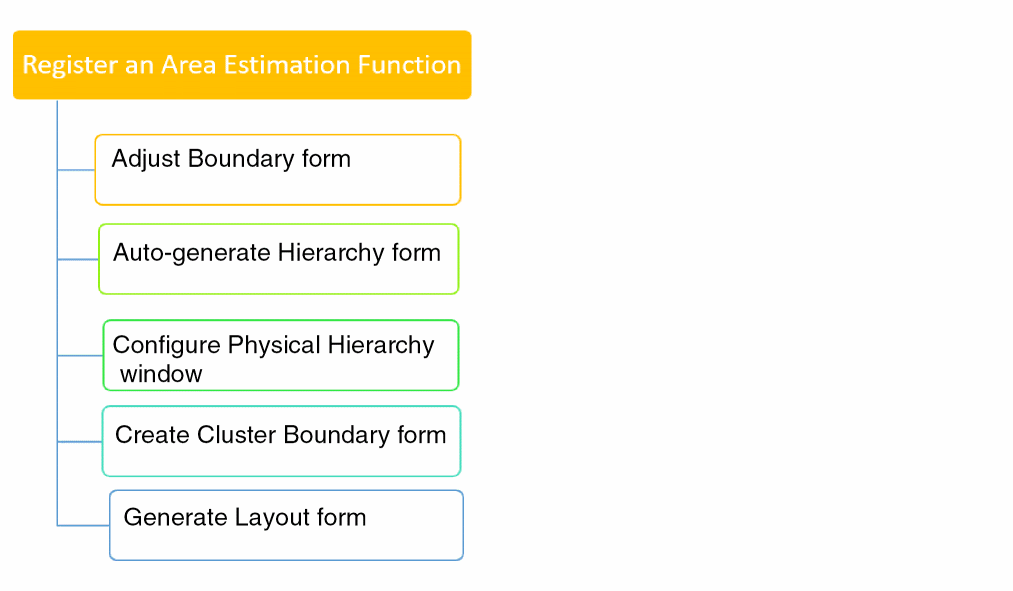
The area estimation function can be called using Adjust Boundary form, Area Estimation Parameters form in Configure Physical Hierarchy window, Create Cluster Boundary form, Auto-generate Hierarchy form, and Generate Layout form.
The registered function can be accessed using various forms for area estimation as shown in the following image.
The forms mentioned above can be used to call an area estimation function only after it is registered.
Related Topics
Area Estimation Function Registration
Registering an Area Estimation Function to Adjust a Virtual Hierarchy Area Boundary
Registering an Area Estimation Function to Adjust a Soft Block PR Boundary
Adding an Area Estimator Function for Layout Generation
Return to top