
12
CDBA Relative Object Design Functions
This chapter describes Relative Object Design (ROD) C database functions.
- For more information about ROD objects, refer to the Virtuoso Relative Object Design User Guide
Overview
Virtuoso relative object design (ROD) is functionality for defining simple and complex layout objects and their relationships to each other, without the need to use low-level Cadence SKILL language functions. ROD lets you create objects and define their relationships at a high level of abstraction, so you can concentrate on your design objectives. ROD automatically handles the intricacies of traversing the design hierarchy and simplifies the calculations required to create and align geometries.
With a single ROD function call, you can accomplish a task that otherwise would require several lower-level SKILL function calls. For example, creating a pin required a series of low-level SKILL function calls, but with ROD, you use a single function to create a shape and designate it as a pin. You can create entities such as guard rings, contact arrays, and transistors with one function call. You can also create an object from an existing object just by specifying the size of the new object.
About ROD Objects and ROD Object IDs
Every named database object, such as an instance, layout cellview, or named shape, automatically has relative object design information associated with it. This information is stored in a ROD object. A ROD object is also a database object, but it exists in relation to its associated named database object. A ROD object is identified by a unique ROD object ID.
A ROD object for a named shape, instance, or cellview contains the following information:
hierarchical name
cellview ID
database ID
transformation information (rotation, magnification, and offset)
alignment information, if any
number of segments (for shapes)
names and values of user-defined handles, if any
names of system-defined handles
A ROD object ID is similar to a database ID. The database ID for an object is the temporary address in memory for the object. A ROD object ID is the temporary address for the ROD object associated with a specific database object. When you look at these two IDs in the Command Interpreter Window (CIW) for a database object, the database ID might be db:98342974 and the ROD object ID rodObj:23970843.
|
Database ID of the ROD object at the lowest level. For multipart paths, |
Named Objects
ROD lets you assign a name to a zero-level object (an ordinary database shape, such as a rectangle or polygon) either by naming an existing object or by using a ROD function to create an object. You can access information through hierarchy about named objects, such as instances and named shapes.
Hierarchical Name
To access information about a named shape or instance through hierarchy, use its hierarchical name and the top-level cellview ID. A hierarchical name consists of the names of the instances through which you need to descend to reach the desired named shape or instance.
The following figure shows the hierarchy in a layout cellview containing the named shape polyRect. Its hierarchical name is INV1/ptr1/polyRect.
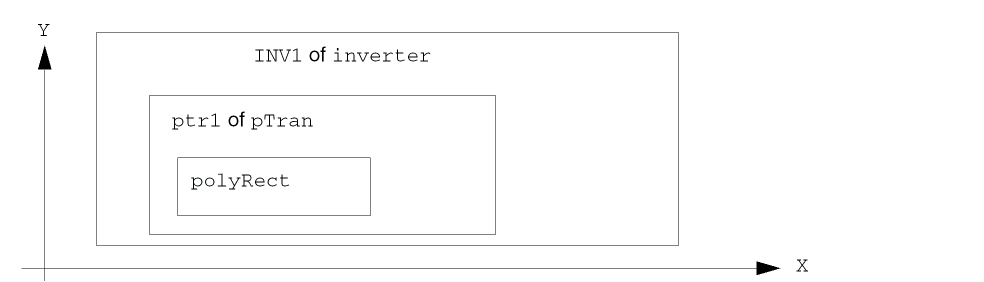
When you name an existing database shape using the ROD naming function, the function creates ROD information associated with the shape. This information is stored in a ROD object and is identified by a unique ROD object ID. The information contained in a ROD object includes its name and database ID. When you create a new shape with a ROD creation function, the function creates a named database shape and a ROD object.
Boolean Query Functions
rodIsMPPMaster
Boolean
rodIsMPPMaster(
dbId           id
);
Description
Determines if the specified id is the dbId for the master path of a ROD multipart path.
A multipart path (MPP) is a single ROD object consisting of one or more parts at level zero in the hierarchy on the same or on different layers.
A multipart path consists of a single master path and one or more subparts. The master path is an ordinary path; however, it is the defining part of a multipart path; all subparts are based on the master path. The subparts can be any combination of offset subpaths, enclosure subpaths, and sets of subrectangles.
Arguments
|
The database |
Return Values
|
Returns TRUE if the specified id is the |
rodIsMPRMaster
Boolean
rodIsMPRMaster(
dbId           id
);
Description
Determines if the specified id is the dbId for the master rectangle of a ROD multipart rectangle.
A multipart rectangle (MPR) is a single ROD object consisting of one or more parts at level zero in the hierarchy on the same or on different layers.
A multipart rectangle consists of a single master rectangle and one or more subparts. The master rectangle is an ordinary rectangle; however, it is the defining part of a multipart rectangle; all subparts are based on the master rectangle. The subparts can be any combination of offset subrectangles, enclosure subrectangles, and sets of subrectangles.
Arguments
|
The database |
Return Values
|
Returns TRUE if the specified id is the |
rodIsMPPMasterChoppable
Boolean
rodIsMPPMasterChoppable(
dbId           id
);
Description
Determines if the specified id is the dbId for the master path of a ROD multipart path and if that master path is choppable.
When the master path is choppable, then all of its subpaths and subrectangles must be choppable also. When the master path is not choppable, each subpath or set of subrectangles may be choppable or not choppable.
Arguments
|
The database |
Return Values
|
Returns TRUE if the specified id is the |
rodIsMPPSubShape
Boolean
rodIsMPPSubShape(
dbId           id
);
Description
Determines if the specified id is a dbId for a subshape that is part of a ROD multipart path. The master path is not considered a subshape.
Arguments
|
The database |
Return Values
rodIsObj
Boolean
rodIsObj(
rodObjectId       objId
);
Description
Determines if the specified object objId is truly a ROD object.
Arguments
Return Values
|
Returns TRUE if the specified object objId is truly a ROD object. Returns FALSE otherwise. |
rodIsObjAligned
Boolean
rodIsObjAligned(
rodObjectId           objId
);
Description
Determines if the specified ROD object objId is aligned.
Arguments
Return Values
|
Returns TRUE if the specified ROD object objId is aligned. Returns FALSE otherwise. |
rodIsObjShape
Boolean
rodIsObjShape(
dbId           id
)
Description
Determines if the specified id is the database Id of a ROD object or is a subshape in a ROD multipart path or in a multipart rectangle.
Arguments
|
The |
Return Values
|
Returns TRUE if the specified id is the |
Object Query Functions
rodGetObjByDbId
rodObjectId
rodGetObjByDbId(
dbId           id
);
Description
Finds a ROD object specified by dbId.
The dbId is the database id of the ROD object at the lowest level. For multipart paths, dbId identifies the master path, for multipart rectangles it identifies the master rectangle.
Arguments
Return Values
rodGetObjByName
rodObjectId
rodGetObjByName(
String         hierName,
dbCellViewId   cvId
);
Description
Finds a ROD object id specified by hierarchical name.
Arguments
|
|
Return Values
|
The ROD object id specified by the hierarchical name hierName. |
rodGetObjDbId
dbId
rodGetObjDbId(
rodObjectId      objId
);
Description
Returns the dbId of the specified ROD object. It first checks to make sure the objId passed represents a ROD object.
Arguments
Return Values
rodGetObjName
String
rodGetObjName(
rodObjectId      objId
);
Description
Returns the hierarchical name of the specified ROD object. The name is constructed in a static string. It first checks to make sure the objId passed in.
Arguments
Return Values
rodGetObjTransform
dbTransform
rodGetObjTransform(
rodObjectId       objId
);
Description
Returns the transform of the specified ROD object.
Arguments
Return Values
Multipart Path Functions
rodDeleteAllMPPs
Boolean
rodDeleteAllMPPs(
dbCellViewId     cvId,
Boolean          immediateUpdate
);
Description
Deletes all of the multipart paths (MPPs) in the specified cellview.
Arguments
|
The |
|
Return Values
|
Returns TRUE if successful. If the immediateUpdate flag is on, it also immediately calls |
rodExplodeMPP
Boolean
rodExplodeMPP(
dbPathId       pathId
);
Description
Changes the MPP into an ordinary path and its subparts into ordinary paths and rectangles; all ROD attributes such as names and alignment are lost.
Arguments
Return Values
rodGetMPPSubShapeMaster
dbIdm
rodGetMPPSubShapeMaster(
dbId           id
);
Description
Returns the database id of the master path for the specified id if the id is a dbId for a subshape that is part of a ROD multipart path. The function returns dbcNullId otherwise. dbcNullId is returned if the specified id is the dbId for the master path of a ROD multipart path. The master path is not considered a subshape.
Arguments
|
The |
Return Values
|
The database |
Multipart Path Subshape Generation Functions
rodStartGenMPPDbIds
rodMPPGenStateId
rodStartGenMPPDbIds(
dbPathId        pathId
);
Description
Generates the MPP subshape database ids.
Arguments
Return Values
rodGenMPPDbId
dbId
rodGenMPPDbId(
rodMPPGenStateId   stateId
);
Description
Returns the a pointer to the next MPP subshape dbId. When done, returns dbcNullId.
Arguments
Return Values
rodStopGen
void
rodStopGen(stateId)
Description
Frees the storage used by the generation control block.
Arguments
Multipart Rectangle Functions
rodGetMPRSubShapeMaster
dbId
rodGetMPRSubShapeMaster(
dbId           id
);
Description
Returns the database id of the master rectangle for the specified id if the id is a dbId for a subpart that is part of a ROD multipart rectangle. The function returns dbcNullId otherwise. dbcNullId is returned if the specified id is the dbId for the master rectangle of a ROD multipart rectangle. The master rectangle is not considered a subpart.
Arguments
|
The |
Return Values
|
The database |
rodExplodeMPR
Boolean
rodExplodeMPR(
dbRectId       rectId
);
Description
Changes the MPR into an ordinary rectangle and its subparts into ordinary parts and rectangles; all ROD attributes such as names and alignment are lost.
Arguments
Return Values
rodReCreateMPR
Boolean
rodReCreateMPR(
dbRectId       rectId
);
Description
Re-creates a MPR. Removes all old dbIds and creates new ones.
Arguments
Return Values
Multipart Rectangle Subshape Generation Functions
rodGetMPRRecId
rodMPRRecId
rodGetMPRRecId(
dbId           id
);
Description
Returns the MPR recId if the dbId is an MPR master.
Arguments
|
The |
Return Values
rodStartGenMPRSubParts
rodStartMPRSubParts(
dbId        Id
);
Description
Allocates a rodMPRGenState then fills it with an array of rodMPRSubPart pointers
Arguments
Return Values
rodStartGenModMPRSubParts
rodMPRGenStateId
rodStartGenModMPRSubParts(
rodMPRRecId        MPRRecId
dbBBox       *bBox
);
Description
Modifies the MPR structures according to the new bounding box.
Arguments
Return Values
rodGenMPRSubParts
*rodMPRSubPart
rodGenMPRSubParts(
rodMPRGenStateId   stateId
);
Description
Returns the pointer to the next MPRSubPart dbId. When done, returns dbcNullId.
Arguments
|
The |
Return Values
rodGenMPRDbId
dbId
rodGenMPRDbId(
rodMPRGenStateId          stateId
);
Description
Returns the pointer to the next MPR dbId.
Arguments
|
The |
Return Values
rodStartGenMPRDbIds
rodMPRGenStateId
rodStartGenMPRDbIds(
dbRectId        rectId
);
Description
Starts to generates the MPR subshape database ids.
Arguments
Return Values
rodStopGenMPR
void
rodStopGenMPR(
rodMPRenStateId           stateId
);
Description
Frees the storage used by the MPR generation control block.
Arguments
rodIsMPRSubShape
Boolean
rodIsMPRSubShape(
dbId           id
);
Description
Determines if the specified id is a dbId for a subshape that is part of a ROD multipart rectangle. The master path is not considered a subshape.
Arguments
Return Values
Name, Unalign, Unname Functions
rodNameShape
rodObjectId
rodNameShape(
String          name,
dbShapeId       shapeId
);
Description
Names the specified shapeId making it a ROD object.
Assigns a name to an unnamed database shape or renames a ROD shape. Creates (or updates) a ROD object containing information associated with the shape, including its name and database ID. The associated ROD object is identified by a ROD object ID. You can assign a name to any of the following shapes:
rectangle
polygon
path
line
dot
label
text-display object
You can refer to a named shape through hierarchy using its hierarchical name.
To assign a name to an unnamed shape, you must identify the shape by its database ID. You can specify a name that is unique within the cellview or let the system generate a name. If you attempt to assign a name to an object that already has a name, the system displays an error message.
Before assigning a name, you might want to verify that the string is a valid name and that it has not already been used in the cellview. To do this, use the rodIsFigNameUnused SKILL function.
Arguments
Return Values
rodUnAlign
Boolean
rodUnAlign(
rodObjectId      objId1,
rodObjectId      objId2
);
Description
When you specify only one ROD object id, removes all alignments for the object specified. When you specify two ROD object ids, removes only the alignment between the two objects.
Arguments
Return Values
rodUnNameShape
Boolean
rodUnNameShape(
rodObjectId      objId
);
Description
Removes the ROD name from the dbId of the specified ROD object, so afterwards it is no longer a named shape. The ROD object id for the shape and all other ROD information is deleted. If the object is an instance, the instance keeps its name but all other ROD information is deleted. Also removes all ROD alignment constraints that reference the shape.
Arguments
|
ROD object |
Return Values
Handle Functions
rodGetHandle
Boolean
rodGetHandle(
rodObjectId      objId,
String           name,
rodHandleType    *pHandleType,
rodHandleValue   *pHandleValue
);
Description
Implements the ROD user function rodGetHandle.
The ROD user function rodGetHandle returns the value of a system- or user-defined handle. You specify the handle name and the ROD object id for the object with which the handle is associated.
For Boolean handles, the value can be either t or nil. When the value is nil, rodGetHandle returns an ambiguous result: nil could mean that the handle was not found or that the value of the handle is nil. To avoid ambiguity for Boolean handles, verify that the handle exists with the rodIsHandle function before you try to access it.
Arguments
|
ROD object |
|
|
Character string or symbol specifying the name of the handle whose value is returned. |
|
|
All ROD objects except dots, labels, and text display objects |
|
|
All ROD objects except dots, labels, and text display objects |
|
You can define your own handles to store points, calculations, and other information. When you define a new handle, you specify the name (or let it default) and assign a value. The values of user-defined handles are stored in the database. The information stored can have any of the following data types:
point integer
Boolean floating-point number
string SKILL expression
If you let the name of your new handle default, the system assigns a name unique within the cellview, as follows: handle0, handle1, handle2, and so on.
Return Values
rodGenStateId
rodGenStateId
rodStartGenNamedShape(
dbCellViewId    cvId
);
Description
Allocates a rodGenState control block and fills it in, setting things up for rodGenNamedShape, which returns one rodObjectId at a time when it is called.
Arguments
Return Values
|
Unique generator state |
rodGenNamedShape
Boolean
rodGenNamedShape(
rodGenStateId     stateId,
rodObjectId       objId
);
Description
Returns TRUE if there was another rodObjectId generated to fill in the return argument objId. Returns FALSE otherwise.
Arguments
Return Values
Return to top