
Controlling the Display of Library Information
You can choose to display library information from the following options:
- To display information in list boxes, choose View – Lists or click the View Lists icon from the Library Manager toolbar.
- To display information in tree mode, choose View – Tree or click the View Tree icon from the Library Manager toolbar.
-
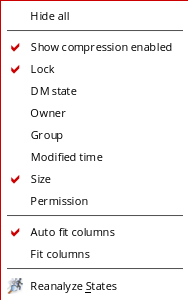
To customize the information displayed in the tree table, right click over the table header of the Libraries section.The following menu is displayed:
Return to top