
axlRegisterCustomDeviceFilter
axlRegisterCustomDeviceFilter(
t_name
s_function
)
=> t / nil
Description
Adds a custom filter for device instance parameters on the Variables and Parameters assistant pane in ADE Explorer and ADE Assembler.
The default filters are Default, CDF Parameters, and CDF Editable. To add an additional filter, use the axlRegisterCustomDeviceFilter function.
Arguments
Value Returned
Examples
The following example shows how to create and register a custom filter.
First, define a custom filter. For example:
(procedure (myCustomFilter inst simulator)
   (list
   (list "fw" (get inst "fw"))
   (list "l" (get inst "l"))
   (list "fingers" (get inst "fingers"))
   (list "m" (get inst "m"))
   )
)
Then, call axlRegisterCustomDeviceFilter from the CIW as follows:
axlRegisterCustomDeviceFilter("My Filter" 'myCustomFilter)
The function returns t if the registration is successful; otherwise, nil.
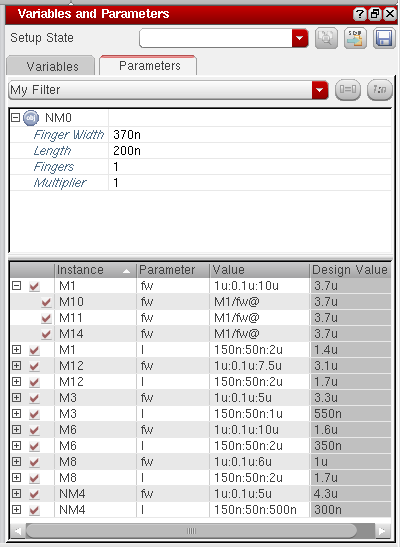
On success, the above example adds a new filter, My Filter, to the Variables and Parameters assistant in the GUI. When you apply this filter, only the Finger Width, Length, Fingers, and Multiplier parameters are displayed for instances. All other parameters are filtered out. Note the filtered parameter list in the figure shown below.
Related Topics
Variables and Parameters assistant pane
Return to top