
Tools and Sessions
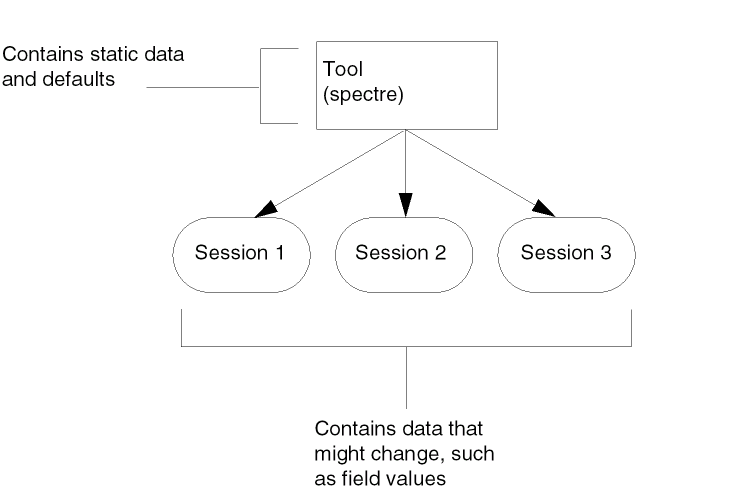
Understanding the difference between a tool object and a session object will help you use many of the functions in this manual. A tool object is a data structure that contains all the default and static data for a simulator. For example, the fields on an analysis form are static (a transient analysis always has a From, To, and By field). A session object contains data that might change between simulator uses, such as the values of the From, To, and By fields, or design variables or model paths.
Several sessions can be associated with one tool. This means you can start several Cadence sessions, each with different transient analysis settings. However, all these sessions are associated with one tool (spectre).
Most of the functions take the tool argument. Some take either the tool or the session argument, and some take only the session argument. For example, asiSetEnvOptionVal takes the following arguments:
asiSetEnvOptionVal( {o_tool|o_session}s_nameg_value)
This means you can pass either a tool or a session object. If you pass a tool object, you are modifying the tool and every session created after this. If you pass a session object, your changes affect the current session only.
Examples
Consider Spectre tool with the model path set to ~/models, and a schematic window open with your design. When you open a Simulation window, which is set to use the spectre simulator by default, you are starting a spectre session. If you bring up the Environment Options form, the model path is set to ~/models. You can change the model path for the tool by typing the following in the CIW:
asiSetEnvOptionVal( asiGetTool('spectre) 'modelPath
"~/processA/best/models")
Now, if you check the model path from your existing spectre simulation window, it is still set to ~/models. This is because this session was previously created based on the original tool. However, if you open a second spectre simulation window, a new session is created based on the modified spectre tool. In this session, the model path is set to ~/processA/best/models.
If you do not want to open another session, but you want to change the model path in the current session, you might type the following command in the CIW:
asiSetEnvOptionVal( asiGetCurrentSession() 'modelPath
"~/processA/best/models")
This changes the model path in the existing session only. If you open another session, the modelPath value is still set to ~/models. This is because the command did not change the default value of the model path, it changed the session value only.
You can think of a tool as the template from which sessions are created. Changing a tool affects all sessions created after the tool is changed, but does not affect existing sessions.
oasis.cxt and analog.cxt files. You must load these context files before using the functions. Bringing up the Simulation window automatically loads these contexts.Return to top