
maeDeleteMultiWildCardOutputs
maeDeleteMultiWildCardOutputs(l_outputNamesWithWildCards[?custom_columnl_customColumnValue] [?customColumnNamet_customColumnName] [?sessiont_sessionName] ) => t/ nil
Description
Deletes the named outputs from the active setup. You can also delete outputs conditionally, based on a specified value in a custom column. You can use wildcard characters in the list of output names.
The specified arguments are case-sensitive.
Arguments
Value Returned
|
The specified outputs are deleted from the active setup in the specified session. |
||
Examples
Let us consider the following setup.
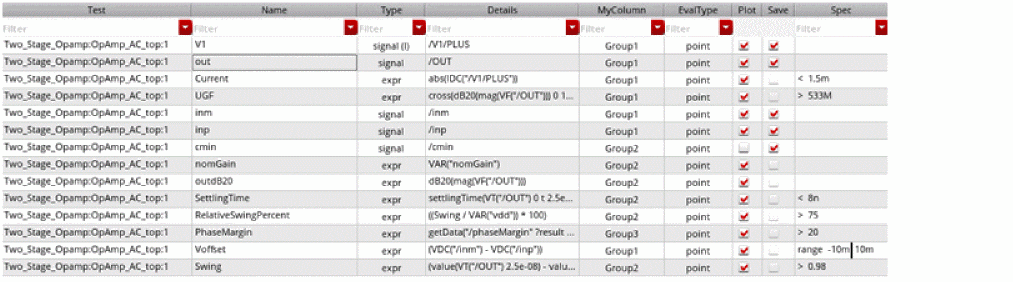
Deletes all outputs with names that start with the letter S:
maeDeleteMultiWildCardOutputs(list("S*"))
maeSaveSetup()
The outputs Swing and SettingTime are deleted.
Deletes all outputs with names starting with the string out and the value Group1 in the custom column MyColumn:
maeDeleteMultiWildCardOutputs(list("out*") ?customColumnValues list("Group1") ?custom_column "MyColumn")
maeSaveSetup()
Delete all outputs with names containing the string out and the values Group1 and Group2 in the custom column MyColumn:
maeDeleteMultiWildCardOutputs(list("*out*") ?customColumnValues list("Group1" "Group2") ?custom_column "MyColumn"
maeSaveSetup()
The outputs out and outdB20 are deleted.
Deletes all outputs with names that start with the strings Swing, off, or out, and the values Group1 and Group2 in the custom column MyColumn:
maeDeleteMultiWildCardOutputs(list("Swing*" "off*" "out*") ?customColumnValues list("Group2" "Group1") ?custom_column "MyColumn")
maeSaveSetup()
The outputs Swing, out, and outdB20 are deleted.
Return to top