
axlReadResDB
axlReadResDB(t_ResultsDBFileName) =>h_ResultsDBObj/ nil
Description
Returns a handle to the specified results database. This handle provides read-only access to the results database that contains objects of the following types:
- point: a design point
- corner: a corner defined for a particular design point
- test: a test defined for a particular corner
- param: a parameter defined for a particular corner
- output: an output defined for a particular test
There is a hierarchical relationship between the instances of these objects. For example, a point is associated with one or more corners. Each corner is associated with one or more tests. Each test is associated with zero or more outputs, and so on. As a result of this relationship, for an object, you can access the properties of the object itself and other objects related to it.
- The following properties:
- A set of member functions that return the instances of that object type and other related types. For example, using an instance of type output, you can get the value of an output object and its parent test instance. Using the functions given for a test instance, you can get a corner instance. For a corner instance, you can get the parameters which were used to generate the output, as well as the point and its ID.
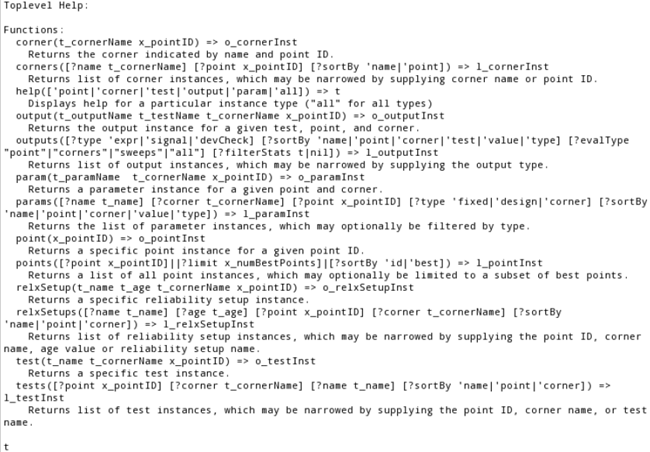
In addition, the result database provides a function help() for each object of the above mentioned types to displays the list and description of functions that can be called using that particular object. For example, function call help('corner) displays a list of all the functions that can be called using an object of type corner. help('all) displays help for all the object types.
Argument
Value Returned
Examples
The following code returns a handle rdb to the results database for a history named CornerResults:
historyname="Interactive.0"
x_mainSDB=axlGetMainSetupDB(axlGetWindowSession())
=>
x_history=axlGetHistoryEntry(x_mainSDB historyname)
=>
rdbPath=axlGetHistoryResults(x_history)
=>
rdb=axlReadResDB(rdbPath)
=> axlrdb@0x1949a438
; the returned value is a handle to the results database
The following code opens the results database and displays built-in help:
rdb->help()
The help is displayed in the CIW, as shown in the following figure:
The example code given below shows how to use the handle to the results database to explore the result values. The handle to the first point in the results database is obtained to display the outputs of type expression with their values. The results are sorted by corner.
historyname="Interactive.1"
x_mainSDB=axlGetMainSetupDB(axlGetWindowSession())
=> 1001
; returns handle to the setup database of the current session
x_history=axlGetHistoryEntry(x_mainSDB historyname)
=> 4932
; returns handle to the given history
rdbPath=axlGetHistoryResults(x_history)
=> "/servers/user1/opamplib/ampTest/maestro/results/maestro/Interactive.82.rdb"

rdb=axlReadResDB(rdbPath)
=> axlrdb@0x1949a438
; The following statement returns the point object for design point 1.
pt = rdb->point(1)
; The following code prints corner name, test name, output name and its value
; for each output of type expression
foreach(out pt->outputs(?type 'expr ?sortBy 'corner)
printf("corner=%s, test=%s, output=%s, value=%L\n" out->cornerName out->testName out->name out->value)
)
The following functions calls describe how to access test objects in a result database:
; The following function lists all test instances and their properties.
rdb->tests()
; The following function returns a test instance with the given test name, from
; the given corner for point 1.
tst = rdb->test(<t_testName> <t_cornerName> 1)


; The following statement returns the execution host for the test instance.
tst->host
; The following statement returns the run status for the test
tst->status
; The following statement returns the start time and stop time the test in the
; default format, such as 'Mon Sep  9 22:25:01 EDT 2013'
Test->startTime()
Test->stopTime()
; You can change the format in which the start time and stop time is displayed. For
; this, specify the format as shown below. You can change the fromat, as appropriate.

tst->startTime("h:m:s ap")
; Time would be displayed in this format: : '10:25:1 pm'
tst->stopTime("h:m:ss:zzz ap")
; Time would be displayed in this format: : '12:25:01:035 pm'
; The following code gets the parent corner for the test and returns the parameters
;(sorted by name) for that corner and their values.
foreach(mapcar p tst->corner()->params(?sortBy 'name)
list( p->name p->value)
)
Consider an example setup that contains a test with one output that is measured across corners and four outputs measured across sweeps. Other outputs are evaluated for each point and each corner individually.
By default, the outputs function of the results database object returns all outputs for all points except those that are measured across corners, sweeps, or all sweep points and corners.
; The following function call returns the names of all outputs for two points in
; the setup:
rdb->outputs()

=> rdb->outputs()~>name
("/vin" "/out" "pw" "VT" "ymax2" "/net1" "pw" "/vin" "/out" "pw" "VT" "ymax2"
"/net1" "pw" "/vin" "/out" "pw" "VT" "ymax2" "/net1" "pw" "/vin" "/out" "pw")
The following code shows how to read the results of expressions measured across corners or sweeps:
; To access the outputs measured across corners, use the ?evalType argument of the
;outputs function:
rdb->outputs(?evalType "corners")~>name
("macOut" "macOut")
; here, the name of output remains same for all points.

; The following function call returns the output value of macOut for each point in
; the setup:

rdb->outputs(?evalType "corners")~>value
(-0.0317678 -0.0287915)

; The following code prints the names and values of the outputs evaluated across
; corners for each point

ops = rdb->outputs(?evalType "corners")
=>(axlrdbocorners@0x27b57410 axlrdbocorners@0x27b57428)

foreach(op ops printf("%s     %N   %N\n" op->name op->value ))
=>macOut     -0.0317678
macOut     -0.0287915
(axlrdbocorners@0x27b57410 axlrdbocorners@0x27b57428)

; Similarly, the following code prints the names and values of the outputs evaluated
; across sweeps
ops = rdb->outputs(?evalType "sweeps" ?name "MAS")

=>( axlrdbosweeps@0x27b57458 axlrdbosweeps@0x27b57470
axlrdbosweeps@0x27b57488 axlrdbosweeps@0x27b574a0 ...)
;
foreach(op ops printf("%s     %N\n" op->name op->value))
=> MAS     0.03313052
MAS_Dep     1.033131
MAS_wave1     "wave"
MAS     0.06797625
MAS_Dep     1.067976
....
Return to top