
Set Member Alignment and Spacing Form
Use the Set Member Alignment and Spacing form to specify alignment and spacing values for instances in Modgens.
| Field | Description |
|---|---|
|
Lists the Modgen members to which the alignment and spacing settings need to be applied. |
|
|
Specifies the alignment of instances along the horizontal axis, which is the x-axis. |
|
|
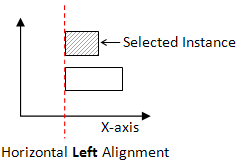
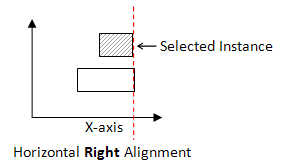
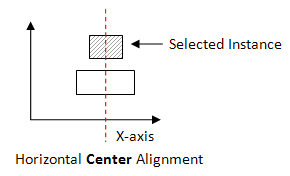
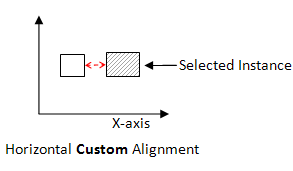
Specifies the horizontal alignments of the selected instances. The available options are:
|
|
Environment variables: modgenDefHoriAlignment |
|
|
Specifies the spacing of selected instances from the left edge. Environment variables: modgenDefHoriSpacing |
|
|
Specifies the reference layer based on which: Environment variable: modgenDefHCSRefLayer |
|
|
Specifies the reference purpose for calculating custom spacing value and for specifying the alignment of instances. Environment variable: modgenDefHCSRefPurpose |
|
|
Specifies the alignment of instances along the vertical axis, which is the y-axis. |
|
|
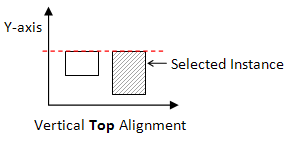
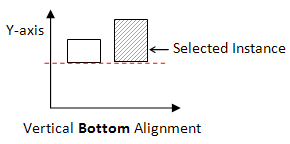
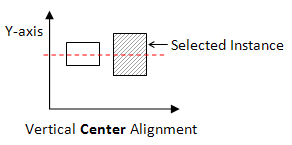
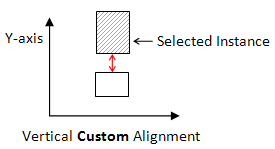
Specifies the vertical alignments of the selected instances. The available options are: |
|
Multiple instances can be selected and their horizontal and vertical alignments can be set. For example, if multiple instances in a row are selected and their vertical alignment is set to top, all instances are top aligned. Environment variable: modgenDefVertAlignment |
|
|
Specifies the spacing of selected instances from the bottom edge. Environment variables: modgenDefVertSpacing |
|
|
Specifies the reference layer based on which: Environment variable: modgenDefVCSRefLayer |
|
|
Specifies the reference purpose for calculating custom spacing value and for specifying the alignment of instances. Environment variable: modgenDefVCSRefPurpose |
|
|
Overwrites environment variables with the values specified in the Set Member Alignment and Spacing form. |
|
|
Resets all values in the form with values from their corresponding environment variables stored in the .cdsenv file. These values were saved earlier by clicking Save Values. |
|
|
Applies the custom spacing to all the devices in the module. |
Related Topics
Specifying Modgen Device Alignment and Spacing
Return to top