
1
Configuring OpenAccess
The OpenAccess API is a C++ programming interface for integrating design tools and design methodologies through a common, open database. Many Cadence products use this API to store and access design data.
Cadence products that require OpenAccess automatically install OpenAccess in the following directory:
<cadence_install_dir>/oa_v22.60.<xxx>/
The directory name contains information about the OpenAccess version number and the data model revision:
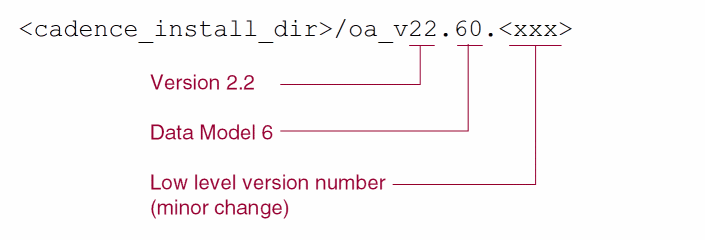
A symbolic link is automatically created from cadence_install_dir/share/oa to the OpenAccess installation directory shown above. Although you can change the OpenAccess installation that your application uses, it is strongly recommended that you do not do so because products are tested with the version of OpenAccess which is shipped with the product. Data produced by versions of OpenAccess from 22.04 and 22.4x are compatible, enabling interoperability between products using those versions of OpenAccess. However, if it is necessary to use a different version of OpenAccess, you can do so with one of the following approaches:
- Use the Configure utility available through InstallScape to specify a different default OpenAccess installation.
-
Use the
OA_HOMEenvironment variable to override the default OpenAccess installation.
Use the Configure Utility to Specify a Different Default OpenAccess Installation
-
In the Configure part of your installation of the Cadence tools, provide the path to the Cadence installation to configure and specify that you want to configure all the products.
The OpenAccess configuration utility opens in a shell window. -
Press
Enterto continue.
The utility shows the OpenAccess installation you are currently using and asks if you want to choose a different OpenAccess installation. -
Type
y.
You are prompted for a path to a valid OpenAccess installation. -
Specify the OpenAccess installation you want.
Do not use the tilde character (~) to represent home directories. Instead, use the full path name, such as/home/username.
A symbolic link is created from <cadence_install_dir>/share/oato the OpenAccess installation location.
InstallScape displays a dialog box indicating that the task is complete.
Override the Default OpenAccess Installation
It is possible that different design groups using different versions of a design flow might need to use different versions of OpenAccess. For example, you might want to try a new version of OpenAccess for a particular group. In such cases, set the OA_HOME environment variable to override the symbolic link set up by the Cadence tool installation process. This will ensure that for that particular design group, Cadence tools use the desired OpenAccess installation when invoked.
setenv OA_HOME <oa_install_dir>
Where <oa_install_dir> is the path to the OpenAccess installation to use.
Installation Hierarchy
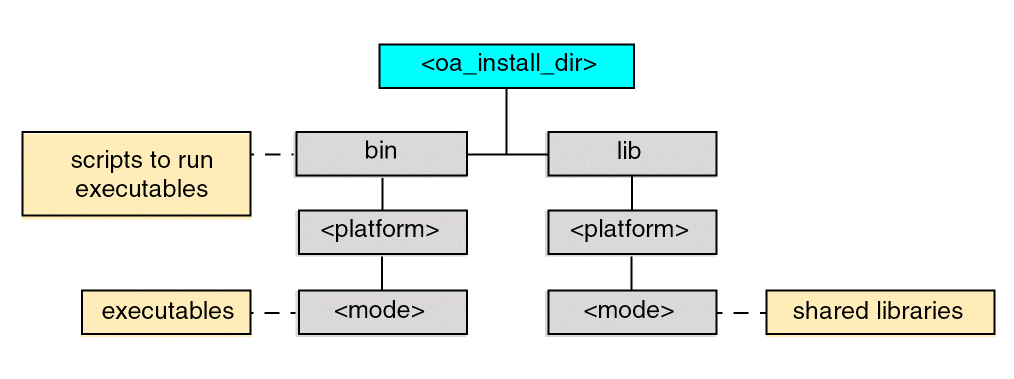
The following shows the directory structure of the OpenAccess hierarchy.
Return to top