
Changed Area
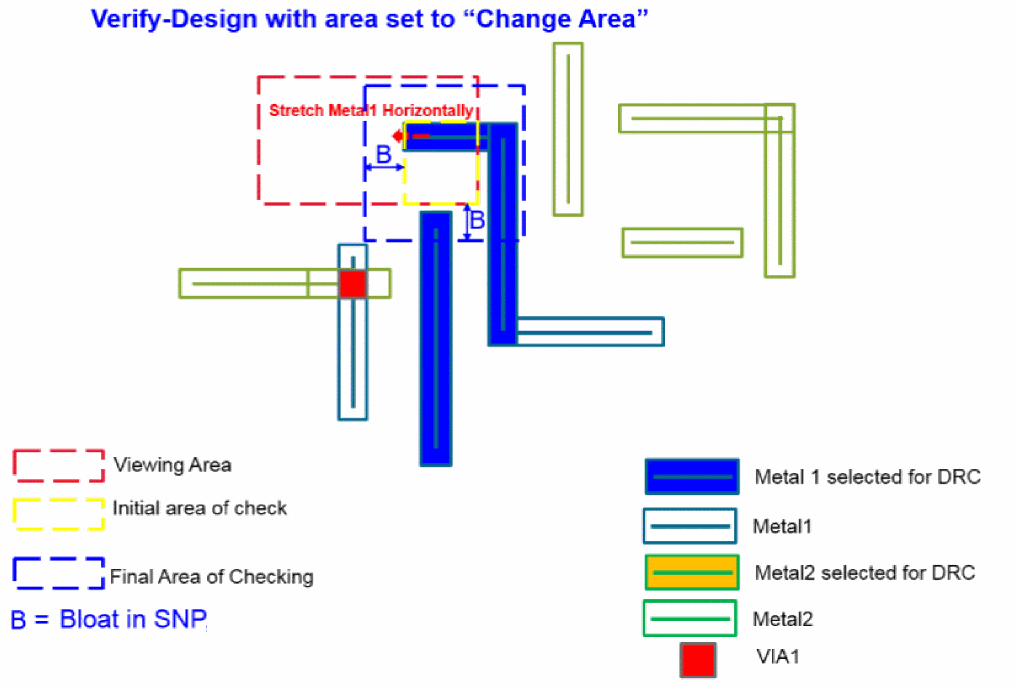
This mode allows you to conduct multiple layout editing and tracks these modification between each DRC. Once you are satisfied with the editing, you can invoke Pegasus Interactive to check on the final changed area. Its final area is computed based on the final layout modifications plus bloat value defined in the current active snapshot.
Pegasus Interactive starts to track modified polygon after Changed Area is enabled. The tracking is only between each Verify Design run with Changed Area enabled. Once DRC run is complete, the changed area tracking is reset. Also, any change made prior to Changed Area enablement is not tracked by Pegasus Interactive.
To disable automatic reset of Changed Area tracking deselect Always Reset Changed Area check box in the Run Options form.

Once deselected the tracking of changed area is kept between each Verify Design runs. You can reset tracking using toolbar button Clear Changed Area.

Note that Clear Changed Area button is available only when selected mode is Changed Area and Always Reset Changed Area settings of the Run Options form is deselected.
Return to top