
Checking that Snapshot is Generated by Up-to-Date DK Version
If DK team wants to make sure that their users use snapshot generated by latest DK versions then they can create a SKILL code which checks validity of snapshot based on PegasusIntValidateSnapshot SKILL function and then define how to proceed further: either allow to use with warning or hide snapshot.
General assumption is that the customer implements procedure of fixed name and list and order of arguments.
-
If
PegasusIntValidateSnapshot(snp_name snp_dir snp_comment)returns:-
t
i. Snapshot name will show up on Pegasus Interactive Toolbar
ii. There will be no message in CIW -
nil
i. Snapshot name will not show up on Pegasus Interactive Toolbar
ii. Following warning message will be shown in CIW:Pegasus Interactive: snapshot <snp_name> located in <snp_dir> didn't pass validation against comment <snp_comment> -
Non empty
error_message (string)
i. Snapshot name will not show up on Pegasus Interactive Toolbar
ii. Following warning message will be shown in CIW:"Pegasus Interactive: <error_message>"
-
Empty
error_message (string)
i. Snapshot name will not show up on Pegasus Interactive Toolbar
ii. There will be no message in CIW - Anything else (list, symbol, and so on …) will be treated as nil like point # b above
-
-
This procedure must be loaded before first layout cell is opened (this is when the SKILL context is loaded and snapshot validation is run on init).
Examples (called from.cdsinit):
Allowing snapshots located only in a specific directories:
procedure( PegasusIntValidateSnapshot( snp_name snp_dir snp_comment)
let((project_dir valid)
project_dir = getShellEnvVar("Pegasus_N7_DIR")
if( project_dir && simplifyFilename(project_dir) == simplifyFilename(snp_dir)
then
valid = t
else
valid = sprintf(nil "Refusing snapshot %s from %s. Only snapshots from %s directory are enabled." snp_name snp_dir project_dir)
);if
valid
);let
);procedure
Allowing snapshots based on processing its comment line:
procedure( PegasusIntValidateSnapshot( snp_name snp_dir snp_comment)
let(()
rexMatchp( " N[5-7]" snp_comment)
);let
);procedure
Example
-
Create snapshot and add comment:
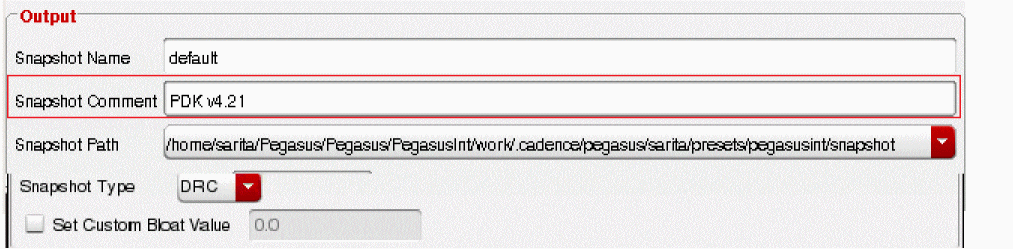
-
Create another snapshot and add comment:

- Create SKILL and load it at Virtuoso start:
;; if SNP comment does not match PDK v.4.21 then snp will not be shown in the list, ;;warning will be issued.
procedure( PegasusIntValidateSnapshot( snp_name snp_dir snp_comment)
let(()
rexMatchp( "PDK v.4.21" snp_comment)
);let
);procedure
- Open layout window. Just default snapshot is available. default_old is hidden. Warning is issued to CIW.
Return to top