
Snapshot Definition and Files
A snapshot captures design rules in a compiled binary format, which only Pegasus understands. This format allows Pegasus the direct access to design rules during DRC without re-compiling design rules from the rule deck. The advantages of using snapshot over rule deck are:
- Run time improvement since rule compilation are eliminated
- Fast switching between different snapshots
- Ensure rules stored in the snapshot reflect the creator's initial intent
- Re-usability of custom rule sets
Following table gives an overview of these snapshot files.
Snapshot Files Outline| Snapshot Files | Description |
|---|---|
In order for Pegasus Interactive to work properly, a set of snapshot related files are created by the tool either through interactive or batch snapshot creation. Seven files are created by Pegasus Interactive and the filename is formatted as snapshot name appended with specific file type suffix: .preset, .tag, .cap, .snp, .layermap, .objectmap and .sum.
For dynamic rule selection, Pegasus Interactive relies on information collected from .tag, .cap and .layermap /.objectmap. Since polygons drawn in Virtuoso are represented by Layer-Purpose pairs defined in the technology file, Pegasus Interactive transfers these LPP specific polygons to their Layer-Datatype stream pair equivalents and then passes them directly to Pegasus. This is a direct communication between Virtuoso and Pegasus through Pegasus Interactive interface socket. In addition to transporting geometry data, Pegasus Interactive performs rule selection based on layer visibility by relying on information stored in the .cap and .tag files. The .tag file contains rule specific layers check lookup table. All the layers are represented by Layer-Datatype stream pair. Following is the general syntax declared in .tag file.
<Rule Caption> <# of different layer pair's check>
<LayerStream1#> <LayerStream2#> <Datatype1#> <Datatype2#>
:
Following example shows three different rule captions: M1.Spacing.1, M1.Width.1, and M1.Area.1. There are also three layer check conditions:
- Gray color M1:drawing to Gray M1:drawing
- Mask1 specific M1:drawing to Mask1 specific M1:drawing
- Mask2 specific M2:drawing to Mask2 specific M1:drawing
Rule is selected for DRC if any of the above interlayer check combinations is detected in the Palette.
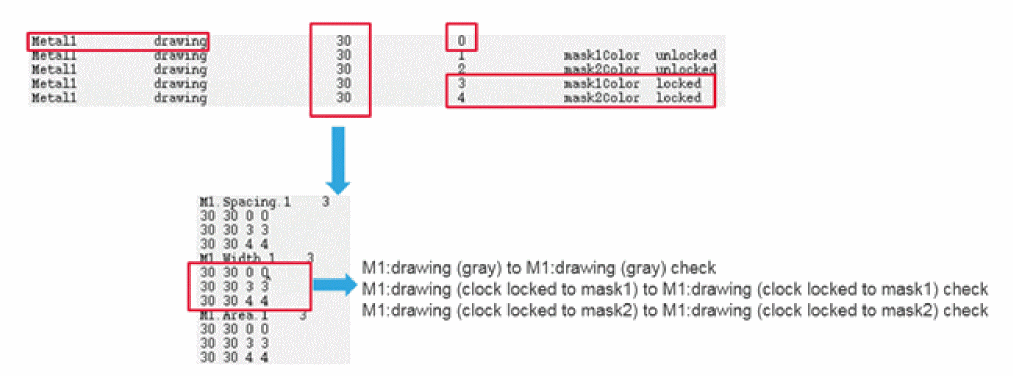
For the .cap file, it contains rule types that Pegasus Interactive refers to for either density or connectivity type rules exclusion. Below example shows a typical content of .cap file. Its rule status' syntax is composed as following:
<Select Tag> <Rule Name> <Rule Caption's Line Count> <Rule Type>
<Rule Caption>
:
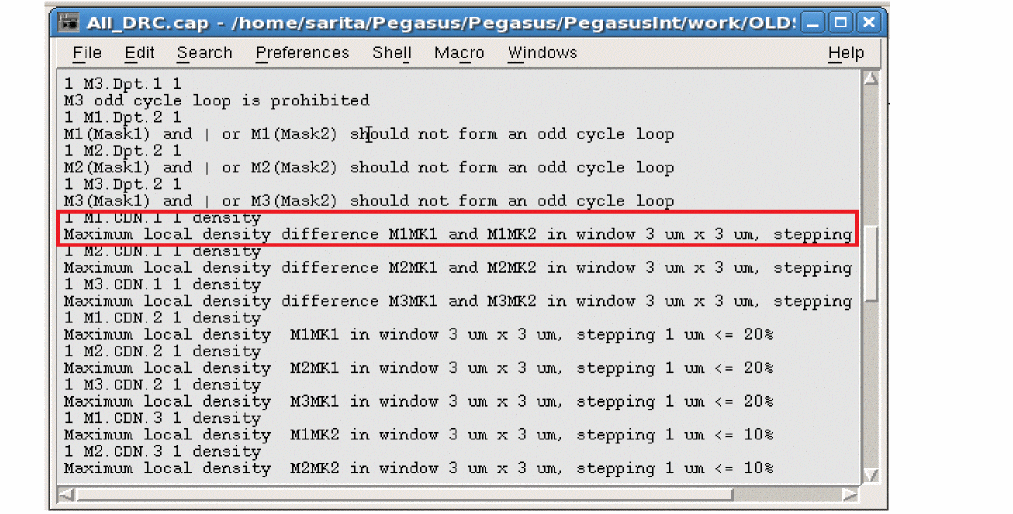
The .preset file is the configuration file that contains the Snapshot Creator Form setting. It is only for GUI application and is not understood by Pegasus engine. The advantage of having this .preset file is allowing you to load settings that generate current active snapshot while launching Snapshot Creator GUI. In addition to .tag, Pegasus Interactive refers to .cap file to ensure rule selection only on rules existed in the snapshot (.snp).
Finally .sum is for Pegasus Interactive to check snapshot files completeness. For a given snapshot validity check, Pegasus Interactive does not populate it in the snapshot combo field if file information recorded in .sum mismatches from its detected files.
Return to top