
ccCreateConnectorWidthExpressionList
ccCreateConnectorWidthExpressionList(n_startWidth n_endWidth S_taperStyle o_polyCurve[ ?startClampn_startClampLength] [ ?endClampn_endClampLength] ) =>l_segmentsWidths
Description
(Virtuoso Photonics Option) Creates a list of curved segments with the corresponding width expressions defining a tapered connector path of the specified tapering style with the specified start and end width around the centerline specified by the input polyCurve.
The segments of the input polyCurve are assumed to be parametrized by the arc length in the same way as the segments created by the connector generation functions
The tapering width function can optionally be clamped to have zero derivative at either or both the ends of the connector with the length of the clamping regions specified by the specified clamp lengths.
The width function w(t) of the connector is represented by the following equation:
w(t) = f(t) + g(t)
-
tis the arc length measured from the start of the connector. -
f(t)is the non-clamped tapering width function (linear,exp,parabolic, andlog) -
g(t)is the clamping function represented by the following equation:
g(t) = C1 * exp(-t / D1) + C2 * exp(t / D2) + C3 + C4 * t
where,
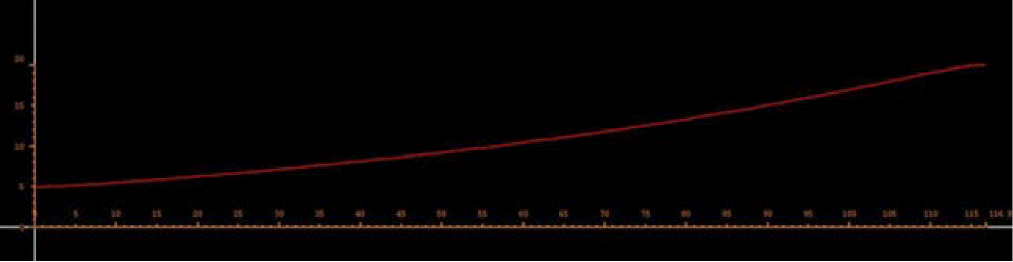
The following is the plot of the function w(t), which is the width of the connector as a function of the arc length:
Arguments
|
A polyCurve specifying the centerline of the connector with the segments parametrized by the arc length. |
|
|
Length of the clamping region at the start of the connector. |
|
Value Returned
Example
c = ccBendConnector('(nil xy (0 0) facet (nil angle 30)) 50 120 20 0.5)
> (nil connector cc@0xda456df6 message "Length=116.804672 MinRadius=37.180082")
s = ccCreateConnectorWidthExpressionList(5 20 'exp c->connector ?startClamp 3.0 ?endClamp 3.0)
> ((cc@0xb1fb573d
((-7.105427e-15 -3.552714e-15) -60.0) "5*exp((0.01186848385793852)*(1*t+(0)))+(0.2021274047854202)*exp(-t/(3))+(-9.0738813184265e-18)*exp(t/(3))+(-0.2021274047854202)+(0.008033382305447485)*t"
)
(cc@0x722f07af
((43.30127 2.724799) -120.0) "5*exp((0.01186848385793852)*(1*t+(38.93489058117659)))+(4.66898511029175e-07)*exp(-t/(3))+(-3.928220028334695e-12)*exp(t/(3))+(0.1106514562739377)+(0.008033382305447485)*t"
)
(cc@0xa0bb9ee6
((86.60254 -1.776357e-14) 60.0) "5*exp((0.01186848385793852)*(-1*t+(116.8046717435298)))+(2.49124859626004e-18)*exp(-t/(-3))+(-0.7362091783926537)*exp(t/(-3))+(0.7362091783926537)+(-0.008033382305447485)*t"
)
)
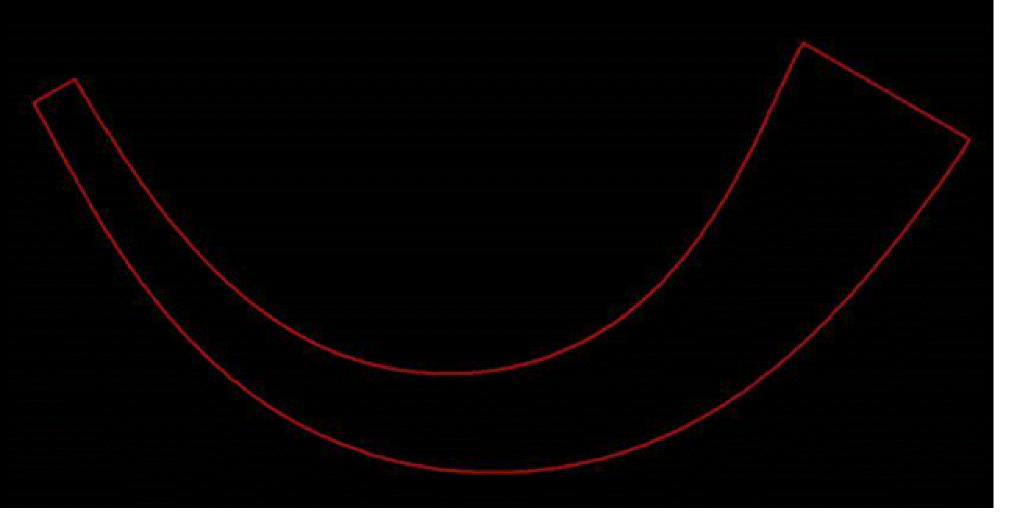
ccGenFigs(ccCreatePath(cv "y1" s))
> (db:0x21d0d49b)
Related Topics
Curvy Core Connector Functions
Return to top