
ccCreateEllipse
ccCreateEllipse(d_cellViewId l_lpp l_llPoint l_urPoint ?offset l_offset?rotationn_rotation?genFigsg_genFigs) =>o_surface/ nil
Description
(Virtuoso Photonics Option) Creates an ellipse with the specified coordinates as a ccSurface object in the cellview with specified layer-purpose pair. The ellipse is then transformed according to the specified offset and rotation. Optionally, OpenAccess figures (polygons) are created.
Arguments
|
Specifies whether OpenAccess figures are generated for the resulting ccSurface.
The default is |
|
Value Returned
Example
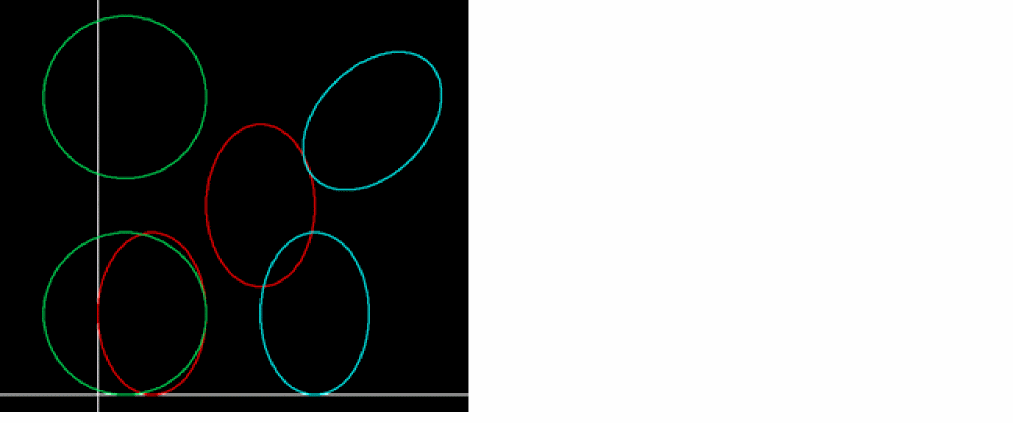
cv = geGetEditCellView()
; the red ellipses
ccCreateEllipse( cv list("y1" "drawing") 0:0 10:15 ?offset 10:10)
ccCreateEllipse( cv list("y1" "drawing") 0:0 10:15 )
; the green ellipses (circles)
ccCreateEllipse( cv list("y2" "drawing") -5:0 10:15 )
ccCreateEllipse( cv list("y2" "drawing") -5:0 10:15 ?offset 0:20)
; the light blue ellipses
ccCreateEllipse( cv list("y4" "drawing") -5:0 5:15 ?offset 20:0)
ccCreateEllipse( cv list("y4" "drawing") -5:0 5:15 ?offset 20:20 ?rotation -45)
Related Topics
Curvy Core Shape Creation Functions
Return to top