
ccCreatePolygon
ccCreatePolygon(d_cellview l_lpp l_points?offsetl_offset?rotationn_rotation?genFigsg_genFigs?tolerancen_tolerance ) => o_surface | nil
Description
(Virtuoso Photonics Option) Creates a polygon with the specified vertices as the ccSurface in the specified cellview and on the specified layer-purpose pair. The polygon is transformed according to the specified offset and rotation. Optionally, OpenAccess figures (polygons) are created.
Arguments
|
Tolerance for the removal of input points. Point will be removed if its distance from the line connecting its two neighboring points is less than |
|
Value Returned
|
ID of the resulting ccSurface. The polygon is the boundary of the surface. |
|
Example
cv = geGetEditCellView()
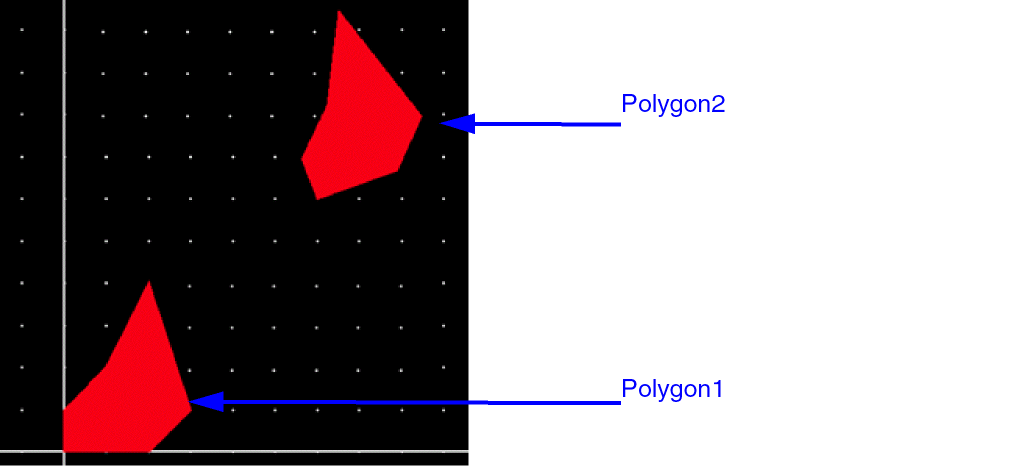
Polygon1 = ccCreatePolygon( cv list("waveguide" "drawing") list( 0:0 10:0 15:5 10:20 5:10 0:5))
cc:0x257b2970
Polygon2 = ccCreatePolygon( cv list("waveguide" "drawing") list( 0:0 10:0 15:5 10:20 5:10 0:5) ?offset 30:30 ?rotation 20.0)
cc:0x30225850
Two polygons are created as shown below:
Related Topics
Curvy Core Shape Creation Functions
Return to top