
ccLayerOffset
ccLayerOffset(g_shapes n_value[ ?cellViewd_cellView] [ ?lppg_lpp] [ ?facetsToCurves { t | nil } ] ) => l_surfaces
Description
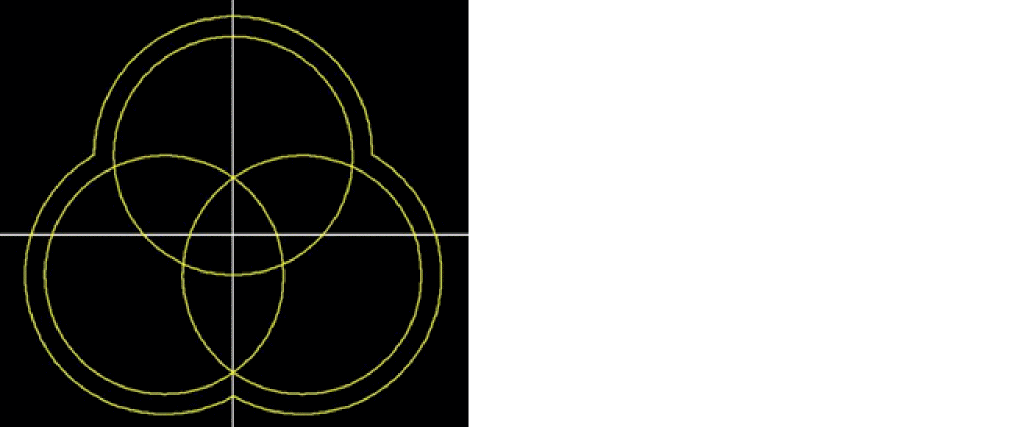
(Virtuoso Photonics Option) Returns a list of surfaces derived by merging the areas of the input shapes and offsetting them by the specified offset value. Resulting surfaces can optionally be created in the specified cellview and with the specified layer-purpose pair different from the default layer-purpose pair of the first input shape.
Arguments
|
Specifies whether all input facets are converted to curves before the actual operation.
The default is |
|
Value Returned
Example
c=ccCreateCurve("3*cos(t)" "3*sin(t)" 0:8*atan(1))
> cc@0x36adc1b
s1=ccCreateSurface(cvId "y0" ccCreatePolyCurve(list(c list(0:2 0)) ?close t))
> cc@0x2d609190
s2=ccCreateSurface(cvId "y0" ccCreatePolyCurve(list(c list(-sqrt(3):-1 0)) ?close t))
> cc@0x20480bc0
s3=ccCreateSurface(cvId "y0" ccCreatePolyCurve(list(c list(sqrt(3):-1 0)) ?close t))
> cc@0x29143150
s=ccLayerOffset(list(s1 s2 s3) 0.5)
> (cc@0x2b01d870)
Related Topics
Return to top