dbCreateRailDef
dbCreateRailDef(
d_cellViewId
t_raildDefName
t_netName
l_lpp
t_rowReference
t_railReference
g_width
[ g_offset ]
[ g_beginOffset ]
[ g_endOffset ]
)
=> d_railDef / nil
Description
This function creates a container of attributes to define a row rail. The definition can be referenced in more than one row or placeArea. If a physical attribute is modifed in the object, it is instantly reflected in all row/placeArea that reference the railDef.
Arguments
|
d_cellViewId
|
Database ID of a cellview.
|
|
t_railDefName
|
Name of the railDef.
|
|
t_netName
|
Name of the net.
|
|
l_lpp
|
Layer and purpose of the rail geometry.
|
|
t_rowReference
|
Specifies row reference.
Valid Values: bottomAlignment, centerAlignment, topAlignment.
|
|
t_railReference
|
Specifies rail reference.
Valid Values: bottomAlignment, centerAlignment, topAlignment.
|
|
g_width
|
Width of rail geometry.
|
|
g_offset
|
Optional. If this value is specified, then the rail is placed at the specified distance (in user units) from the two reference points (rail and row).
A negative value indicates offsetting the rail below the top/bottom edge of the row and a positive value indicates offsetting the rail above the top/bottom edge.
|
|
g_beginOffset
|
Optional. This value offsets or extends the rail by the specified user units from the left edge of the row.
A negative value indicates offsetting the rail towards the left side of the left edge of the row and a positive value indicates offsetting the rail towards the right side of the left edge of the row.
|
|
g_endOffset
|
Optional. This value offsets or extends the rail by the specified user units from the right edge of the row.
A negative value indicates offsetting the rail towards the left side of the right edge of the row and a positive value indicates offsetting the rail towards the right side of the right edge of the row.
|
Value Returned
|
d_railDef
|
Returns the database ID of the railDef.
|
|
nil
|
An error occurred during execution.
|
Examples
Creates railDef
def = dbCreateRailDef(cellViewId
     "myRailDef"
      "netName"
      list("layer" "purpose")
      "bottomAlignment"
      "bottomAlignment"
      railWidth
     offsetFromRowReference)
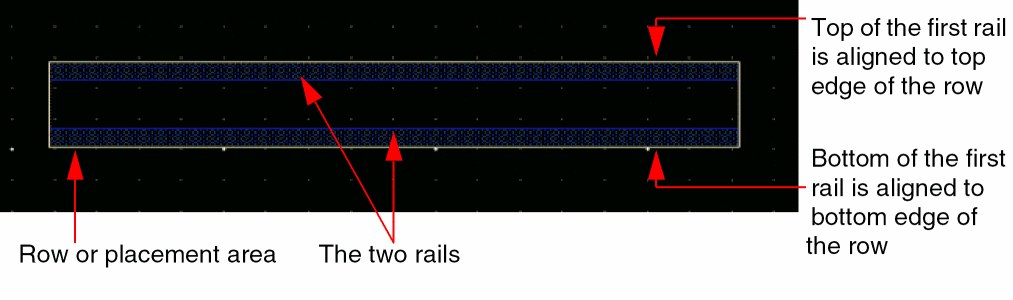
The following example shows two rails aligned to a row. The offset value for the first rail is 0. So, in the figure shown below the top of the first rail is aligned to the top edge of the row. The offset value for the second rail is also 0. Therefore, the bottom of the second rail is aligned to the bottom edge of the row.
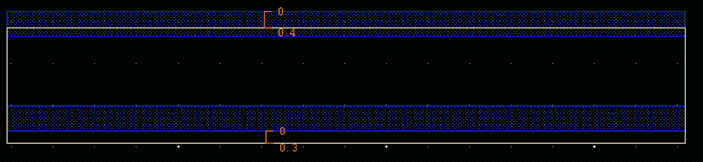
Setting the offset value for the first rail to 0.4 and the value for the second rail to 0.3 will place the two rails in the row as shown in the figure below:
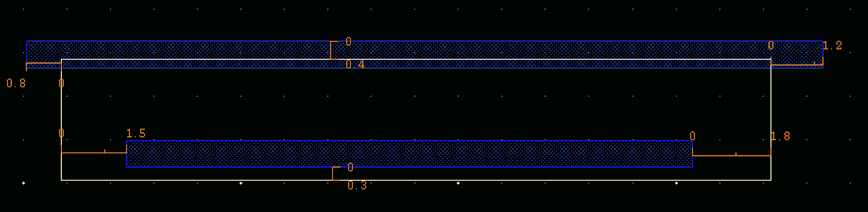
The following table specifies, in addition to the offset values, the begin and end offset values for the two rails.
|
Rail
|
Offset
|
Begin offset
|
End offset
|
|
Top rail
|
0.4
|
-0.8
|
+1.2
|
|
Bottom rail
|
0.3
|
+1.5
|
-1.8
|
Related Topics
Placement Database Access Functions
Return to top