
Examining the Call Stack
The call stack represents function calls that are currently active in the program being debugged. In the call stack, functions and their arguments are listed in the order in which they were called. Every time a function call is made, a new stack frame is pushed on the call stack. The most recently called function is at the top of the call stack.
By examining the call stack, you can trace the flow of execution, identifying the function calls that resulted in errors.
Displaying the Call Stack
To view the current call stack:
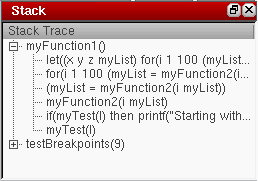
Moving Through the Call Stack
You can move up and down the call stack by clicking individual function names. SKILL IDE updates the source code pane to display the definition of the selected function. For example, if you click the testBreakpoints(9) in the call stack shown above, the source code pane displays the code containing the definition of testBreakpoints(). If the file containing the definition of the selected function is not already open, then it gets opened.
Related Topics
Efficiency Improvement of SKILL Code
Examining and Modifying Variable Values
Return to top