
fprintf
fprintf(p_portt_formatString[g_arg1... ] ) =>t
Description
Writes formatted output to a port.
The fprintf function writes formatted output to the port given as the first argument. The optional arguments following the format string are printed according to their corresponding format specifications.
printf is identical to fprintf except that it does not take the p_port argument and the output is written to
Output is right justified within a field by default unless an optional minus sign “-” immediately follows the % character, which will then be left justified. To print a percent sign, you must use two percent signs in succession. You must explicitly put \n in your format string to print a newline character and \t for a tab.
The t_formatString argument is a conversion control string containing directives listed in the table above. The %L, %P, and %B directives ignore the width and precision fields.
%[-][width][.precision]conversion_code
    [-]              = left justify
    [width]          = minimum number of character positions
    [.precision]     = number of characters to be printed
    conversion_code
Arguments
Value Returned
Examples
p = outfile("power.out")
=> port:"power.out"
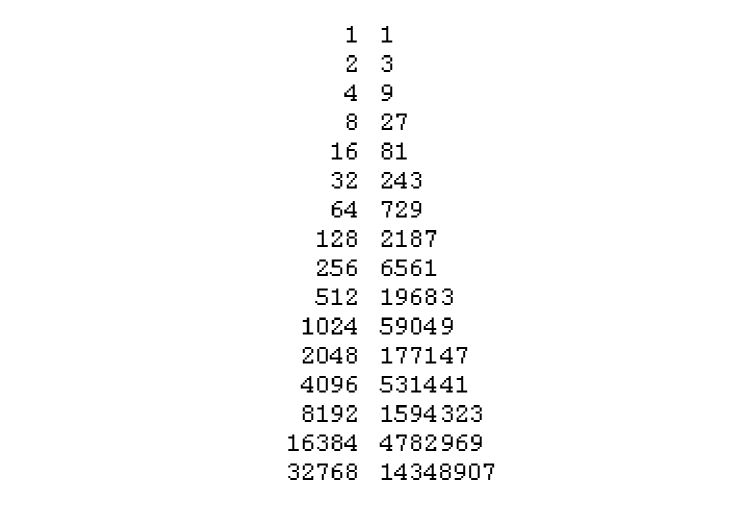
for(i 0 15 fprintf(p "%20d %-20d\n" 2**i 3**i))
=> t
close( p)
At this point the power.out file has the following contents.
The following example shows the use of %A, which calls the printself method.
defmethod(printself ((obj fixnum))
sprintf(nil "FIXNUM{%d}" obj));;Defines the printself method
printf("Print control A returns: %A\n" 42);; %A calls the printself method
=> Print control A returns: FIXNUM{42}
The following example shows the use of %L, which calls printself only for standard objects.
defmethod(printself ((obj fixnum))
sprintf(nil "FIXNUM{%d}" obj));;Defines the printself method
printf("Print control L returns: %L\n" 42)
=> Print control L returns: 42
The following example shows the use of %L, %A, and %N print controls with printf when printing standard objects. %A prints the same result as %L and %N does not call the printself method.
defclass(A () ());; Defines a class A
defmethod(printself ((obj A));; Defines the printself method
sprintf(nil "OBJ_A{%L}" obj))
printf("Print control L returns: %L\n" Instance('A))
printf("Print control A returns: %A\n" Instance('A))
printf("Print control N returns: %N\n" Instance('A))
=> Print control L returns: OBJ_A{stdobj@0x83bf024}
Print control A returns: OBJ_A{stdobj@0x83bf024}
Print control N returns: stdobj@0x83bf03c
Related Topics
Return to top