
Product Documentation
Virtuoso Layout Suite SKILL Reference
Product Version IC23.1, November 2023

abeLayerShrink

abeLayerShrink(
o_abeInputLayer 
o_abeOutputLayer 
[ ?north g_sizeNorth ] 
[ ?south g_sizeSouth ] 
[ ?east g_sizeEast ] 
[ ?west g_sizeWest] 
[ ?queue g_queue ] 
)
=> t / nil

Description

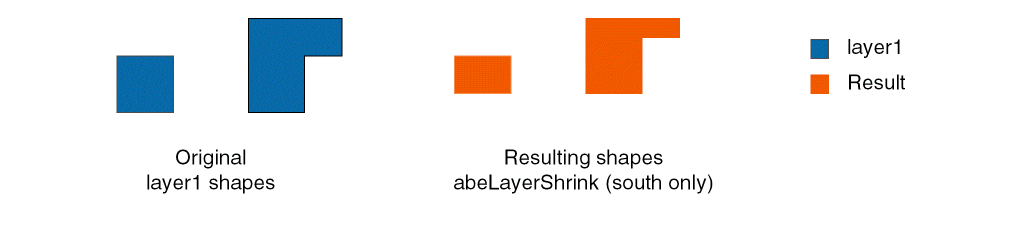
Decreases the size of shapes from the input ABE layer and outputs them to the ABE output layer. Shapes can be reduced by different distances in the north, south, east, and west directions.
Arguments

o_abeInputLayer

ID for the ABE input layer.

o_abeOutputLayer

ID for the ABE output layer.

?north g_sizeNorth

Shrinks the north side of the shapes by this distance, in user units. The default value is 0.

?south g_sizeSouth

Shrinks the south side of the shapes by this distance, in user units. The default value is 0.

?east g_sizeEast

Shrinks the east side of the shapes by this distance, in user units. The default value is 0.

?west g_sizeWest

Shrinks the west side of the shapes by this distance, in user units. The default value is 0.

?queue g_queue

Adds the function to the queue if set to t, rather than running it immediately. Functions in the queue are not run until abeRunQueue is issued.

Values Returned

t

The reduced shapes are added to the output layer or the function was queued.

nil

The function was not successful because ABE is not initialized or there was an argument error.

Examples

Adds shapes from the a1 ABE layer that have been decreased in size by 0.05 on the south side to the result ABE layer.

abeLayerShrink( a1 result ?south 0.05)

Related Topics

abeRunQueue

Support for Multithreading in ABE Functions


Return to top
 ⠀
X