
vfoGRGetCommonQPtr
vfoGRGetCommonQPtr(
)
=> t_queuePointer
Description
Returns the common queue pointer of the Create Guard Ring form customized by you.
In the Create Guard Ring form, there are multiple global lists that enable you to add various form components. The common global list (also called common queue) defines the set of form components that are displayed on all four tabs (Wrap, Path, Rect, and Polygon) of this form. For example, the GUI components, such as Technology, Device, and Contact Rows, that are common on all tabs (as shown in the images below) exist in the common queue area. If you add a new component in this area, it will be displayed on all the tabs.
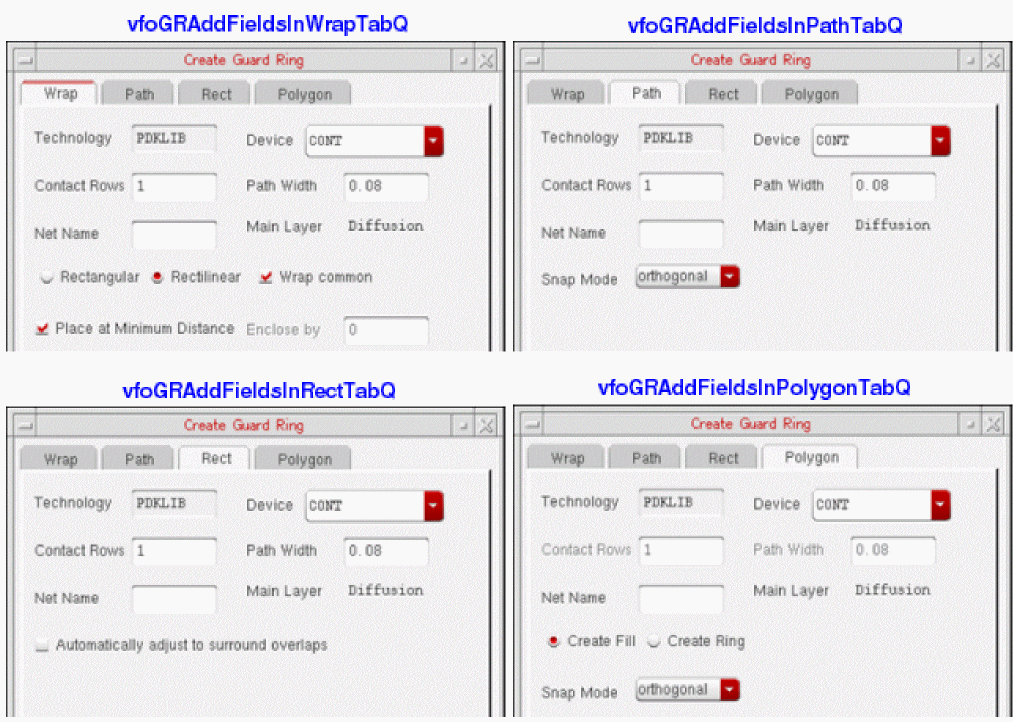
The following example shows how to add a field into the common queue of the form:
;Define a new field named "User Field"
userDefinedField = hiCreateBooleanButton(
?name 'userDefinedField
?buttonText "User Field"
?buttonLocation 'right
?defValue t
?value t
?callback "userDefinedField_CB()"
)
;Ensure that the user-defined components is added in the vfoGRAddFieldsInCommonQ list, as shown below
vfoGRAddFieldsInCommonQ=list(
list(userDefinedField 10:50 180:20 160)
)
However, if you want to update the GUI components on only a specific tab of the Create Guard Ring form, use the following lists:
-
vfoGRAddFieldsInPathTabQ(use for the Path tab) -
vfoGRAddFieldsInRectTabQ(use for the Rect tab) -
vfoGRAddFieldsInPolygonTabQ(use for the Polygon tab) -
vfoGRAddFieldsInWrapTabQ(use for the Wrap tab)
Arguments
Value Returned
Example
To set the property value of the newly added form field, actField, write the following procedure:
procedure( setCreateFormUserFieldProp(actField promptString property value)
let(( newField )
importSkillVar(vfoGRAddFieldsInCommonQ)
    evalstring( sprintf( nil "vfoGRGetCommonQPtr()->%s->%s = %s" actField
                ->hiFieldSym property value )
)
))
Return to top