
19
Graph Browser
A Directed Acyclic Graph (dag) is a generic data structure that is commonly used in computer programs to represent objects and show how those objects relate to each other. The objects are represented in a directed graph by nodes. How the nodes relate to each other is represented by arcs that connect the nodes together. The graph is classified as directed because the arc connecting any two nodes together has a direction. The direction of the arc is from the parent node (at the tail of the arc) to the child node (at the head of the arc).
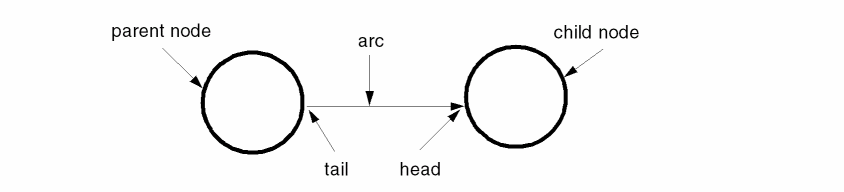
Although the name dag implies that the graph cannot have cycles, you can makes cycles in the graphs you construct with the dag interface. When the dag functions traverse the graph you make, they take the necessary precautions to avoid infinitely looping because of cycles in the graph. However, the automatic placement or routing of graphs with cycles might not be visually pleasing.
The Virtuoso dag interface provides many sophisticated capabilities for constructing browser tools. These include
- The concept of classes of nodes, with inheritance of information from class to node.
- Context-sensitive pop-up menus and bindkeys, based on the class of the node over which the menu is invoked.
- Many capabilities for controlling the layout and appearance of the graph presentation.
- Automatic placement and routing algorithms for the nodes and arcs in the graph.
- Ability to display a text string and an icon for each node. The icon can be customized using the display list interface. The icon and text strings displayed can be node-specific or class-specific.
- Ability to use any number of browser tools simultaneously.
- Ability to share nodes, arcs, and classes among many tools. The same node can have different appearances in different tools.
- Ability to use many of the normal hi interface functions for a window, including pulldown menus for a dag browser window.
Related Topics
Terms Used in Cadence User Interface
Return to top