|
Name
|
SKILL Type
|
Description
|
|
name
|
string
|
Name of the tool. This is displayed in the window banner of the tool window.
|
|
type
|
symbol
|
Type of the object. The symbol for this object is dagClass. This property is read-only.
|
|
window
|
wType
|
Window of the dagTool. It’s initialized when the dagOpenTool function is called. This property is read-only.
|
|
toolNumber
|
fixNum
|
Number of this tool. Each tool is assigned a unique number upon creation. This property is read-only.
|
|
horizontal
|
t or nil
|
Controls the dagTool to draw the nodes from left to right, rather than from top to bottom. The default is nil, meaning draw the graph from the top to the bottom.
|
|
scaleToFit
|
t or nil
|
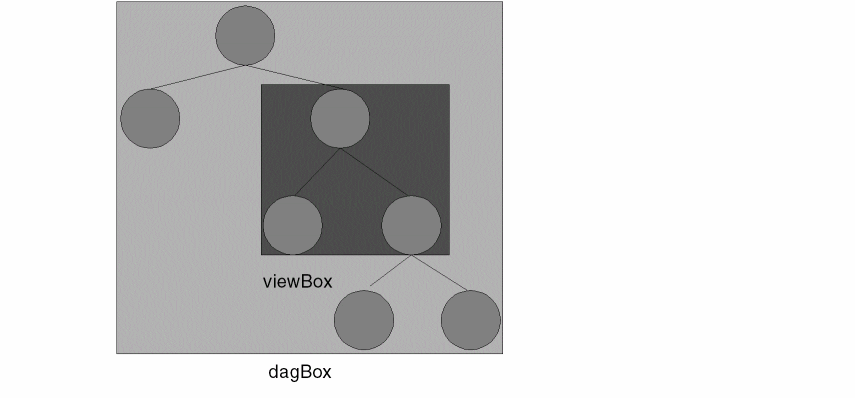
Controls the dagTool to draw the graph so that bounding boxes of all of its nodes fit within the given window. Icons and scalable font text strings are scaled proportionally; raster text strings are not. If nil, the dagTool uses the view box (specified by viewLx, viewLy, viewUx, and viewUy) and draws only the visible, unpruned nodes that exist within this box. The default is t. Using this property causes the anchorTo and anchorObject properties to be ignored.
|
|
noPlace
|
t or nil
|
Restricts the dagTool to invoke the placer. If you set this to t, then you are responsible for positioning the nodes yourself. The default is nil.
|
|
noRoute
|
t or nil
|
Restricts the dagTool to invoke the router. The default is nil.
The pre and post display procedures can be used to do work just before or just after the graph is displayed.
|
|
preDisplayProc
|
string
|
The preDisplayProc is called with the following form:
preDisplayProc( tool dirtyOrNot )
The dirtyOrNot parameter is true if any nodes in the graph have been modified (either by having new children created, or by having a property modified).
If you have disabled automatic placement, you can do the placement you want in this function.
|
|
postDisplayProc
|
string
|
The postDisplayProc is called with the following form:
postDisplayProc( tool )
|
|
closeProc
|
string
|
SKILL procedure that is called when the dagTool is closed. The closeProc takes the following arguments.
closeProc( w_dagTool )
|
|
startingObject
|
wType
|
dagNode that the tool starts with. This node is the root of the graph you want displayed in the tool. This property is read-only.
|
|
anchorObject
|
wType
|
Node the tool justifies to. The dagTool positions its viewing box about this node.
|
|
anchorTo
|
symbol
|
Justification style for positioning the graph around the anchorObject. The graph is justified around the corresponding part of the anchorObject node. It is ignored when the scaleToFit property is t. It can be one of the symbols name on the left in the following table or ’none.
|
|
x
|
fixNum
|
X position of the tool (in screen coordinates). This property is read-only.
|
|
y
|
fixNum
|
Y position of the tool (in screen coordinates). This property is read-only.
|
|
width
|
fixNum
|
Width of the tool (in screen dimensions). This property is read-only.
|
|
height
|
fixNum
|
Height of this tool (in screen dimensions). This property is read-only.
|
|
dagLx
|
fixNum
|
Least x coordinate specified in the graph. This property is read-only.
|
|
dagLy
|
fixNum
|
Least y coordinate specified in the graph. This property is read-only.
|
|
dagUx
|
fixNum
|
Greatest x coordinate specified in the graph. This property is read-only.
|
|
dagUy
|
fixNum
|
Greatest y coordinate specified in the graph. This property is read-only.
|
|
viewLx
|
fixNum
|
Lower left x coordinate that is displayed
|
|
viewLy
|
fixNum
|
Lower left y coordinate that is displayed.
|
|
viewUx
|
fixNum
|
Upper right x coordinate.
|
|
viewUy
|
fixNum
|
Upper right y coordinate.
|
|
textOnly
|
t or nil
|
Tells the dagTool to draw the nodes as text boxes, rather than using displayLists. The default is nil. The text is displayed in a raster font.
|
|
showLabels
|
t or nil
|
Turns on label display mode in the tool. The dagTool displays the label property of the dagNode.
|
|
labelJustification
|
symbol
|
Specifies where the label is displayed relative to the dagNode when the showLabels property is t. It follows the same syntax and behavior as the anchorTo property.
|
|
fontName
|
string
|
Specifies which raster font is used to display the labels when the showLabels property is t.
|