
enterDonut
enterDonut( [?promptsl_promptList] [?pointsl_pointList] [?forms_form] [?addPointProct_addProcName] [?delPointProct_delProcName] [?initProct_initProcName] [?doneProct_doneProcName] [?formProct_formProcName] [?dontDrawg_dontDraw] [?alwaysMapg_alwaysMap] [?acceptStringg_acceptString] [?acceptNumberg_acceptNumber] [?noInfixg_noInfix] [?cmdNamet_cmdName] [?cursorx_cursor ] ) =>l_point_list/nil
Description
Enter a donut in the current window.
Arguments
|
List of prompt strings to appear on the CIW prompt line. If supplied, only the first three strings are used. The first string corresponds to the center, which is the first point entered. The second string corresponds to a point on the circumference of the donut hole. The third string corresponds to a point on the outer circumference of the donut. |
|
|
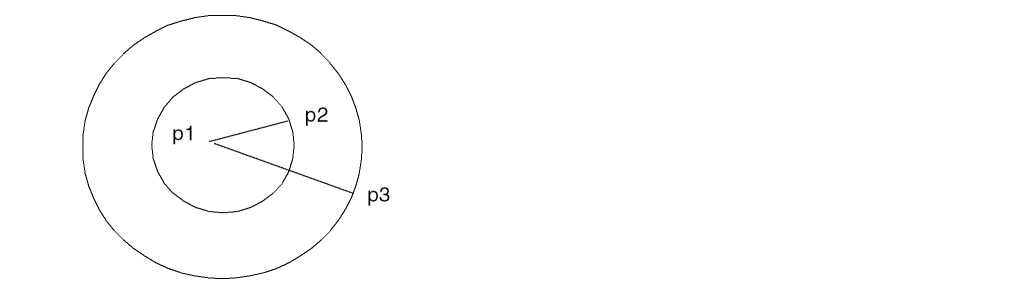
List of no more than three points. If all points are specified, they are returned after adjustment. If not, the supplied points are adjusted and you are prompted for the remaining points. The first point is the center of the donut. After the first point is entered, a rubberbanding circle is drawn with that center point and passing through the cursor. When the second point is entered, the circle becomes permanent, and another rubberbanding circle is drawn. After the third point is entered, the three points are returned in a list. The second and third points determine the hole radius and the outer radius of the donut and can be specified in either order. The returned list orders the points as center, inner radius, and outer radius. |
|
|
Options form created with |
|
|
Name of the SKILL function to be called when a point is entered. |
|
|
Name of the SKILL function to be called when a point is deleted. |
|
|
Name of the SKILL function to be called immediately after the enterfunction is started and before any data entry. |
|
|
Name of the SKILL function to be called when the enterfunction is terminated. |
|
|
Name of the SKILL function to be called when the options form is displayed. |
|
|
Determines whether or not to immediately display the options form. |
|
|
Determines whether or not to accept string input without terminating the enterfunction. |
|
|
Determines whether or not to accept numeric input without terminating the enterfunction. |
|
|
Name you associate with the enterfunction. If the command name is set, it can be accessed with |
|
|
An integer argument that will default to an appropriate cursor. For example, |
|
Value Returned
|
The entered points as a list containing the coordinates for the donut. |
|
Retrieve data through the callback procedure t_doneProcName instead of using the return value for this enterfunction.
Examples
procedure( donutAddPt( w pts )
   prog( (p)
   p = car(pts)
   if( car(p) < 0 || cadr(p) < 0 then
      warn("Donut center is not in first quadrant.\n") )
   )
)
procedure( donutDone( w done pts )
   if( done then
      printf("Donut entered was %L.\n" pts)
   else
      println("Donut entry aborted.")
   )
)
enterDonut( ?prompts list( "Enter the donut center."
   "Enter a point on the circumference of the hole."
   "Enter a point on the circumference of the donut.")
   ?doneProc "donutDone" ?addPointProc "donutAddPt"
)
A rubber band circle appears with center p1 and passing through the cursor. Enter point p2. The circle becomes permanent, and a new rubberbanding circle appears through the cursor. Enter point p3. doneProc prints the donut points:
Donut entered was ( p1 p2 p3 ).
The enterfunction returns a list of the donut points:
( p1 p2 p3 )
Related Topics
Return to top