
hiCreateSpinBox
hiCreateSpinBox(?names_fieldName[?promptt_prompt] [?helpg_fieldHelp] [?valueg_value] [?defValueg_defaultValue] [?fontt_fontName] [?callbackg_callback] [?rangel_rangeOfItems] [?arrowOrientationg_arrowOrientation] [?shadowedg_shadowed] [?enabledg_enabled] [?editableg_editable] [?obeyWidthg_obeyWidth] [?invisibleg_invisible] [?wrapAroundg_wraparound] [?justifications_justification] ) =>r_fieldHandle
Description
Creates a spin box field, which contains a range of items that users can cycle through. The spin box field can only contain integers. For floating point numbers, use hiCreateFloatSpinBox.
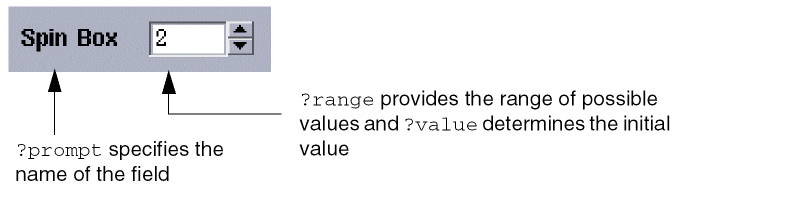
This field can also have a context menu, that is, a pop-up menu that is displayed when you right-click on the field.
For information on creating tooltips for fields, see Creating Tool Tips for Fields.
Arguments
|
The name that appears next to the spin box field, specified as a string. |
|
|
A string, symbol, list of strings, or list of symbols used to reference help. If this argument is not specified, s_name is used. This argument is not currently used. |
|
|
The initial and current value of the field. g_value must be an integer within the range specified by l_rangeOfItems. |
|
|
The default value of the field. g_defaultValue must be an integer within the range specified by l_rangeOfItems. |
|
|
This optional argument is accepted but not supported currently. |
|
|
A string, function object, or symbol type callback. If the callback is of string type, you can specify one or more SKILL functions or even multiple SKILL statements that should be executed when the value of the field changes. |
|
|
A list of two integers defining the range of values in the spin box field. The first integer must be less than the second integer. |
|
|
This argument is now ignored. Arrows that are used to cycle through the spin box field are always vertical and are always displayed on the right side of the field. |
|
|
This argument is now ignored. There is always a shadow box around the arrows in the spin box field. |
|
|
Specifies whether the fields in the layout are enabled. The default value is |
|
|
|
|
|
For information on 2D attributes, see Two Dimensional Form Layout. |
|
|
Specifies whether the layout and the fields within are invisible. The default value is |
|
|
Increments or decrements the spin box field as normal, but stop at the max/min values respectively. The default value is |
|
|
Specifies one of the following symbols for the value added to the spinbox field: |
|
Values Returned
Examples
spinField = hiCreateSpinBox(
      ?name 'spinField
      ?prompt "Spin box: "
      ?arrowOrientation 'vertical
      ?range '(1 100)
      ?value 3
      ?defValue 100
      ?callback "callbackOne"
      ?wrapAround nil
)
Related Topics
Creating Context Menus for Fields
Return to top