
Workspace Functions
This topic provides a list of Cadence® SKILL functions associated with windows.
A workspace, also known as a window configuration, contains session window layout state information. Specifically, it stores the following information:
- Which dock assistants are displayed and whether they are docked, floating, or hidden
- Which toolbars are displayed and whether they are docked, floating, or hidden
- The size and position of the dock assistants
- The size and position of the toolbars
Workspaces do not include any information about menus.
You can create workspaces interactively with your Cadence application and save them to files for later use.
HI window configuration functions let you read and write workspace files programmatically as well as retrieve and apply in-memory workspaces to session windows.
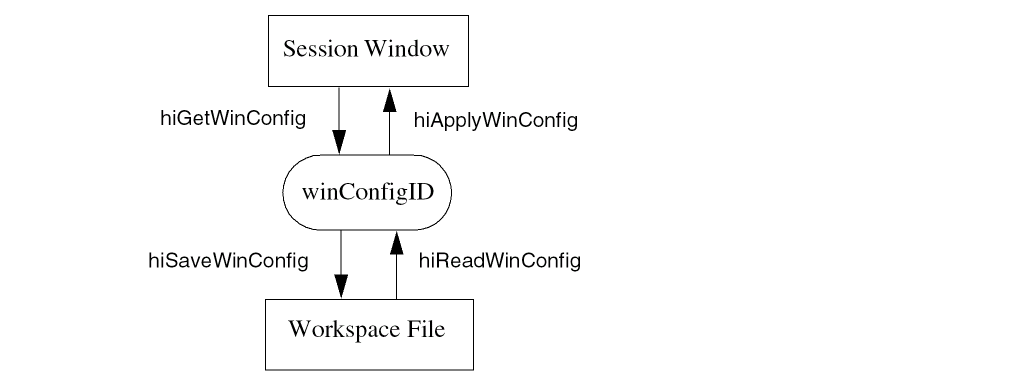
You can use the hiGetWinConfig function to retrieve a workspace from a session window programmatically and either apply it to another session window with hiApplyWinConfig or save it to a file with the hiSaveWinConfig function, or both. To apply a saved workspace, you read it from the file with the hiReadWinConfig function, which returns the window configuration ID, and then use hiApplyWinConfig to apply it to a session window.
Every toolbar and dock assistant must have a unique name that does not change between invocations or from session window to session window.
Only the functions listed here are supported for public use. All other functions, regardless of their name or prefix, and undocumented aspects of the functions described below, are private and are subject to change at any time.
- hiGetWinConfig
- hiSaveWinConfig
- hiReadWinConfig
- hiApplyWinConfig
- hiWinConfigModified
- hiGetWinConfigInfo
- hiSetWinObjName
- hiGetWinObjName
Return to top