Dynamic Excessive Element Current Check (dyn_exi)
Spectre Syntax
title dyn_exi dev=[d1 d2 ...] duration=<value> ith=<value> <inst=[inst1 inst2...]> <xinst=[xinst1 xinst2...]> <subckt=[subckt1 subckt2....]> <xsubckt=[xsubckt1 xsubckt2....]> <depth=n> error_limit=<value> time_window=[start1 stop1 start2 stop2 ....] <save=no|violation> <spice=no|yes>
SPICE Syntax
.cck title dyn_exi dev=[d1 d2 ...] duration=<value> ith=<value> <inst=[inst1 inst2...]> <xinst=[xinst1 xinst2...]> <subckt=[subckt1 subckt2....]> <xsubckt=[xsubckt1 xsubckt2....]> <depth=n> error_limit=<value> time_window=[start1 stop1 start2 stop2 ....] <save=no|violation> <spice=no|yes>
Description
Reports elements and devices carrying currents (absolute value) above a threshold specified by ith for a time longer than the duration threshold specified by duration. The results are written to a file with the extension dynamic.xml, which can be viewed with a Web browser.
Arguments
|
dev
|
Device (MOSFET, R, C, and so on) instance names to be checked (default is none).
|
|
duration
|
Excessive currents with a duration longer than value are reported (default is 5ns).
|
|
ith
|
Elements with current higher than the specified value are reported (default is none).
|
|
inst
|
Subcircuit instances to which the circuit check is applied. Default is inst=*
|
|
xinst
|
Subcircuit instances that are excluded from the circuit check. Default is none.
|
|
subckt
|
Instances of the specified subcircuit to which the circuit checks are applied. Default is subckt=*.
|
|
xsubckt
|
Instances of the specified subcircuit which are excluded from the circuit checks. Default is none.
|
|
depth
|
Hierarchy level (from top level) to be checked. depth=3 reports errors on top level plus 3 sublevels. Default is 8.
|
|
error_limit
|
Maximum number of errors to be reported. Default is 10000.
|
|
time_window
|
Time window to which the circuit check is applied. Multiple non-overlapping time windows are supported. Default time window is 0 to tend.
|
|
save
|
Specifies how to probe the signals specified within this circuit check. Possible values are:
-
no: None of the signals in this circuit check are probed. This is the default value. -
violation: Automatically probe the signals with violations under this circuit check.
|
|
spice
|
Specifies whether to save the probed signals specified by the save parameter in the SPICE syntax.
Possible values are:
-
yes: Saves the signals in SPICE syntax -
no: Saves the signals in Spectre syntax. This is the default value.
|
Example
Spectre Syntax
exi dyn_exi dev=["*"] ith=1e-06 duration=1e-09
SPICE Syntax
.cck exi dyn_exi dev=["*"] ith=1e-06 duration=1e-09
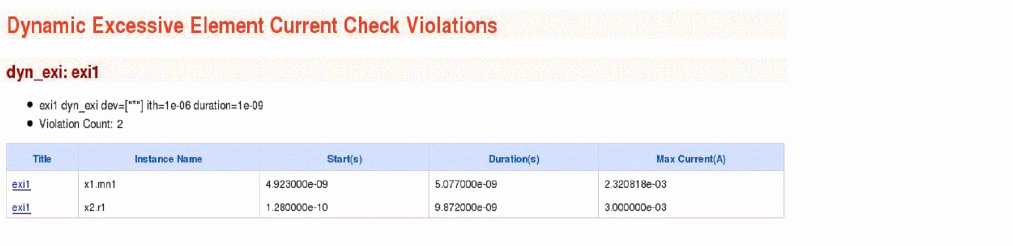
The above command will report all device instances that carry excessive currents higher than 1e-06 for a duration longer than 1e-09s. The following is an example of the report that is displayed in the Web browser:
Related Topics
Dynamic Checks
Return to top