
awvEyeCross
awvEyeCross(w_waveform n_start n_stop n_eyePeriod n_threshold[x_edgeType] [x_ignoreStart] [x_ignoreEnd] ) =>o_waveform/nil
Description
Returns a waveform showing x-axis values where an eye diagram crosses the specified threshold value on y axis.
Arguments
Value Returned
|
Returns a waveform showing cross numbers on x axis and cross time on y axis. |
|
|
The specified eye diagram does not exist or the output waveform object cannot be created because of an error. |
Examples
The following example creates a Waveform window and returns its window ID.
win=awvCreatePlotWindow()
=> window:3
The following example opens simulation results stored in the specified results directory.
openResults("/servers/user/design/prbs.raw")
=> "/servers/user/design/prbs.raw"
The following example lists the available results in the currently open results directory.
results()
=> tran()
The following example selects the tran result of the results directory.
selectResult('tran)
=> stdobj@0x32e1bf20
The following example creates a waveform object, representing the waveform of the signal jitter, which is stored in the tran result of the results directory.
jitter=v("jitter")
=> srrWave:0x36b8f020
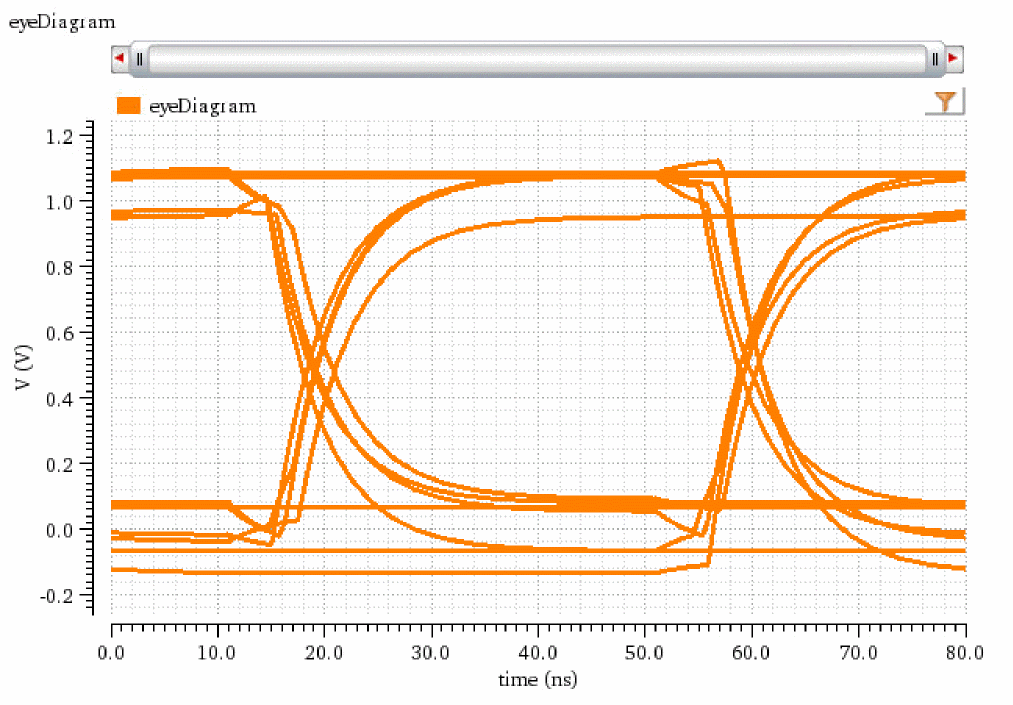
The following example creates a waveform object eye, representing the eye diagram that is created by applying eyeDiagram function on the jitter signal.
eye=eyeDiagram(jitter 200n 1.4u 2*40n ?autoCenter t)
=> srrWave:0x36b8f030
The following example plots the eye diagram in the specified Waveform window.
awvPlotWaveform(
win
list(eye)
?expr list("eyeDiagram")
?color list("y6")
?lineType list("line")
?lineStyle list("solid")
?lineThickness list("thick")
)
=> t
The following example creates another Waveform window and returns its window ID.
win=awvCreatePlotWindow()
=> window:4
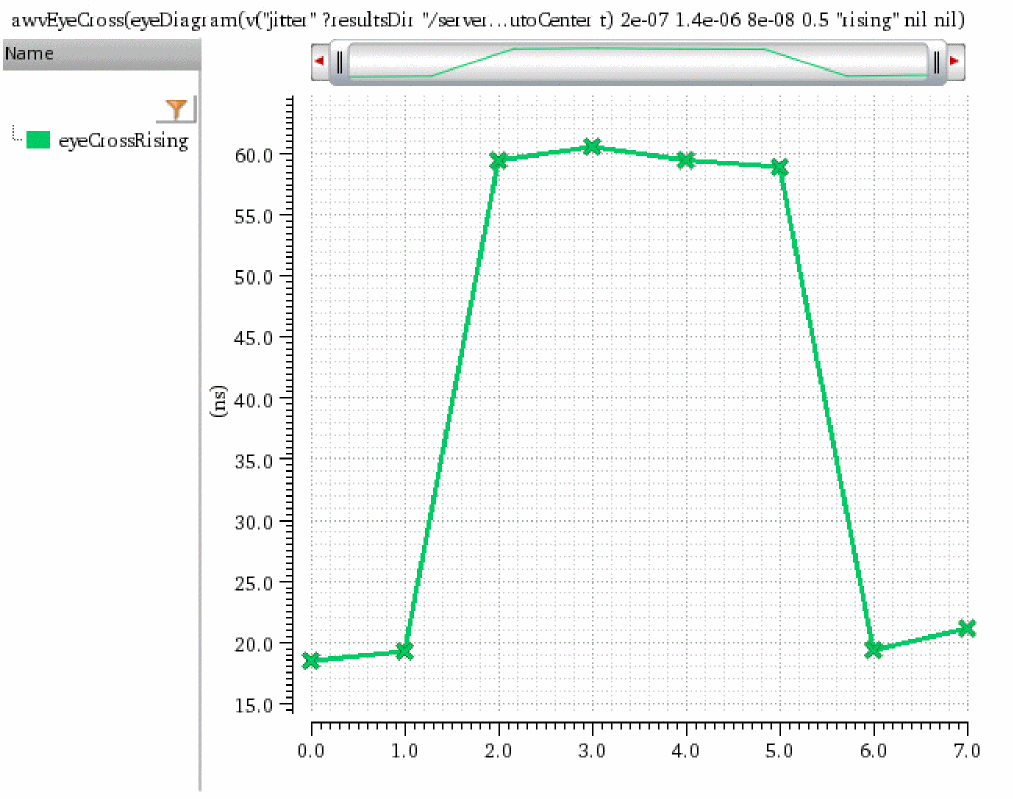
The following example creates a waveform object eyeCrossRising, which shows time when the rising edge of the eye diagram eye crosses the threshold value 0.5 plotted on y axis against the cross values plotted on x axis
eyeCrossRising=awvEyeCross(eye 200n 1.4u 80n 0.5 "rising")
=> srrWave:0x36b4c050
The following example plots the waveform object eyeCrossRising.
awvPlotWaveform(
win list(eyeCrossRising)
?expr list("eyeCrossRising")
?color list("y18")
?lineType list("line")
?lineStyle list("solid")
?lineThickness list("thick")
?showSymbols list(t)
?dataSymbol list("x")
)
=> t
The following example creates a Waveform window and returns its window ID.
win=awvCreatePlotWindow()
=> window:5
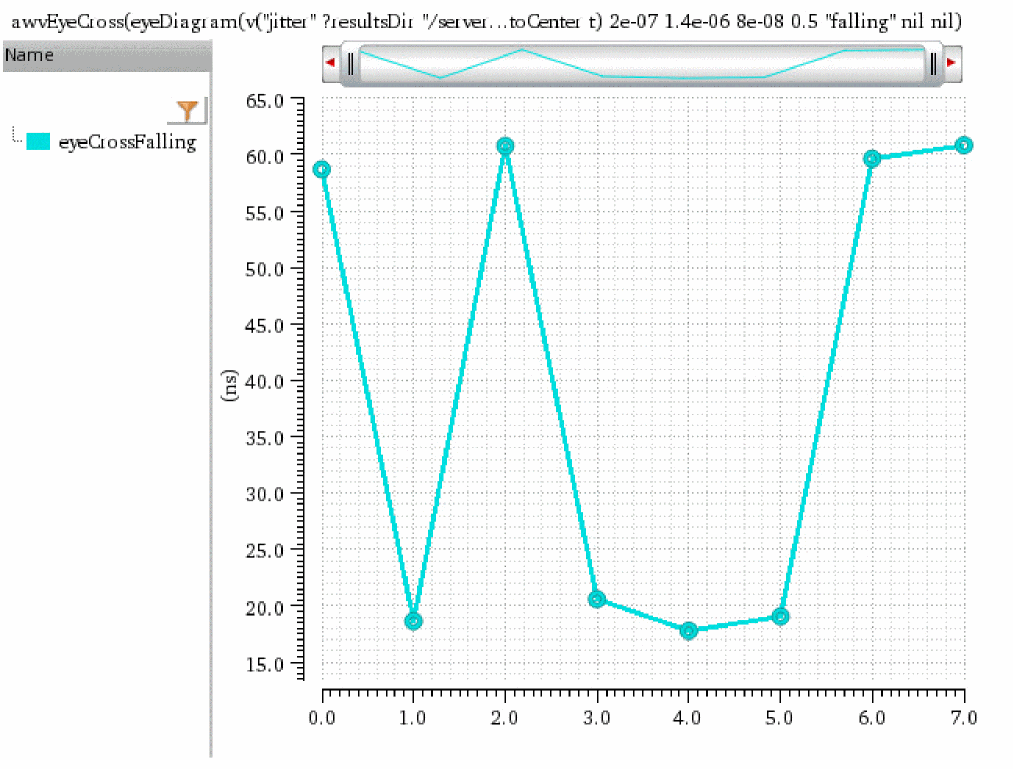
The following example creates a waveform object eyeCrossFalling, which shows time when the falling edge of the eye diagram eye crosses the threshold value 0.5 plotted on y axis against the cross values plotted on x axis.
eyeCrossFalling=awvEyeCross(eye 200n 1.4u 80n 0.5 "falling")
=> srrWave:0x36b4c070
The following example plots the waveform object eyeCrossFalling.
awvPlotWaveform(
win list(eyeCrossFalling)
?expr list("eyeCrossFalling")
?color list("y12")
?lineType list("line")
?lineStyle list("solid")
?lineThickness list("thick")
?showSymbols list(t)
?dataSymbol list("O")
)
=> t
The following example creates a Waveform window and returns its window ID.
win=awvCreatePlotWindow()
=> window:6
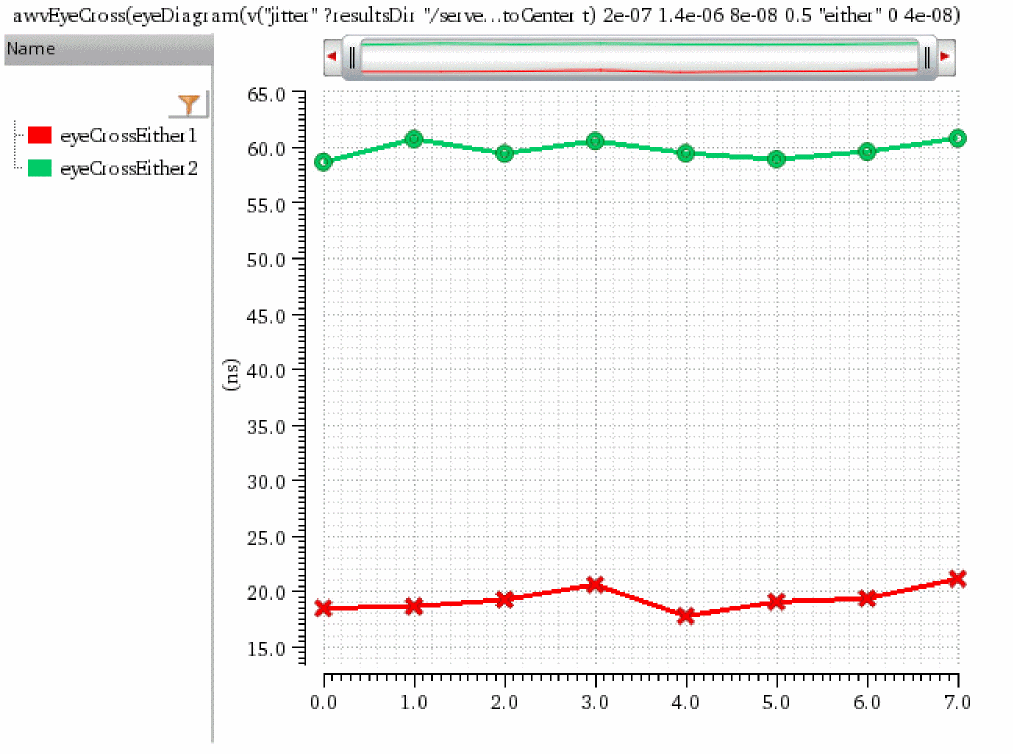
The following example creates a waveform object eyeCrossEither1, which shows time between 0 and 40ns when any edge (either rising or falling) of the eye diagram eye crosses the threshold value 0.5 plotted on y axis against the cross values plotted on x axis.
eyeCrossEither1=awvEyeCross(eye 200n 1.4u 80n 0.5 "either" 0 40n)
=> srrWave:0x36b4c090
The following example creates a waveform object eyeCrossEither2, which shows time between 40ns and 80ns when any edge (either rising or falling) of the eye diagram eye crosses the threshold value 0.5 plotted on y axis against the cross values plotted on x axis.
eyeCrossEither2=awvEyeCross(eye 200n 1.4u 80n 0.5 "either" 40n 80n)
=> srrWave:0x36b4c0b0
The following example plots the waveform objects, eyeCrossEither1 and eyeCrossEither2.
awvPlotWaveform(
win
list(eyeCrossEither1 eyeCrossEither2)
?expr list("eyeCrossEither1" "eyeCrossEither2")
?color list("y1" "y66")
?lineType list("line" "line")
?lineStyle list("solid" "solid")
?lineThickness list("thick" "thick")
?showSymbols list(t t)
?dataSymbol list("X" "O")
)
=> t
Return to top