
awvLoadCustomCalcFunction
awvLoadCustomCalcFunction( [?funcListl_funcList] [?fileNamet_fileName] [?templateFileNamet_templateFileName] [@restl_args] ) =>t/nil
Description
Adds the functions specified in the SKILL file (.il) and UI template file (.ocn) to the Custom Functions drop-down list in the Function Panel of Virtuoso Visualization and Analysis XL Calculator.
The SKILL file contains the definition of the custom calculator functions. The UI template file (.ocn) contains the user-interface template of the custom calculator functions.
The user-interface template can be obtained either from the SKILL file or from a separate .ocn file.
Arguments
Value Returned
|
Custom functions cannot be added to Function Panel because of an error. |
Examples
The following example adds a custom function customBandwidth to the Custom Functions drop-down list in the Function Panel. The SKILL definition of the custom function is saved in the myCustomCalFunction.il and the UI template of the custom function is saved in a separate myCustomCalFunction.ocn file.
awvLoadCustomCalcFunction(?funcList "customBandwidth" ?fileName "/home/user/myCustomCalFunction.il" ?templateFileName "/home/user/myCustomCalFunction.ocn")
=> t

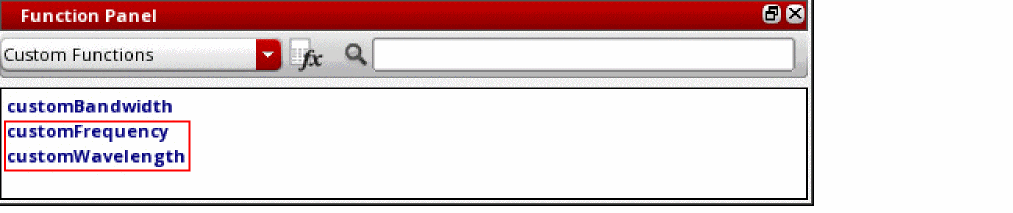
The following example adds two custom functions customFrequency and customWavelength to the Custom Functions drop-down list in the Function Panel.
The SKILL definitions and UI templates for both custom functions are saved in a single SKILL file myCustomSKILL.il.
awvLoadCustomCalcFunction(?funcList list("customFrequency" "customWavelength") ?fileName "/home/user/myCustomSKILL.il")
=> t
Return to top