
awvLoadSharedCustomFunctionsFile
awvLoadSharedCustomFunctionsFile(t_centralFileName) =>t/nil
Description
Shares definitions and UI templates for custom functions among multiple users from a central file location.
Arguments
|
Name of the configuration file (.ini), containing definitions and UI templates for custom functions, that you want to share. |
Value Returned
|
Definitions and UI templates for custom functions is shared successfully. |
|
|
Definitions and UI templates for custom functions cannot be shared because of an error. |
Examples
The following example shows how to share definitions and UI templates for custom functions defined in a configuration file (.ini) from a central location.
-
Create a configuration file named
central.ini. -
Specify functions to add three custom functions
customFunction1,customFunction2, andcustomFunction3in the filecentral.ini. -
In the
.cdsinitfile, add theawvLoadSharedCustomFunctionsFilefunction to share and load the custom functions.awvLoadSharedCustomFunctionsFile("~/central.ini")
You can verify that shared custom functions are loaded successfully by running the following in CIW.awvLoadSharedCustomFunctionsFile("/home/user/central.ini")
=> t
The shared custom functions appear in red in Function Panel.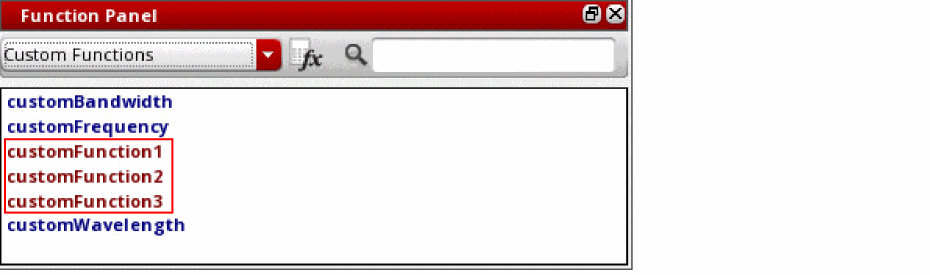
Return to top