awvPlotWaveform
awvPlotWaveform(
w_windowID
l_waveformList
[ ?subwindow x_subwindow ]
[ ?expr l_exprList ]
[ ?index l_waveIndexList ]
[ ?component t_component ]
[ ?color l_colorList ]
[ ?lineType l_lineTypeList ]
[ ?lineStyle l_lineStyleList ]
[ ?lineThickness l_lineThicknessList ]
[ ?showSymbols l_showList ]
[ ?dataSymbol l_symbolList ]
[ ?barBase t_barBase ]
[ ?barWidth t_barWidth ]
[ ?barShift t_barShift ]
[ ?yaxisUnit t_yaxisUnit ]
[ ?yaxisLabel t_yaxisLabel ]
[ ?modifierType t_modifierType ]
[ ?graphType t_graphType ]
[ ?stripNumber x_stripNumber ]
)
=> t / nil
Description
Plots the waveforms in the list l_waveformList.
Arguments
|
w_windowID
|
Waveform window ID.
|
|
l_waveformList
|
A list of waveform objects to be plotted.
|
|
?subwindow x_subwindow
|
|
|
Identification number of the subwindow, which is found in the top-right corner of the subwindow.
If you do not specify this argument, waveforms are plotted in the current subwindow of the specified Waveform window.
|
|
?expr l_exprList
|
|
|
List of waveform names to be displayed in the trace legend.
|
|
?index l_waveIndexList
|
|
|
List of index numbers identifying the waveforms.
If you do not specify index numbers for the waveforms in l_waveIndexList, the lowest unused numbers in the subwindow are assigned.
|
|
?component t_component
|
|
|
Plot option for the waveform. This option is ignored unless display mode is set to strip or composite.
The imaginary part of the waveform is plotted against its real part when display mode is set to smith.
Valid values are:
-
magnitude: Plots the magnitude of the waveform against an independent variable. -
dB10: Calculates 10*log of the magnitude of each point in the waveform and plots the results against an independent variable. -
dB20: Calculates 20*log of the magnitude of each point in the waveform and plots the results against an independent variable. -
dBm: Adds 30 to the value calculated by dB10. -
phaseDeg: Plots the phase, in degrees, of the waveform against an independent variable. -
phaseRad: Plots the phase, in radians, of the waveform against an independent variable. -
wrappedPhaseDeg: Plots the wrapped phase, in degrees, of the waveform against an independent variable. -
wrappedPhaseRad: Plots the wrapped phase, in radians, of the waveform against an independent variable. -
real: Plots the real part of the waveform against an independent variable. -
imaginary: Plots the imaginary part of the waveform against an independent variable.
Default value is real.
|
|
?color l_colorList
|
|
|
List of colors for the waveforms. Available colors are defined in your technology file. Valid values are from y1 through y66.
If you do not specify this argument, default colors are used.
The color information can also be provided in the RGB format, such as 0X00FF50.
|
|
?lineType l_lineTypeList
|
|
|
List specifying the type of line to be used for the waveforms.
Valid values are line, bar, scatterPlot, poleZero.
If you do not specify this argument, default value line is used.
|
|
?lineStyle l_lineStyleList
|
|
|
List specifying the line style to used for the waveforms.
Valid values are solid, dash, dot, dashDot, and dashDotDot.
If you do not specify this argument, default value solid is used.
|
|
?lineThickness l_lineThicknessList
|
|
|
List specifying the line thickness of the waveforms.
Valid values are fine, medium, thick, and extraThick.
If you do not specify this argument, default value fine is used.
|
|
?showSymbols l_showList
|
|
|
List of flags that specify whether to show the symbols on the waveforms. Valid values are t and nil.
The default value is nil, which means that symbols are not displayed on the waveforms.
The number of flags in the l_showList must match the number of symbols in the l_symbolList.
|
|
?dataSymbol l_symbolList
|
|
|
List of symbols to be displayed for data points on the waveforms.
To use a symbol, specify an integer or a single character corresponding to the symbol.
|
|
?barBase t_barBase
|
|
|
Specifies base of the bar when the ?lineType argument is set to bar.
|
|
?barWidth t_barWidth
|
|
|
Specifies width of the bar when the ?lineType argument is set to bar.
This argument takes integer values. The default value is 1.
|
|
?barShift t_barShift
|
|
|
Specifies whether to shift the bar ahead or backwards when the ?lineType argument is set to bar. This argument takes integer values.
Positive integer shifts the bar backwards and negative integer shifts the bar forward.
The default value is 0, which indicates that bar is not shifted.
|
|
?yaxisUnit l_yaxisUnit
|
|
|
List of units for y axis.
Default value is an empty string.
|
|
?yaxisLabel l_yaxisLabel
|
|
|
List of labels of y axis.
Default value is an empty string.
|
|
?modifierType t_modifierType
|
|
|
List of graph modifiers.
|
|
?graphType t_graphType
|
|
|
List of graph types.
Valid Values are rectangular, polar, impedance, admittance, and immittance.
Default value is rectangular.
|
|
?stripNumber x_stripNumber
|
|
|
A list of integers identifying the strip numbers of the traces to be plotted. If you do not specify this argument, the currently selected strip is used to plot traces.
|
Value Returned
|
t
|
Waveforms specified in the l_waveformList list are plotted in the specified Waveform window.
|
|
nil
|
Waveforms cannot be plotted because of an error.
|
Examples
The following example creates a Waveform window and returns its ID.
awvCreatePlotWindow()
=> window:3
The following examples create waveform objects w1, w2, w3, and w4.
w1=drCreateWaveform(drCreateVec('double list(1 3 5)) drCreateVec('double list(5 15 25)))
=> srrWave:0x3208c020
w2=drCreateWaveform(drCreateVec('double list(1 2 3 4 5)) drCreateVec('double list(10 15 20 25 30)))
=> srrWave:0x3208c030
w3=drCreateWaveform(drCreateVec('double list(1 3 5)) drCreateVec('double list(15 25 35)))
=> srrWave:0x3208c040
w4=drCreateWaveform(drCreateVec('double list(1 2 3 4 5)) drCreateVec('double list(20 25 30 35 40)))
=> srrWave:0x3208c050
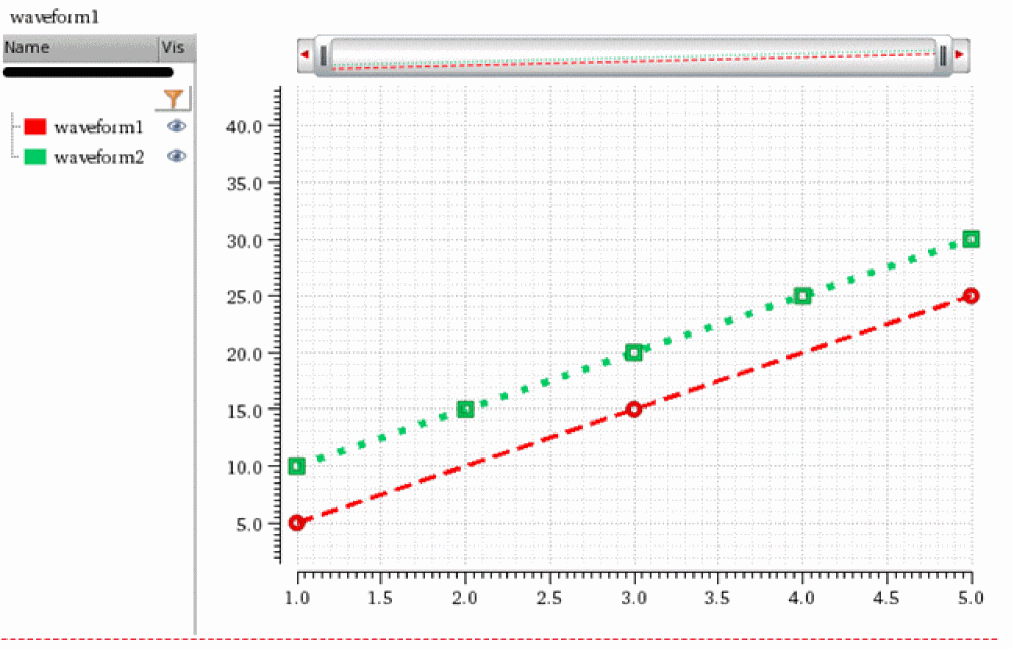
The following example plots the waveforms objects w1 and w2 specified in the list.
awvPlotWaveform(
awvGetCurrentWindow()
list(w1 w2)
?expr list("waveform1" "waveform2")
?color list("y1" "y66")
?index list(1 2)
?lineType list("line" "line")
?lineStyle list("dash" "dot")
?lineThickness list("thick" "extraThick")
?showSymbols list(t t)
?dataSymbol list(4 5)
)
=> t
The following example returns the index numbers and names of the waveforms plotted using awvPlotWaveform function.
awvGetWaveNameList(window(3))
=>
((1 2)
("waveform1" "waveform2")
)
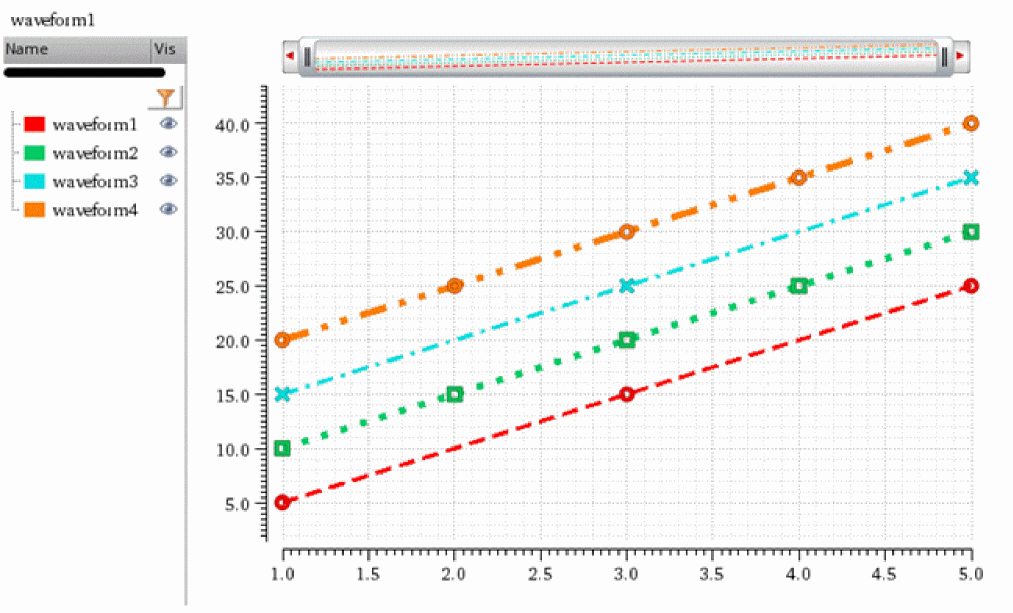
The following example plots the waveform objects w3 and w4 specified in the list and appends them to the waveforms plotted using the awvPlotWaveform function.
awvPlotWaveform(
awvGetCurrentWindow()
list(w3 w4)
?expr list("waveform3" "waveform4")
?color list("y12" "y6")
?index list(5 6)
?lineType list("line" "line")
?lineStyle list("dashDot" "dashDotDot")
?lineThickness list("thick" "extraThick")
?showSymbols list(t t)
?dataSymbol list("x" "O")
)
=> t
The following example returns the index numbers and names of the waveforms plotted in the specified Waveform window.
awvGetWaveNameList(window(3))
((1 2 5 6)
("waveform1" "waveform2" "waveform3" "waveform4")
)
The following example creates a Waveform window and returns its ID.
win=awvCreatePlotWindow()
=> window:3
The following examples create waveform objects w1, w2, w3, and w4.
w1=drCreateWaveform(drCreateVec('double list(1 3 5)) drCreateVec('double list(5 15 25)))
=> srrWave:0x31d37020
w2=drCreateWaveform(drCreateVec('double list(1 2 3 4 5)) drCreateVec('double list(10 15 20 25 30)))
=> srrWave:0x31d37030
w3=drCreateWaveform(drCreateVec('double list(1 3 5)) drCreateVec('double list(15 25 35)))
=> srrWave:0x31d37040
w4=drCreateWaveform(drCreateVec('double list(1 2 3 4 5)) drCreateVec('double list(20 25 30 35 40)))
=> srrWave:0x31d37050
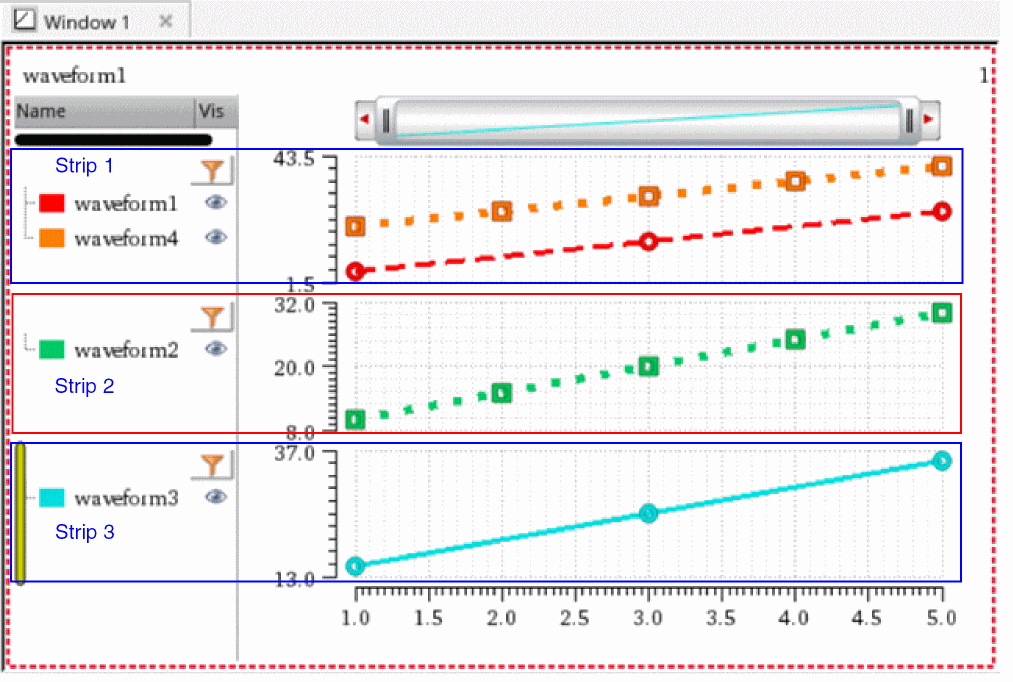
The following example plots the waveforms w1, w2, w3, and w4 in the specified Waveform window win. Note that the waveforms w1 and w4 are plotted in a single strip with strip number 1. Whereas, the waveforms w2 and w3 are plotted in different strips with strip numbers 2 and 3, respectively.
awvPlotWaveform(
win
list(w1 w2 w3 w4)
?expr list("waveform1" "waveform2" "waveform3" "waveform4")
?color list("y1" "y66" "y12" "y6")
?index list(1 2 3 4)
?lineType list("line" "line" "line" "line")
?lineStyle list("dash" "dot" "dash" "dot")
?lineThickness list("thick" "extraThick" "thick" "extraThick")
?showSymbols list(t t t t)
?dataSymbol list(4 5 4 5)
?stripNumber list(1 2 3 1)
)
=> t
Returns the strip numbers of traces plotted in the specified Waveform window.
awvGetStripNumbersList(win)
=> (1 2 3)
Returns the strip number in which the currently selected waveform is plotted.
awvGetStripNumberOfSelectedTrace(win)
=> 3
Related Topics
Symbols for Data Points
Return to top