
awvSaveToCSV
awvSaveToCSV(l_waveforms t_fileName[?fromx_from] [?tox_to] [?precisionx_precision] [?stepx_step] [?linLogt_linLog] [?exprListl_expressionList] [?mergeXAxisg_mergeXAxis] ) =>t/nil
Description
Saves waveform data to the specified CSV file.
Arguments
Value Returned
Examples
The following example creates a Waveform window and returns the ID of the Waveform window.
awvCreatePlotWindow()
=> window:3
The following example opens simulation results stored in the specified results directory ampsim.raw.
openResults("/servers/user/design/ampsim.raw")
=> "/servers/user/design/ampsim.raw"
The following example returns ID of the waveform of the signal out, which is available in the tran-tran result of the results directory ampsim.raw.
w1=v("out" ?result "tran-tran")
=> srrWave:0x36368020
The following example returns ID of the waveform that is obtained after applying the flip function to the signal out, which is available in the tran-tran result of the results directory ampsim.raw.
w2=flip(v("out" ?result "tran-tran"))
=> srrWave:0x36368040
The following example passes waveform objects w1 and w2 into a list named waves.
waves=list(w1 w2)
=> (srrWave:0x36368020 srrWave:0x36368040)
The following example saves waveform data for both waveforms w1 and w2 available in the list waves to a CSV file, WaveData.csv. The CSV file is saved under the /home/user/ directory.
awvSaveToCSV(waves "/home/user/WaveData")
=> t
If you do not specify the path to the CSV file, the file is saved in the current working directory.
The following example saves waveform data for w1 from 50ns to 200ns with a step value 10.
Waveform data is saved in logarithmic format. The dataLog.csv file is saved in the current working directory.
awvSaveToCSV(w1 "dataLog" ?from 50ns ?to 200ns ?step 10 ?linLog "log")
=> t
The following example saves waveform data for w1 from 50ns to 200ns with a step value 10.
Waveform data is saved in linear format. The dataLinear.csv file is saved in the /home/user/ directory.
awvSaveToCSV(w1 "/home/user/dataLinear" ?from 50ns ?to 200ns ?step 10 ?linLog "linear")
=> t
The following examples create two waveform objects w3 and w4
w3=drCreateWaveform(drCreateVec('double list(1 2 3 4 5 6)) drCreateVec('double list(10 20 30 40 50 60)))
=> srrWave:0x36368050
w4=drCreateWaveform(drCreateVec('double list(1 2 3 4 5 6)) drCreateVec('double list(5 10 15 20 25 30)))
=> srrWave:0x36368060
The following example passes waveform objects w3 and w4 into a list named waveList.
waveList=list(w3 w4)
=> (srrWave:0x36368050 srrWave:0x36368060)
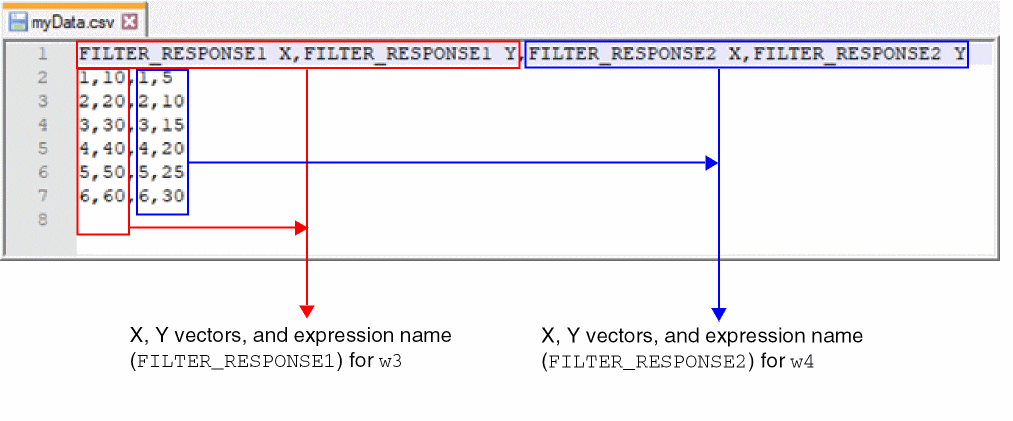
The following example saves waveform data for the waveforms w3 and w4 contained in the list waveList to a CSV file, myData.csv. You can also specify expressions for these waveforms that you want print in the header of the CSV file.
awvSaveToCSV(waveList "myData" ?exprList list("FILTER_RESPONSE1" "FILTER_RESPONSE2"))
=> t
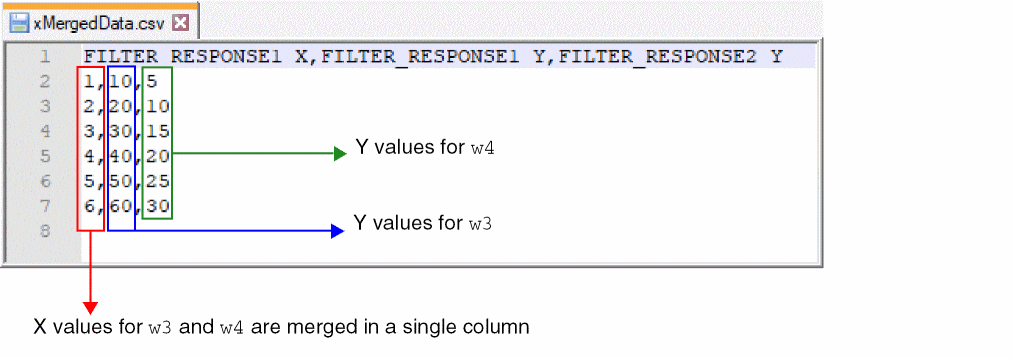
The following example saves waveform data for the waveforms w3 and w4 contained in the list waveList to a CSV file, xMergedData.csv. Note that x-vector values for both waveforms are merged in a single column in the CSV file.
awvSaveToCSV(waveList "xMergedData" ?exprList list("FILTER_RESPONSE1" "FILTER_RESPONSE2") ?mergeXAxis t)
=> t
Return to top