
aaSP
aaSP(n_portOrder1 n_portOrder2[t_dataDirectory] ) =>o_waveform/nil
Description
Returns the S-Parameter waveform for a multi-port network for the specified port numbers. The S-Parameters describe the response of an N-port network to voltage signals at each port.
Arguments
|
Results directory containing results of S-Parameter analysis. |
Value Returned
|
S-Parameter waveform cannot be returned because of an error. |
Examples
The following example creates a Waveform window and returns its window ID.
awvCreatePlotWindow()
=> window:3
The following example opens simulation results of S-Parameter analysis stored in the specified directory.
openResults("/servers/user/spAnalysis/simulation/ampTest/spectre/schematic/psf")
=> "/servers/user/spAnalysis/simulation/ampTest/spectre/schematic/psf"
The following example returns a list of available results in the currently open results directory.
results()
=>
(dcOp dcOpInfo ac sp model
instance output designParamVals primitives subckts
variables
)
The following example selects the sp results. These are the results of S-Parameter analysis for a two-port network.
selectResults('sp)
=> stdobj@0x31bd4b60
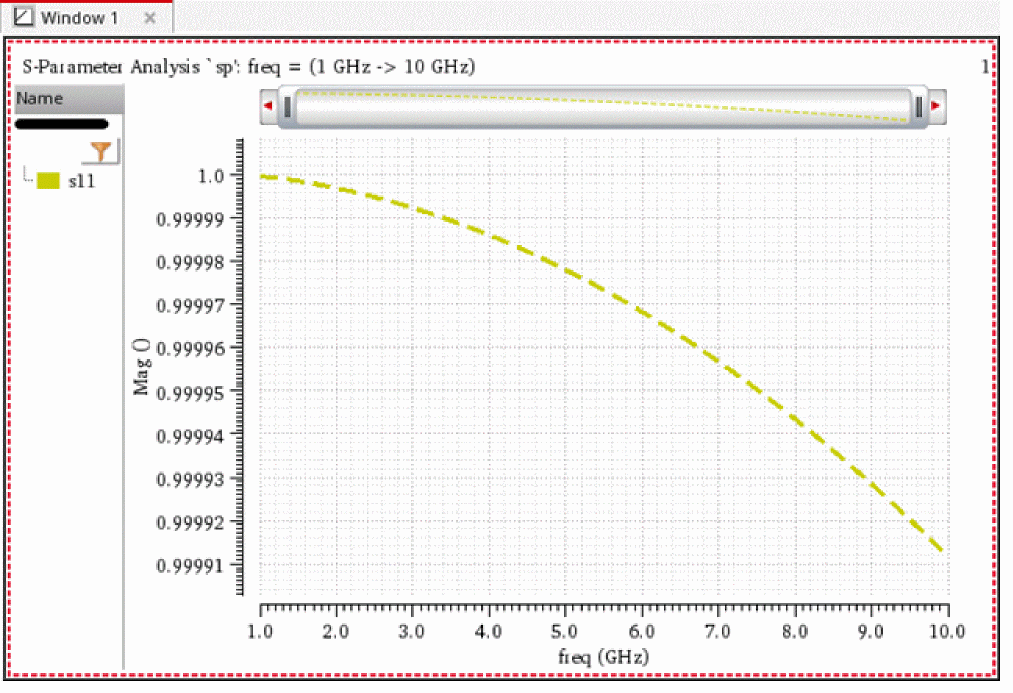
The following example returns a waveform object s11, which represents the response at port 1 due to a signal at port 1.
s11=aaSP(1 1)
=> srrWave:0x35e7a020
The following example plots the waveform s11 in the Waveform window having window ID 3.
awvPlotWaveform(
window(3)
list(s11)
?expr list("s11")
?color list("y8")
?index list(1)
?lineType list("line")
?lineStyle list("dash")
?lineThickness list("thick")
)
=> t
The following example creates another Waveform window and returns its window ID.
awvCreatePlotWindow()
=> window:4
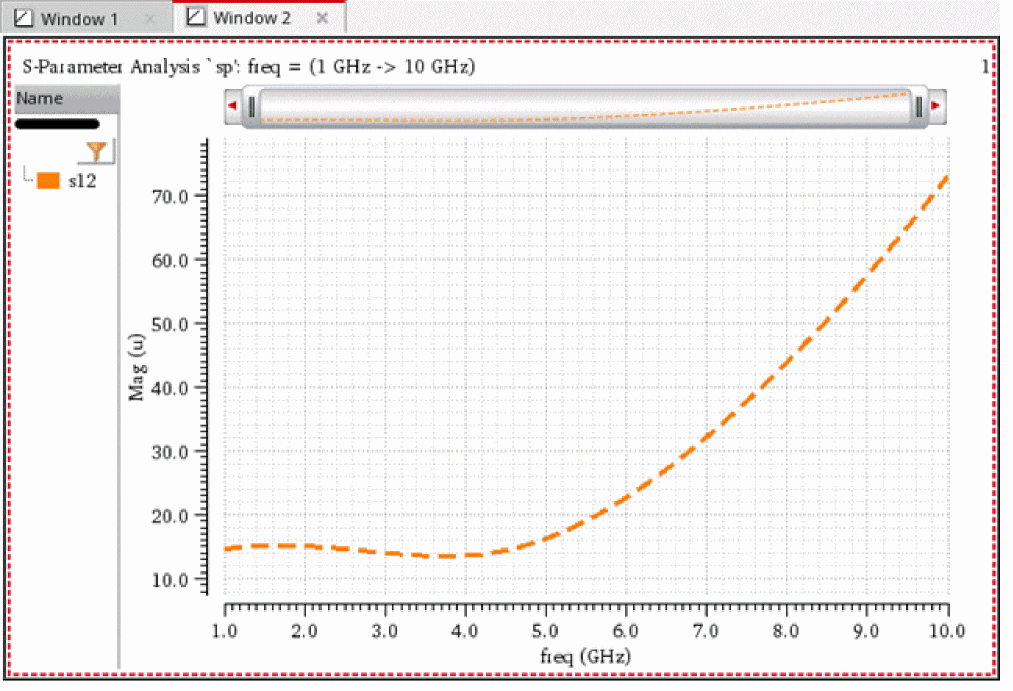
The following example returns a waveform object s12, which represents the response at port 1 due to a signal at port 2.
s12=aaSP(1 2)
=> srrWave:0x35e7a030
The following example plots the waveform s12 in the Waveform window having window ID 4.
awvPlotWaveform(
window(4)
list(s12)
?expr list("s12")
?color list("y6")
?index list(1)
?lineType list("line")
?lineStyle list("dash")
?lineThickness list("thick")
)
=> t
The following example creates another Waveform window and returns its window ID.
awvCreatePlotWindow()
=> window:5
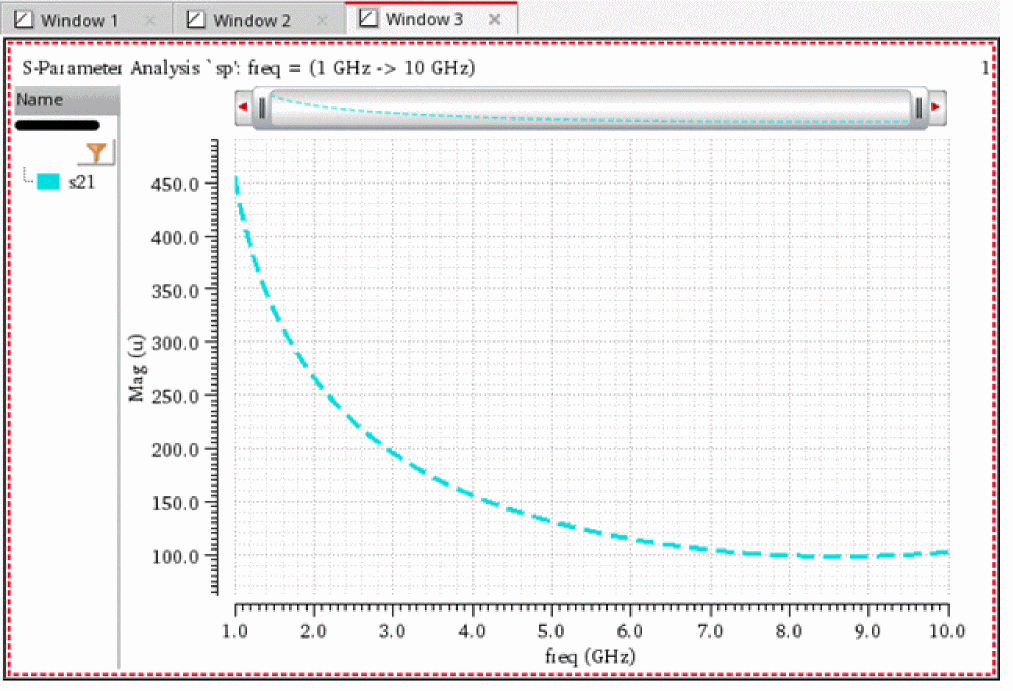
The following example returns a waveform object s21, which represents the response at port 2 due to a signal at port 1.
s21=aaSP(2 1)
=> srrWave:0x35e7a040
The following example plots the waveform s21 in the Waveform window having window ID 5.
awvPlotWaveform(
window(5)
list(s21)
?expr list("s21")
?color list("y12")
?index list(1)
?lineType list("line")
?lineStyle list("dash")
?lineThickness list("thick")
)
=> t
The following example creates another Waveform window and returns its window ID.
awvCreatePlotWindow()
=> window:6
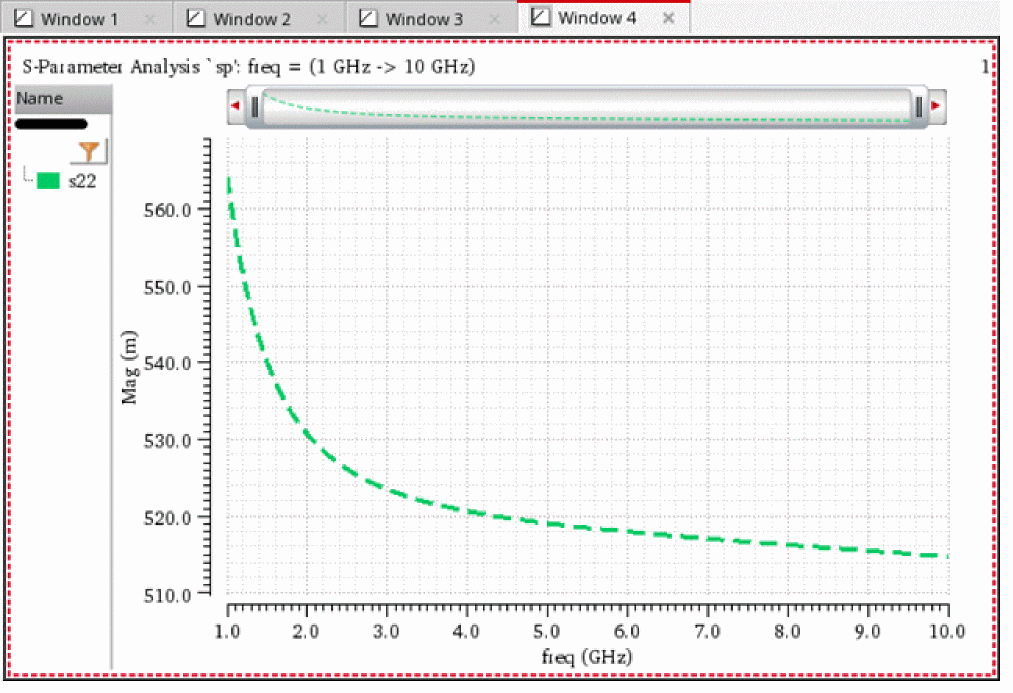
The following example returns a waveform object s22, which represents the response at port 2 due to a signal at port 2.
s22=aaSP(2 2)
=> srrWave:0x35e7a050
The following example plots the waveform s22 in the Waveform window having window ID 6.
awvPlotWaveform(
window(6)
list(s22)
?expr list("s22")
?color list("y18")
?index list(1)
?lineType list("line")
?lineStyle list("dash")
?lineThickness list("thick")
)
=> t
The following examples create waveform objects s11, s12, s21, and s22. Note that the directory /servers/user/spAnalysis/simulation/ampTest/spectre/schematic/psf contains simulation results of S-Parameter analysis for a two-port network.
s11=aaSP(1 1 "/servers/user/spAnalysis/simulation/ampTest/spectre/schematic/psf")
=> srrWave:0x3559d020
s12=aaSP(1 2 "/servers/user/spAnalysis/simulation/ampTest/spectre/schematic/psf")
=> srrWave:0x3559d030
s21=aaSP(2 1 "/servers/user/spAnalysis/simulation/ampTest/spectre/schematic/psf")
=> srrWave:0x3559d040
s22=aaSP(2 2 "/servers/user/spAnalysis/simulation/ampTest/spectre/schematic/psf")
=> srrWave:0x3559d050
Return to top