
appendWaves
appendWaves(o_waveform1 o_waveform2[o_waveformN] ) =>o_appendedWaveform/nil
Description
Appends a series of input waveforms in x-vector direction into a single output waveform.
Ensure that x vectors of input waveforms are in sequence.
Arguments
Value Returned
|
The output waveform is created after appending the specified waveforms. |
|
|
The specified waveforms cannot be appended because of an error. |
|
Examples
The following examples create three waveforms objects w1, w2, and w3, representing waveforms created by plotting specified x and y-vector values.
w1=drCreateWaveform(drCreateVec('double list(1 2 3 4 5)) drCreateVec('double list(10 15 20 25 30)))
=> srrWave:0x2df1c020
w2=drCreateWaveform(drCreateVec('double list(6 7 8 9 10)) drCreateVec('double list(35 40 45 50 55)))
=> srrWave:0x2df1c030
w3=drCreateWaveform(drCreateVec('double list(12 14 16)) drCreateVec('double list(65 75 85)))
=> srrWave:0x2df1c040
The following example creates a Waveform window and returns its window ID.
awvCreatePlotWindow()
=> window:3
The following example plots waveforms w1, w2, and w3 in the Waveform window you created using the function awvCreatePlotWindow.
awvPlotWaveform(
awvGetCurrentWindow()
list(w1 w2 w3)
?expr list("waveform1" "waveform2" "waveform3")
?color list("y8" "y12" "y6")
?index list(1 2 3)
?lineType list("line" "line" "line")
?lineStyle list("dash" "dash" "dash")
?lineThickness list("thick" "thick" "thick")
?showSymbols list(t t t)
?dataSymbol list("x" "O" "+")
)
=> t
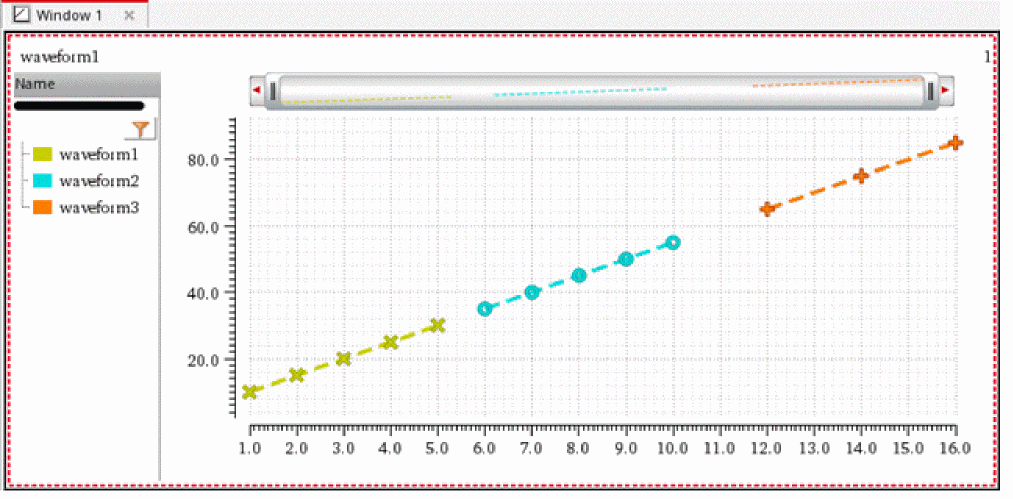
The following example appends input waveforms w1, w2, and w3 and creates an output waveform w4.
w4=appendWaves(w1 w2 w3)
=> srrWave:0x2df1c060
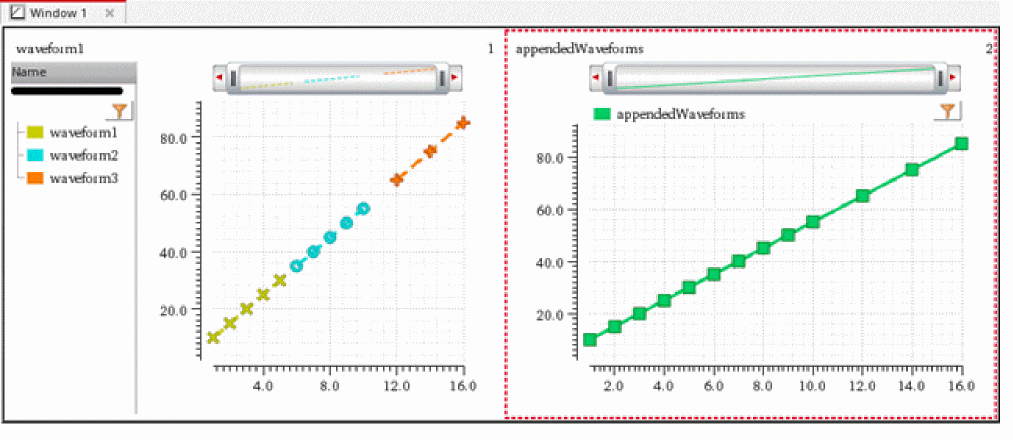
The following example adds a subwindow to the Waveform window. The newly created subwindow 2 is also selected as the current subwindow.
awvAddSubwindow(window(3))
=> 2
The following example plots the waveform w4, which is created by appending input waveforms w1, w2, and w3 in the direction of their x vectors. The appended waveform w4 is plotted in the current subwindow of the current Waveform window.
awvPlotWaveform(
awvGetCurrentWindow()
list(w4)
?expr list("appendedWaveforms")
?color list("y18")
?index list(1)
?lineType list("line")
?lineStyle list("solid")
?lineThickness list("thick")
?showSymbols list(t)
?dataSymbol list(3)
)
=> t
Return to top